Digital Video Recorder for Ness IQ-
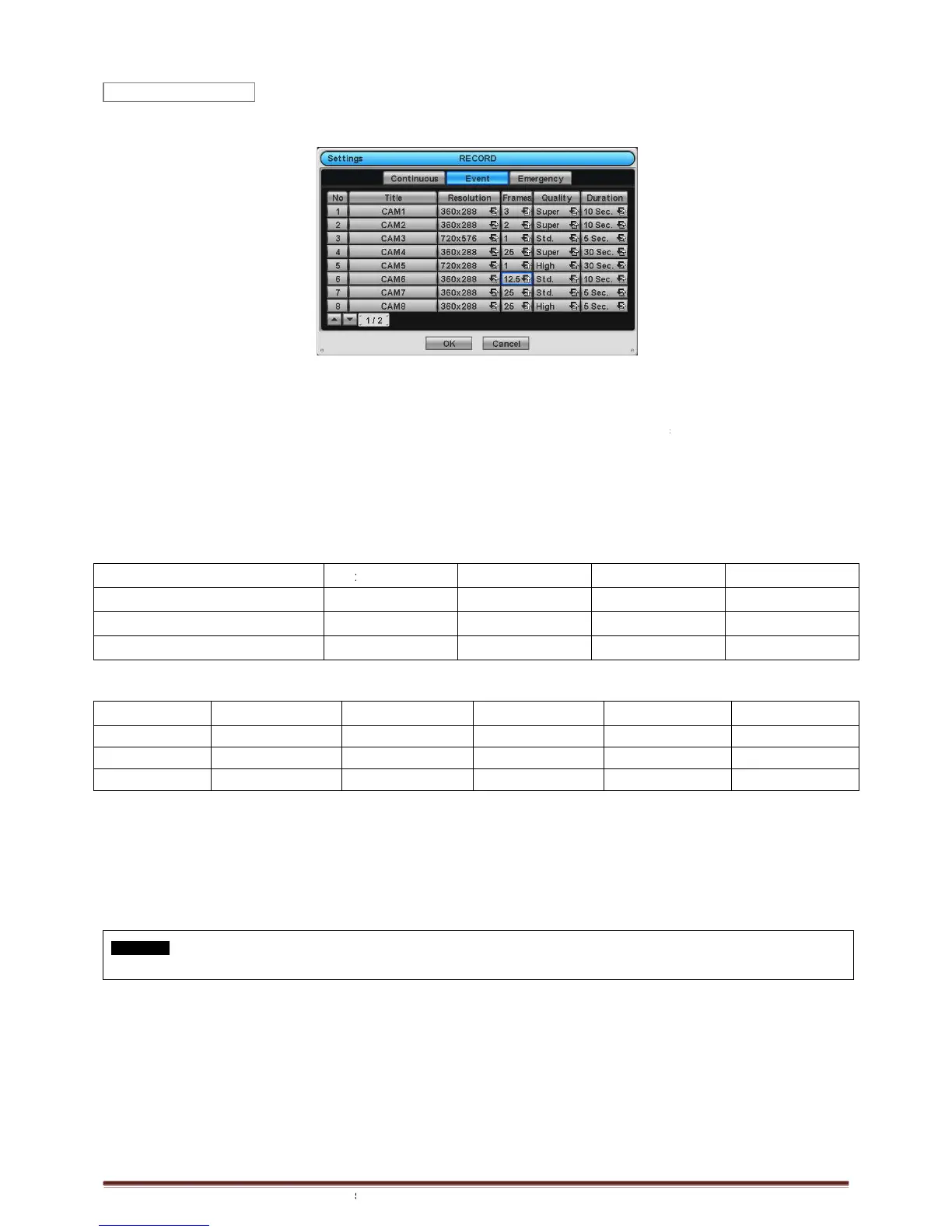
Event and the following screen will appear.
The Event menu will allow user to set Event videos.
Each frame on Title column shows camera title registered in DEVICES
here.
Click (
) each frame on
Resolution column to select recording resolution of a corresponding camera. User may select one
360x240(288), 720x240(288), 720x480(
Click (
) each frame on
Frames column to select recording rate of a corresponding camera. Recording rate varies by
camera. Below lists the maximum recording rate of each camera.
4 Channel DVR
8 Channel DVR
16 Channel DVR
SDI Models
360x240 (360x288)
4 Channel DVR
Max. 30 fps per Channel
8 Channel DVR
Max. 30 fps per Channel
16 Channel DVR
Max. 30 fps per Channel
Click (
) each frame on ‘
Quality’ column to select recording quality of a corresponding camera. User may select
recording quality from Super, High,
Click (
) each frame on ‘
Duration’ column to select recording duration (i.e.,
User may change the setting values of Resolution, Frames, Quality and Duration at a time by clicking the menu tab.
Choose ‘OK’ to confirm the setting.
CAUTION
IF YOU
CONNECT DIFFERENT TYPES OF HD
Event and the following screen will appear.
The Event menu will allow user to set Event videos.
Each frame on Title column shows camera title registered in DEVICES
>Camera/PTZ. User cannot change camera titles
Resolution column to select recording resolution of a corresponding camera. User may select one
360x240(288), 720x240(288), 720x480(
Frames column to select recording rate of a corresponding camera. Recording rate varies by
camera. Below lists the maximum recording rate of each camera.
Max. 30 fps per Channel Max. 30
Max. 30 fps per Channel Max. 15
Max. 30 fps per Channel Max. 15
Quality’ column to select recording quality of a corresponding camera. User may select
Duration’ column to select recording duration (i.e.,
User may change the setting values of Resolution, Frames, Quality and Duration at a time by clicking the menu tab.
CONNECT DIFFERENT TYPES OF HD
SDI SIGNALS WHILE DVR IS OPERATING. IT MAY CAUSE MALFUNCTIONS OF DVR.
>Camera/PTZ. User cannot change camera titles
Resolution column to select recording resolution of a corresponding camera. User may select one
Frames column to select recording rate of a corresponding camera. Recording rate varies by
Quality’ column to select recording quality of a corresponding camera. User may select
) of a corresponding camera.
User may change the setting values of Resolution, Frames, Quality and Duration at a time by clicking the menu tab.
SDI SIGNALS WHILE DVR IS OPERATING. IT MAY CAUSE MALFUNCTIONS OF DVR.



 To Next Page