Home
Netscout
Test Equipment
LinkRunner G2
Page 63
Netscout LinkRunner G2 - Page 63
91 pages
Manual
Save Page as PDF
To Next Page
To Next Page
To Previous Page
To Previous Page
Loading...
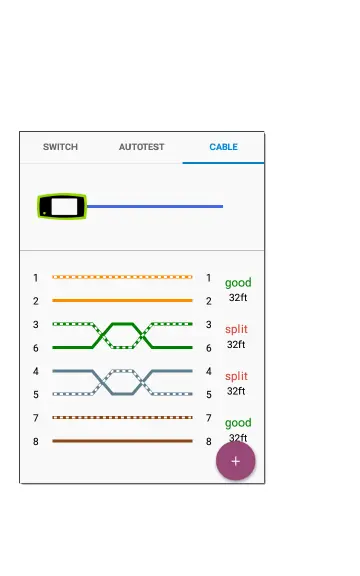
O
p
en
C
ab
le
T
D
R
Tes
t
ing
Co
n
n
ec
t
an
op
en
ca
b
le
(
u
n
te
r
m
inat
ed)
i
n
to
t
h
e
top
RJ
-45
p
o
r
t
to
m
eas
u
re
it
s
lengt
h
a
n
d
vie
w
any
s
ho
r
ts
,
op
ens,
o
r
spli
ts
.
Figure
1
7
:
Op
e
n
/U
n
t
er
min
ated
Cabl
e
Te
st
6
3
Lin
kR
u
nn
er
G
2
Te
s
t
s
and
R
esu
lt
s
62
64
Table of Contents
Main Page
Contact Us
7
Introduction
8
About this Guide
9
Most Commonly Used Features
11
Safety
12
Safety Symbols
13
Physical Features
14
Buttons and Ports
15
Power and Charging
18
Maintenance
20
Home Screen and Android Interface
21
Home Screen
22
Swiping and Navigation
26
Top Notification Panel
27
Quick Settings Panel
29
Device Settings
30
Sharing
31
Linkrunner G2 Application Settings
33
Left-Side Navigation Drawer
34
Configuring Test Settings
35
Profiles and Jobs
41
Linkrunner G2 Tests and Results
44
Autotest
45
Floating Action Button
59
Switch Test
60
Cable Test
62
Link-Live Cloud Service
67
Getting Started in Link-Live
68
Software Management
70
Managing Files
71
Updating Firmware
75
Restoring Factory Defaults
77
Changing the Language
78
Additional Features
79
Reflector
80
Camera and Flashlight
83
Operating Temperature
89
Related product manuals
Netscout aircheck G2
141 pages
Netscout OneTouch AT G2
396 pages
Netscout LinkSprinter
18 pages
Netscout LSPRNTR-200
18 pages



 To Next Page