Page 11
In Solo mode, selecting the button will cut all channels except the one operated,
commonly referred to as Solo In Place. Solo is indicated by the button turning
yellow. As the solo system is latching, it is possible to build up solo groups and to
then use the cut / solo master to audition a solo group or a cut group, this is very
useful for comping or sorting out EQ / balance problems in the mix quickly before
printing the final pass.
Cue Section
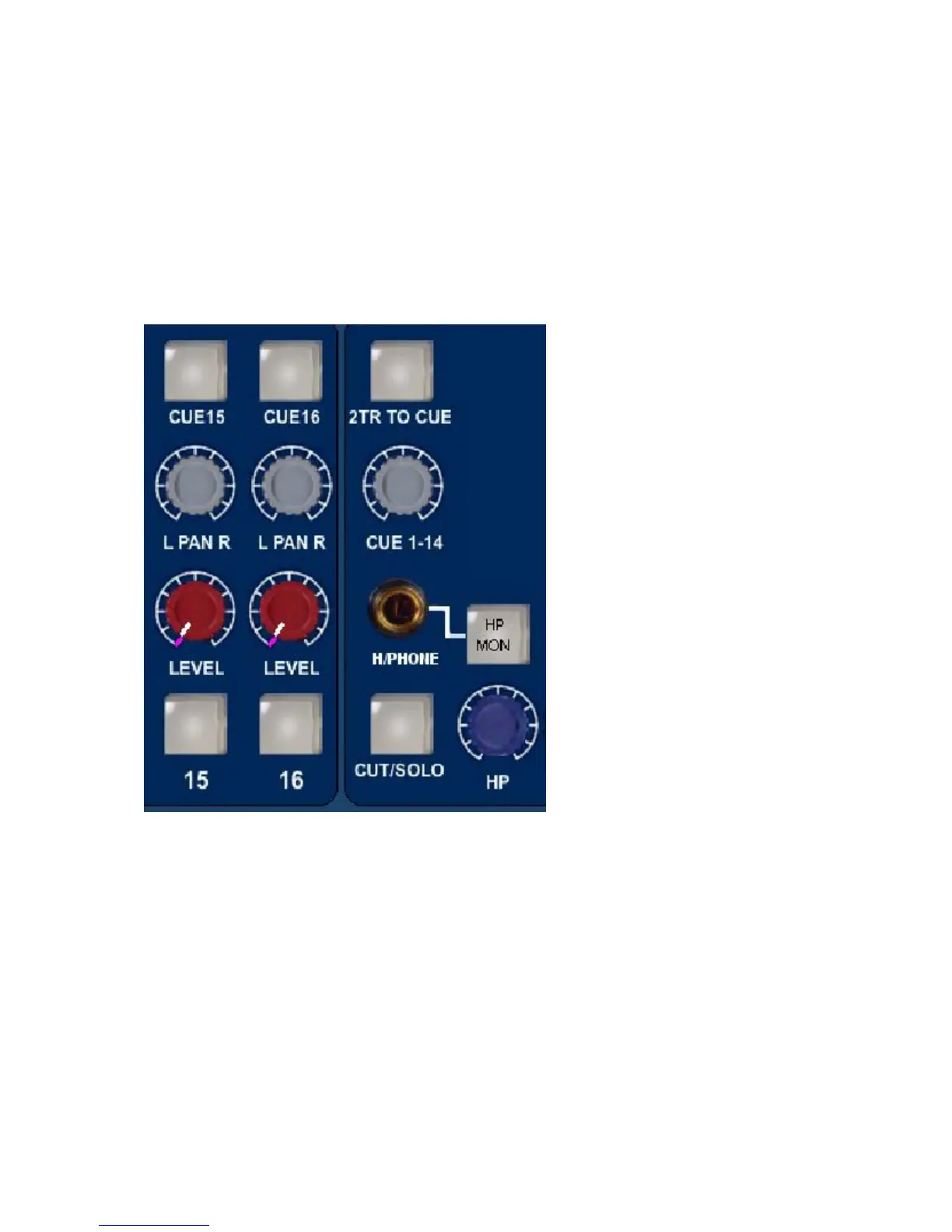
2T to Cue
Sends the 2 track return, post
level control, to the headphone
mix - perfect for replaying the
last over dub pass to the artist
for auditioning or a complete
two track mix of the whole song
without the artist needing to
come into the control room.
Headphone Mon
Selects the prefade LS Outputs
onto the cue headphone
outputs so the artist hears the
same sources as the engineer
feeds to the monitors
Headphone Control
This control adjusts the main headphone levels and has a range between ∞ and 0dB.
The headphone control also incorporates a switch, when pushed the unit's talk back
mic is fed to the headphone output, automatically dimming the music feed to the
headphones and loudspeakers. There is also a parallel 1/4 inch jack on the rear of
the unit to allow for footswitch operation.


 To Next Page