Page 2
2 Application Scenarios
The 8816 can be used to monitor from the workstation while recording directly from a
mic pre such as the 1073DPD or as a pre-mixer for recording a number of signals
simultaneously to the workstation. With the optional fader pack, direct outs can be
used from the 8816 to the DAW enabling it to be used like a conventional desk with
both recording and monitoring signals passing through the unit.
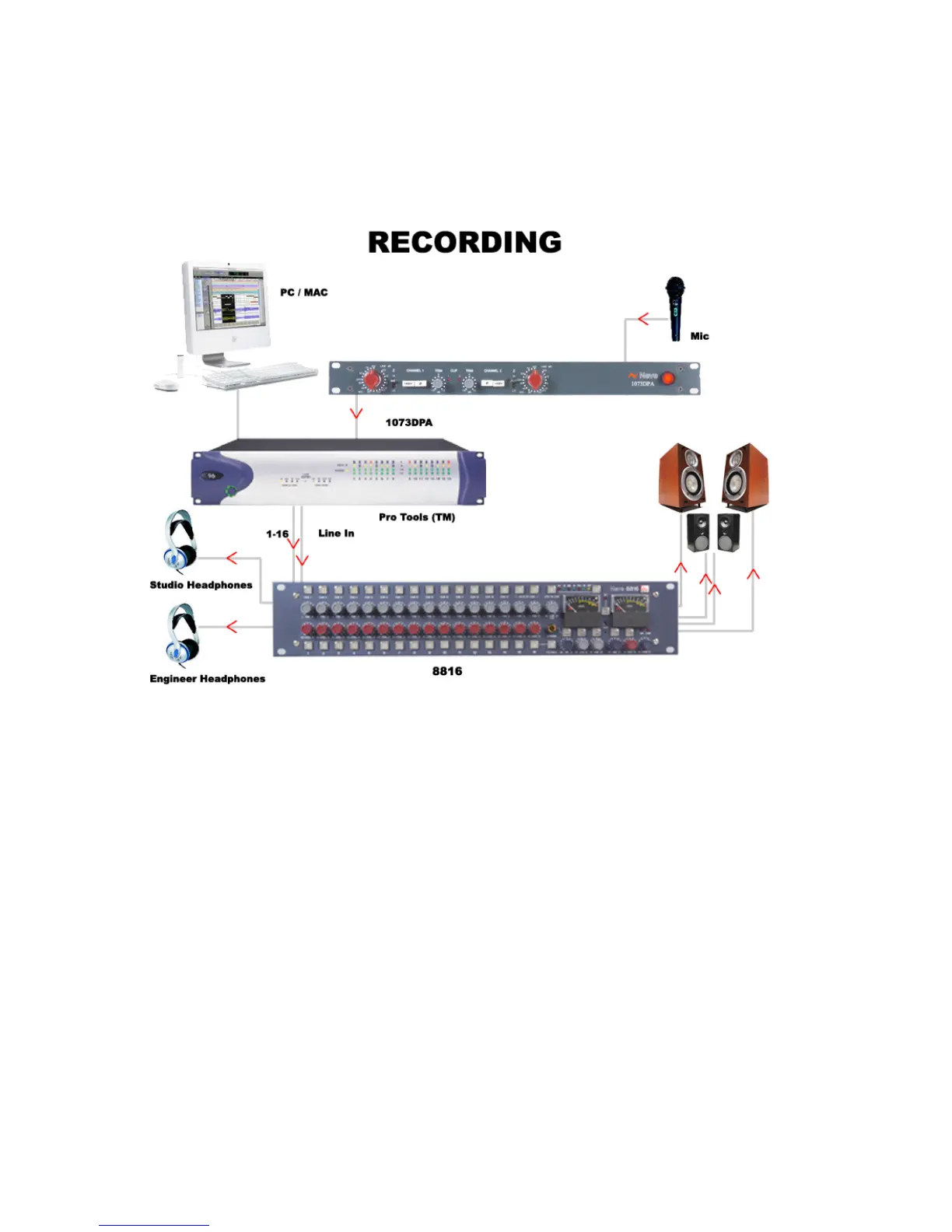
Direct recording with 8816 as monitor:
Connect the output of the mic pre to the
input of the workstation. Connect the outputs of the workstation to the inputs of the
8816. The 8816 outputs can be monitored on loudspeakers or headphones as
required. The performers headphones source can be switched (engineer/performer).
Sub-mixing signals to be recorded:
Connect the instruments to be recorded to the
inputs of the 8816 (via a 1073 or similar mic pre if required). Connect the main output
of the 8816 to the inputs of the workstation (this can be analogue or digital if the
optional digital card is fitted). Set the balance required using the channel level
controls on the 8816 and record onto the workstation.



 To Next Page