Page 7
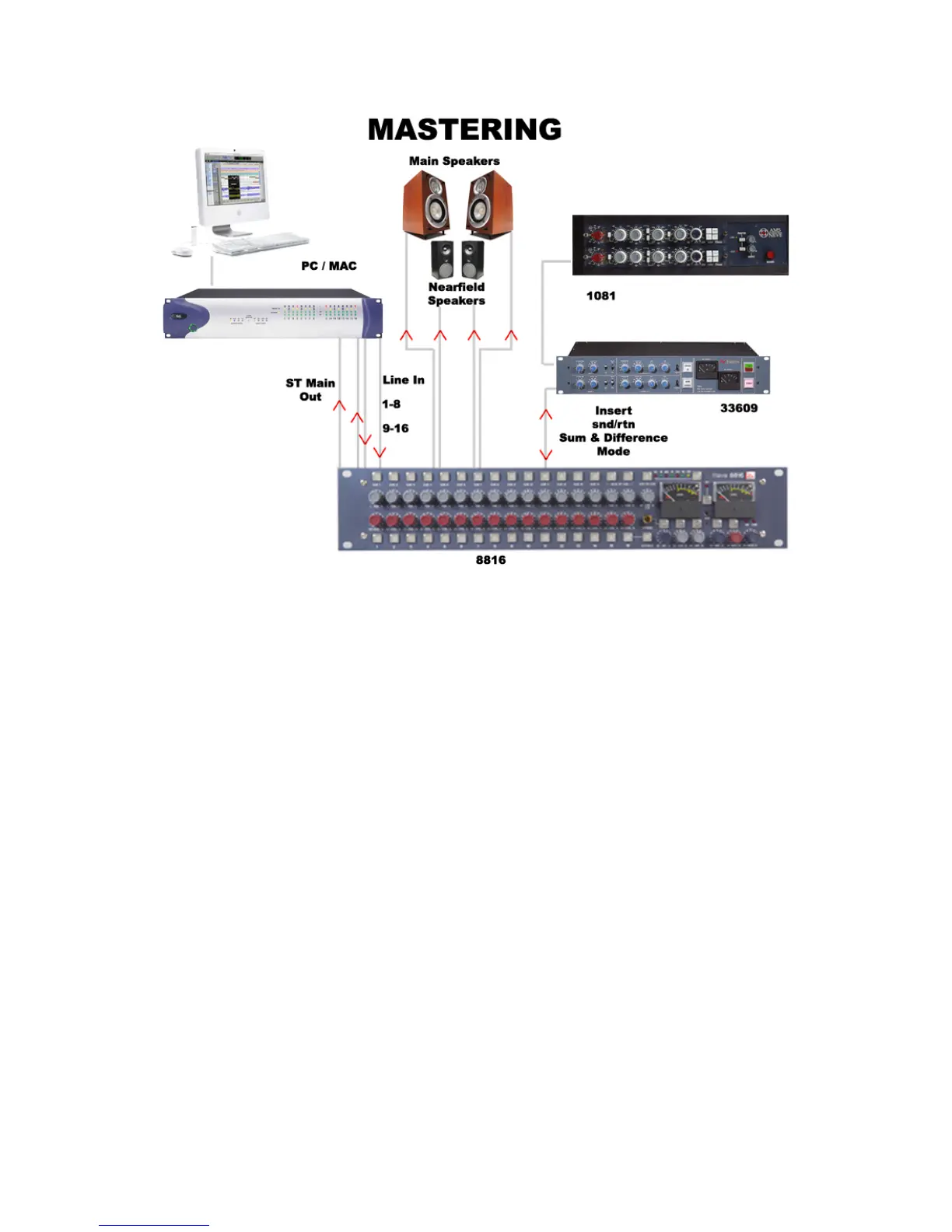
Connect the outputs of your DAT, CD player or two tracks of your DAW to inputs 1
and 2 on the 8816. Connect the master outputs of the 8816 to the inputs of the
Workstation, CDR or DAT that you wish to record onto. Connect the outputs of the
recording device to the 2 track return of the 8816.
The mix is now passing through the mix bus of the 8816. This uses the same
transformer mix topology as the classic 80 series Neve consoles and recreates their
legendary sound.
A compressor such as the Neve 33609 or an EQ such as the Neve 1081 can be
patched across the Insert Point allowing the whole mix to be compressed or EQ’d.
The Insert can be switched to Sum and Difference mode allowing the producer to
process the centre sum/mono signal and the stereo/difference signal in different
manners. The width control can be used to reduce the stereo width, perhaps for a
club remix, or to enhance it beyond standard stereo if the original mix is not wide
enough.
The engineer and producer can monitor on two sets of speakers, main and near field,
and switch between them using the Alt Speaker switch allowing comparisons of the
mastered mix on small and large speakers. Headphones can also be connected if
required.
The monitor source select can be used to switch between monitoring the sound
entering the 8816 on inputs 1 and 2, the sound leaving the 8816 on the mix bus and
the sound as recorded on the CDR/DAT/Workstation via the 2 Track Return.



 To Next Page