ChipSHOUTER Users Manual: Serial Interface
51
Serial Interface
The ChipSHOUTER has a simple 3.3V TTL serial interface,
which you can connect to at 115200 baud, 8N1. The serial in-
terface presents a console that includes the current state
of the device. This is useful to watch for the device enter-
ing a fault state indicating device errors are occurring.
The console format is shown below:
# armed : get voltage
Note the ‘armed’ indicates a state, and ‘get voltage’ is a
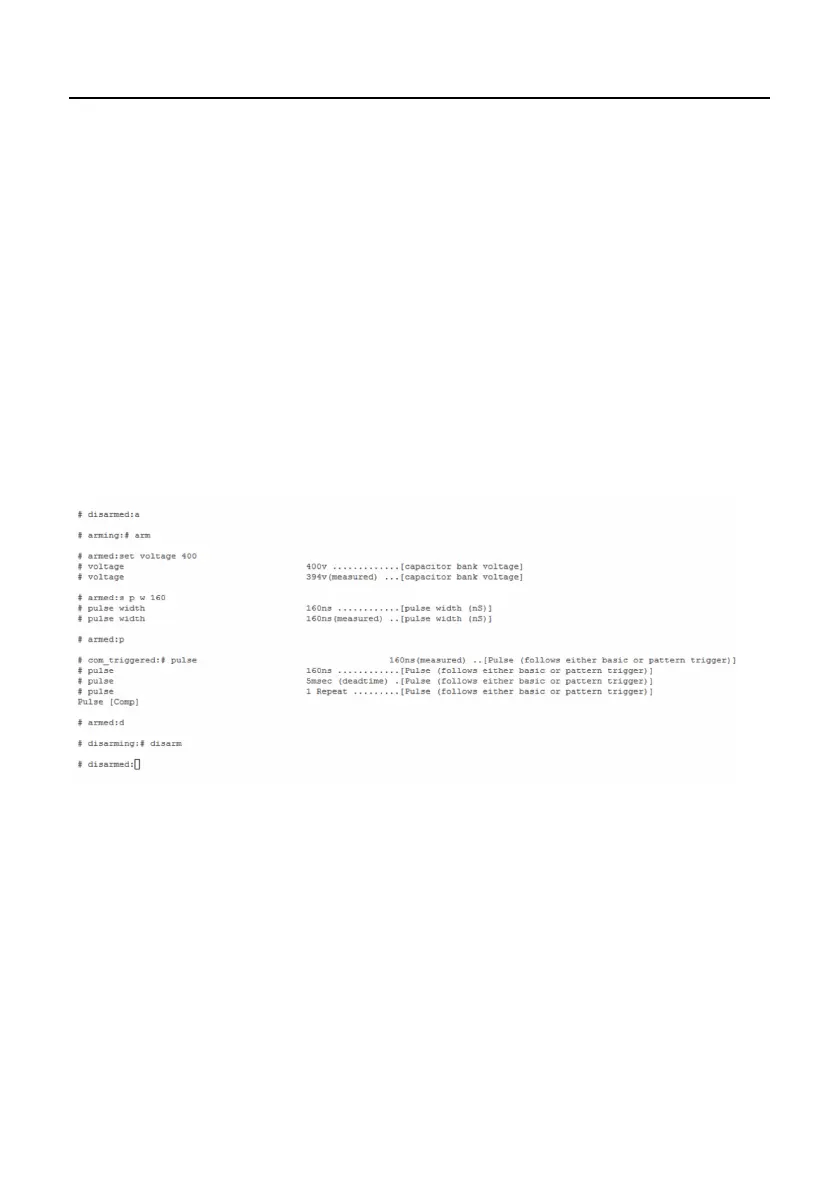
command to the device. The following screenshot shows a typ-
ical interaction with the ChipSHOUTER console:
NOTE: Current (1.8.5) firmware versions only work if sent an
entire serial line at once after you hit enter, and not send
character-by-character as you type. Terminal emulators such
as Termite (by CompuPhase) will send an entire terminal line
at once, but Putty typically sends character-by-character as
you type. Check firmware release notes if using later firm-
ware releases.


 To Next Page