4
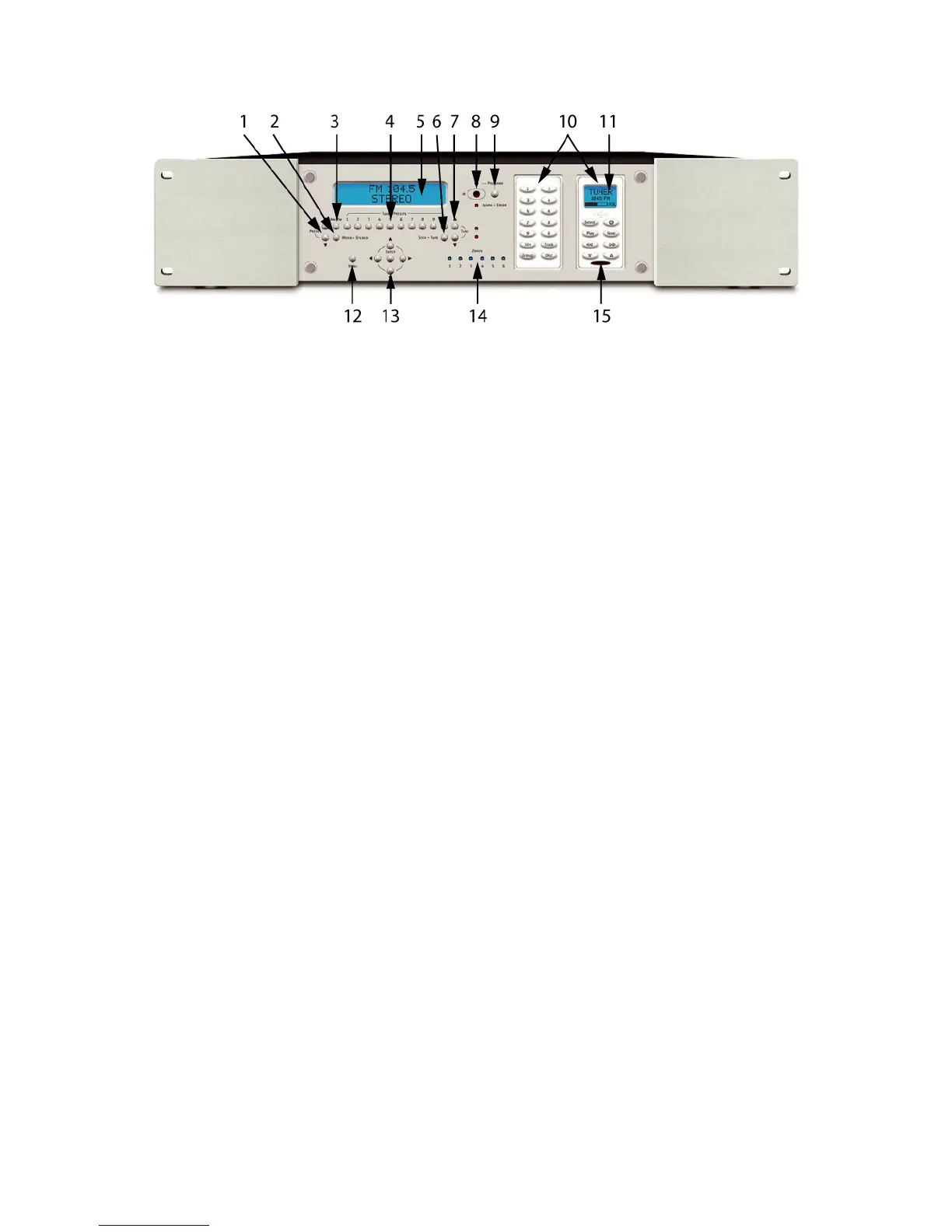
Figure 1. C-6 Controller Front Panel
FEATURES
Controller
Front Panel
1. Preset – Press ▲ or ▼ to scroll up or down the 10 Preset AM or FM Stations.
2. Mono·Stereo – Press to switch FM stations between stereo and mono modes. This can
sometimes be useful for tuning weak FM Stereo stations
3. AM·FM – Press to toggle between AM and FM bands.
4. Tuner Presets – Press to program or select up to 10 AM or FM preset stations.
5. C-6 Controller Display – Backlit LCD provides information regarding: Tuner preset number,
frequency, and mode. Also displays multiple screens for Controller Setup and programming
modes.
6. Seek·Tune – Press to toggle Tuning mode. SEEK will automatically search for the next
station up or down the dial when the TUNE UP/DOWN buttons are pressed. TUNE will step
up or down the dial with single button presses or scroll when held.
7. Tune – Press ▲ or ▼ to change tuner frequency UP or DOWN.
8. IR Learning Eye – Recessed IR sensor used for programming IR commands.
9. Program (Button & LEDs) – Press to activate/exit IR programming mode. Program LED will
illuminate red when programming mode is active. Learn LED will flash red or green when
learning IR commands. (See section: PROGRAMMING – IR.)
10. IR Programming/Zone 1 Control Keypad – This built-in K-22 keypad can be used for IR
command programming or for controlling Zone 1.
NOTE: The keypad on the front of the controller is parallel to a keypad connected to the Zone
1 terminal on the back panel, and both will control Zone 1. However, only the controller front
panel keypad can be used for programming.
11. Keypad Display – Backlit LCD displays source selected, volume setting and Group menu for
Zone 1.
12. Menu – Press to enter Controller Setup Menu for: Source and Zone Naming, Input level Trim,
Page/Mute Setup, Zone Sharing and to display firmware Version.
13. Enter (Navigation Array) – Five button cursor array used to navigate setup menu.
14. Zone ON/OFF LEDs – Illuminate blue to indicate active zones. These LEDs are visible
through windows on the removable front cover plate.
15. Keypad IR Window – IR sensor can be used to control Zone 1 with the R-1 Handheld
Remote.


 To Next Page