WIND DATA
4-16
5.3 Main function
Top data is relative Wind angle, [AWA] (Apparent Wind Angle). As
an alternative to [AWA] the following can be displayed:
[AWS] (Apparent Wind Speed).
[TWA] (True Wind Angle) if the log transducer is connected.
[TWS] (True Wind Speed) if the log transducer is connected.
To change between these functions, see C12, 6.1.2.
5.4 Analogue function
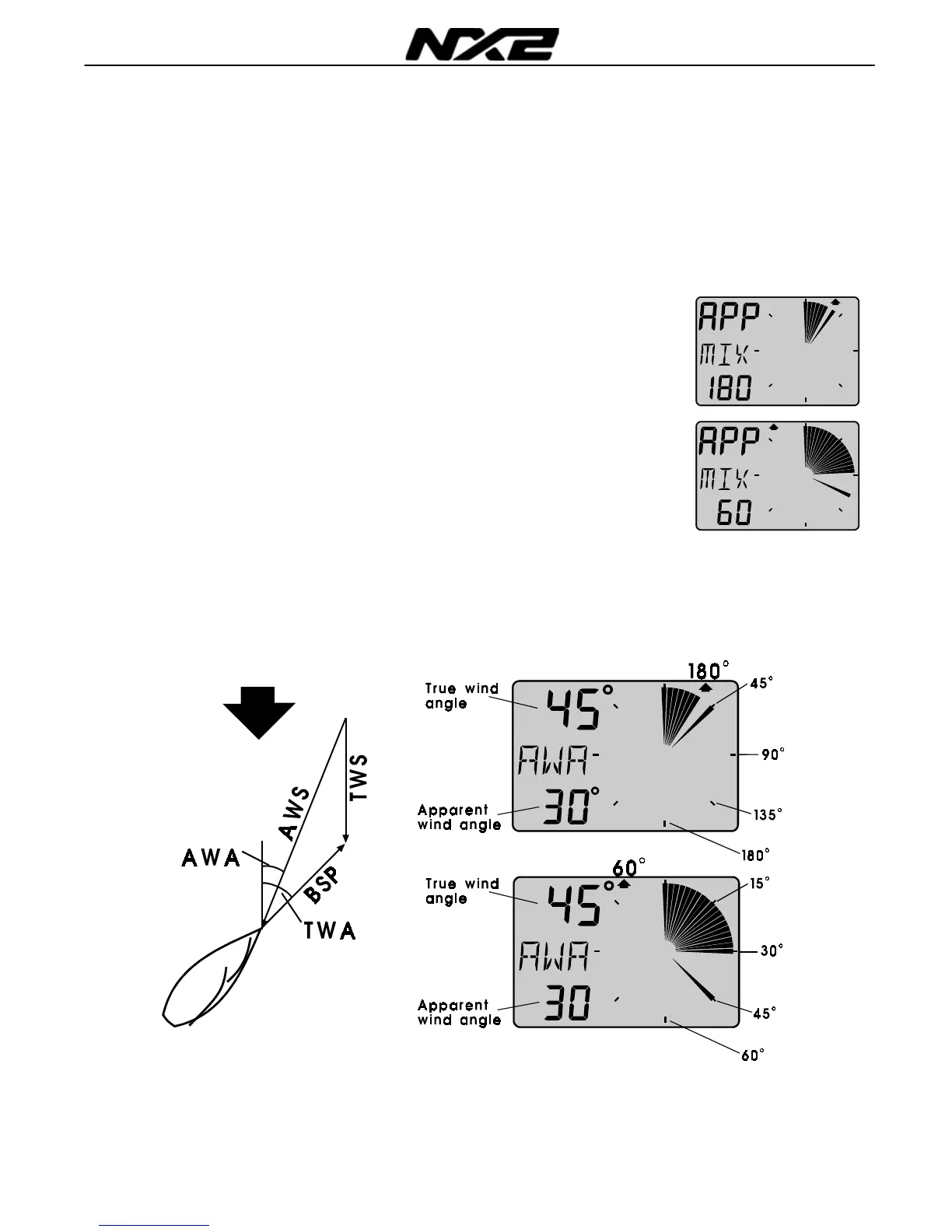
Change Wind scale between 180° and 60° with PAGE . Selected
scale is shown with the LCD arrow pointing at scale.
The text [APP] displays selected main function as apparent Wind
angle or Wind speed.
MIX 180° The text MIX 180° means that both APP and TRUE
Wind angle is displayed in scale 180°.
MIX 60° The text MIX 60° means that both APP and TRUE
is displayed in scale 60.
The scale can be altered between 60° and 180° to get more
accurate readings. At scale 180° each sector represent 5° and at
scale 60° each sector represent 1
2
/
3
°. See the example below .
WIND



 To Next Page