WIND DATA
4-26
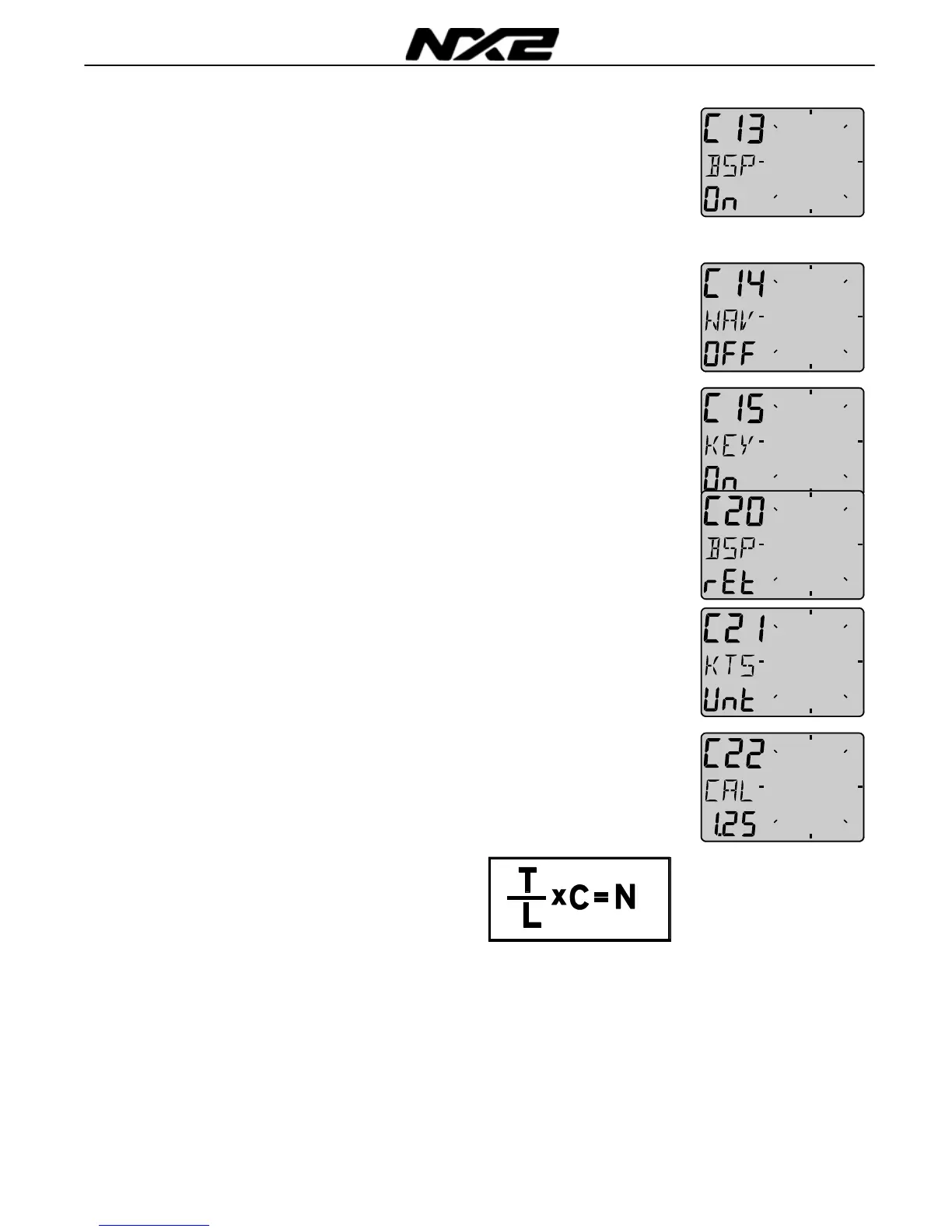
6.1.3 C13 Displaying boat speed, trip log and
temperature, option
When set to OFF, the functions will be removed from the display.
The Wind Data instrument may be used as a Server in the Nexus
Network, transmitting the log and temp to other NX2 instruments
without having the information displayed in this instrument.
6.1.4 C14 Display NAV functions, option
NAV functions are only useful when the Wind Data is connected in
a Nexus Network with Compass transducer and a navigator. The
selection NAV On will add the functions BTW, XTE etc.
6.1.5 C15 Beep when SET is pressed
Setting On will make a beep at every key press, while OFF is silent.
6.2
C20 Calibration of Log
To return to normal PAGE, press SET when the text [rET] is
displayed.
6.2.1 C21 Select unit for speed
Unit for speed, knots (KTS), km/h (K/h) or miles/h (m/h).
6.2.2 C22 Calibration of log transducer
Calibration value for speed and distance (1.00 - 1.99).
Drive the boat a measured distance at normal speed.
Compare the distance with the trip counter.
Calculate the value with the following formula.
True distance from the sea chart: T
Log trip counter distance: L
The current calibration value: C
New calibration value: N
If you suspect a current in the water, drive the boat in both
directions and divide trip counter distance by two.
If the Wind Data is installed with NX2 Server where the log is
already calibrated, no further calibration is needed.



 To Next Page