WIND DATA
4-22
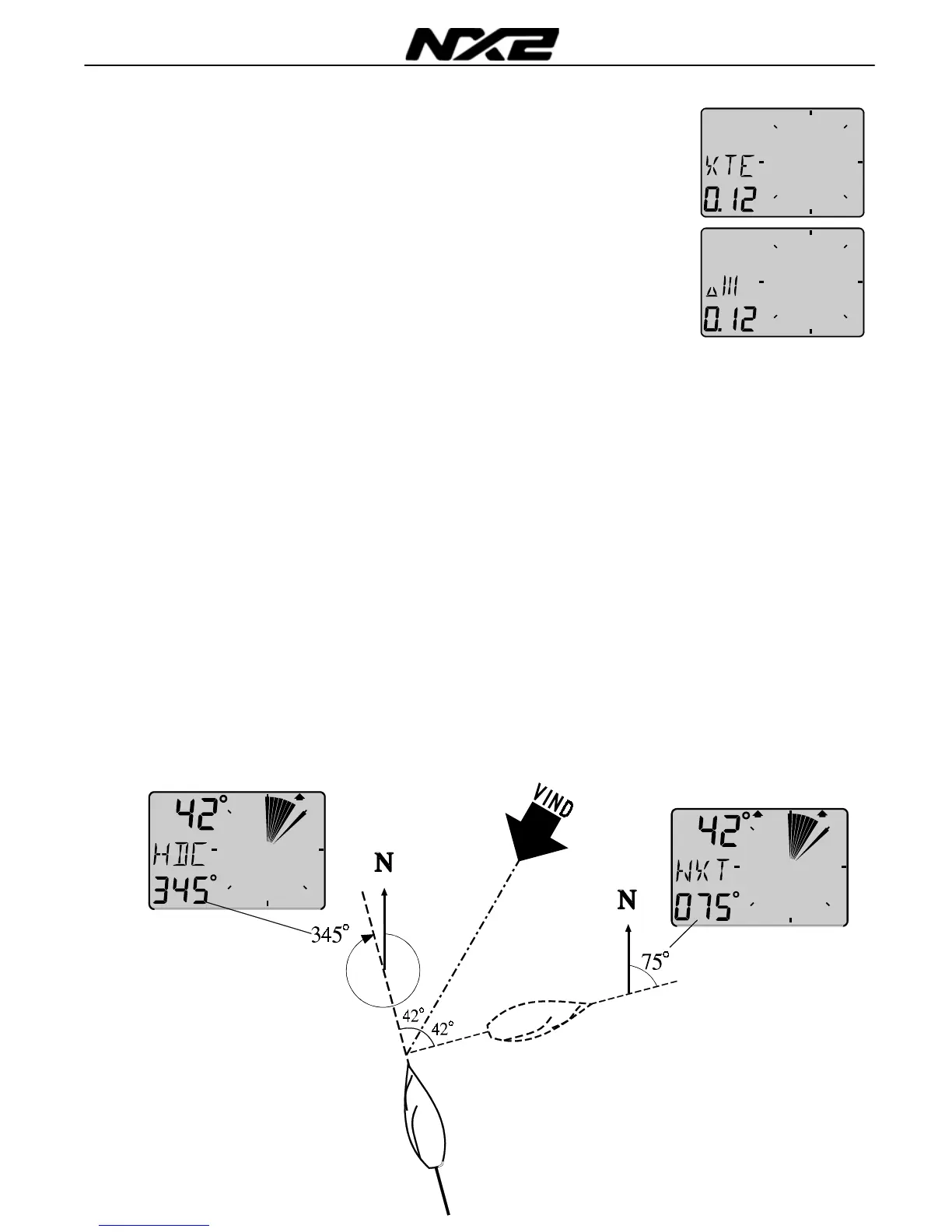
5.6.3 X-track error, XTE
To get this function, set NAV = On C14 (See 6.1.4).
The text [XTE] is displayed shortly when this function is selected,
then a symbolic ”boat” is displayed on one side of the ”road” which
is displayed as three vertical lines.
Your ”boat” will be displayed on the right or left side of the road.
The distance is also displayed and can be in either Nautical mile,
Km or Miles.
5.6.4 HDC / NXT, Course after tack or jibe
To get this function, set NAV = On C14 (See 6.1.4).
This function also needs a Compass connected to the NX2 Server
If the Compass sensor is missing, the HDC may be replaced by the
COG (Course over ground) by setting the reference in COG. (See
C33 6.3.3).
The text [HDC] is displayed with actual magnetic or true heading.
After 4secs. the text [NXT] together with the true or magnetic
course to keep after tack or jibe.
Note! The boat’s drift must be included in your decision when to
tack, to reach the mark.
After a tack, it will take some minute before the new tack angle is
steady due to the dampening.
The functions [HDC] and [NXT] is toggling, but they can be locked
or unlocked by use of the SET.



 To Next Page