VHF NX2000 English
7
Selects the desired channel, squelch control level or volume control level. Each
press selects the next higher channel, number or level. Hold down this key to
scroll upward through all selectable channels.
LIQUID CRYSTAL DISPLAY (LCD)
Dot Matrix display, giving up to 8 lines of information.
11. SPEAKER
12. DISTRESS CALL BUTTON
The distress button is located under a spring-loaded cover that must be lifted
before the button can be pressed.
13. FIST MICROPHONE/CONTROLLER CORD
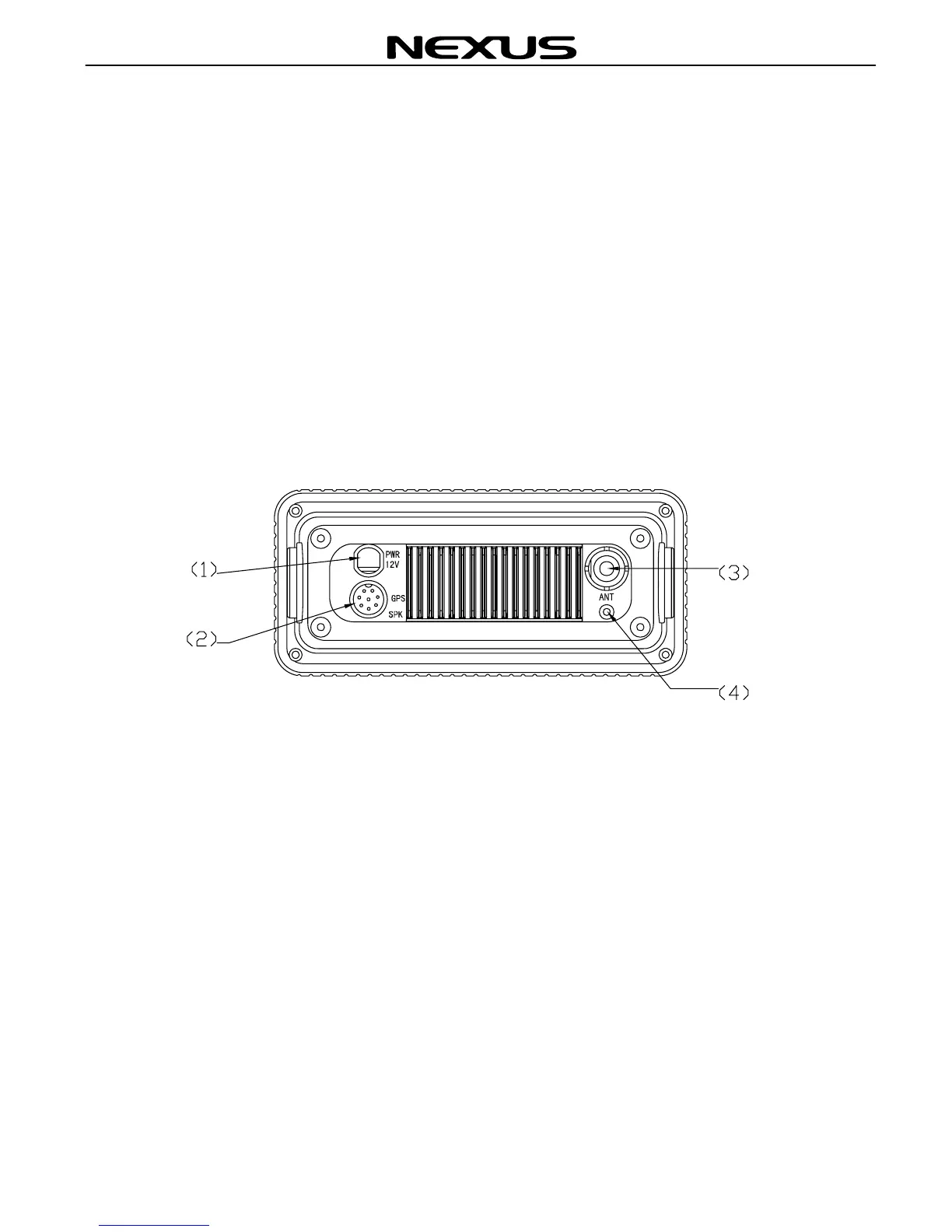
3.2 Back panel
1. POWER CORD
2. GPS and EXT.SP socket.
3. ANTENNA
4. Ventilation Hole
Should the display show signs of misting up, remove this screw and
ventilate the unit until the mist is cleared. Upon completion, insert the screw
and tighten once again.
Note : To ensure your NX2000 maintains its water-proof integrity, please
make sure the water-proof plastic washer is properly inserted before the
screw; the screw should be fully tightened to prevent water ingress.


 To Next Page