19
Chapter 8 QoS menu
8.1 QoS Configuration
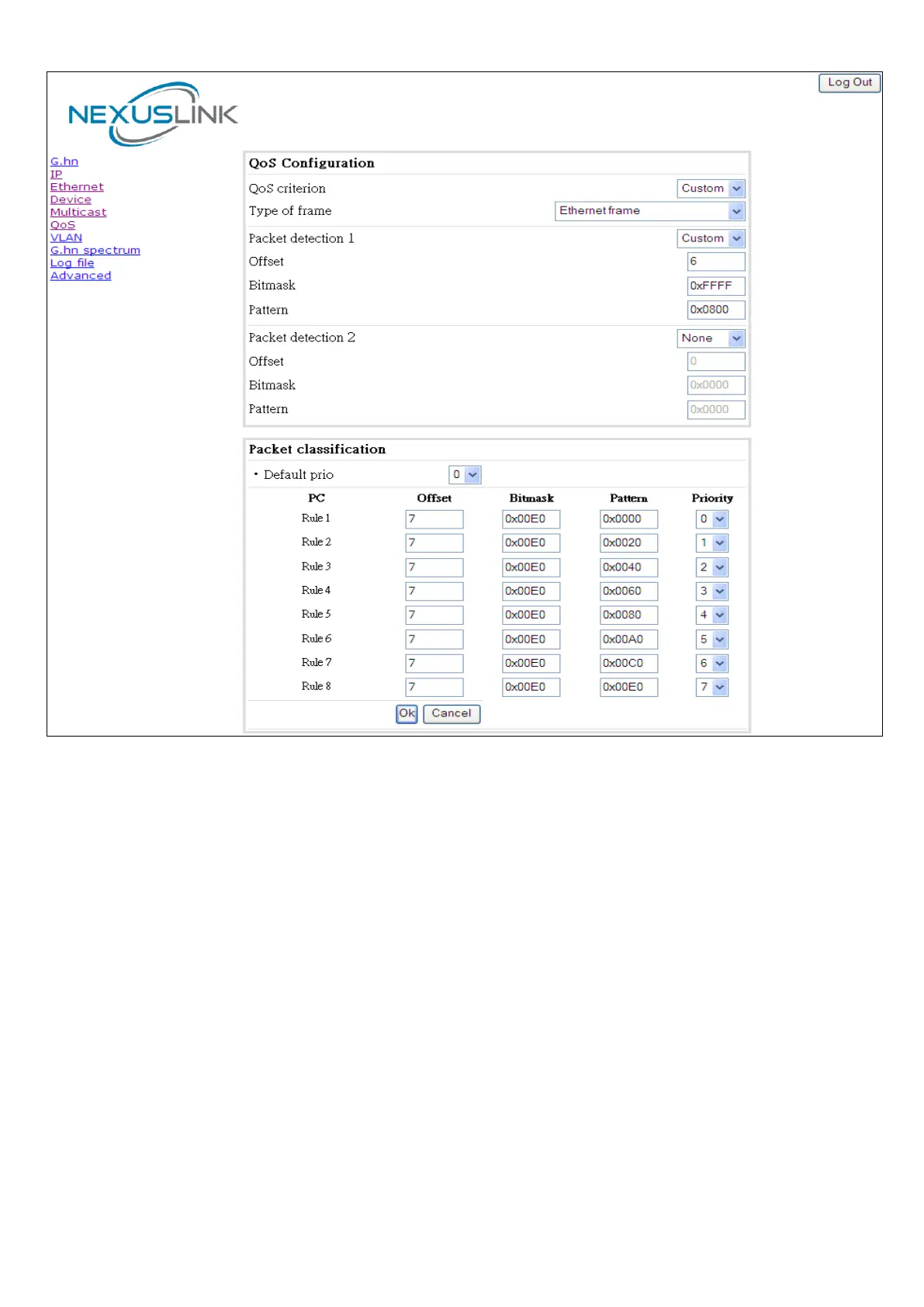
In the QoS configuration tab, the packet classifier can be managed to define a QoS rule for incoming Ethernet
traffic, and assign a priority to be used in the G.hn network. Press the “Update" button for loading the newly
configured settings:
• QoS CRITERION: a general criterion can be chosen among "None" (no QoS), "Custom" and
"802.1p".
• Type of Frame: with this parameter the type of Ethernet traffic being transmitted by the G.hn
network should be selected. Based on this parameter, the internal offsets in the system are adjusted.
In the QoS tab, Ethernet frame offsets should be set counting number as they appear in the sniffer
SW (for instance, the same field will be in a different position if normal Ethernet frames or 802.1Q
tagged frames exist).
• Packet detection 1: first packet detection rule can be configured (offset, bitmask and pattern).
Packets which accomplish it will be sent to the classification module.


 To Next Page