STATUS LEDS Part Number 12762 Rev 1.1 | April 30, 2014
Ethernet Ports
| NETWORK CONTROLLER 3E & 6E MOUNTING AND WIRING GUIDE 25
new NiMH battery may be partially discharged. Therefore, allow at least 18
hours for a new battery to charge if it has not been in a powered unit.
The NiMH battery assembly should be replaced approximately every three years, or
more often if the unit is in a high temperature environment. For more details, see the
“NiMH Battery Installation and Maintenance” section on page 26
Status LEDs
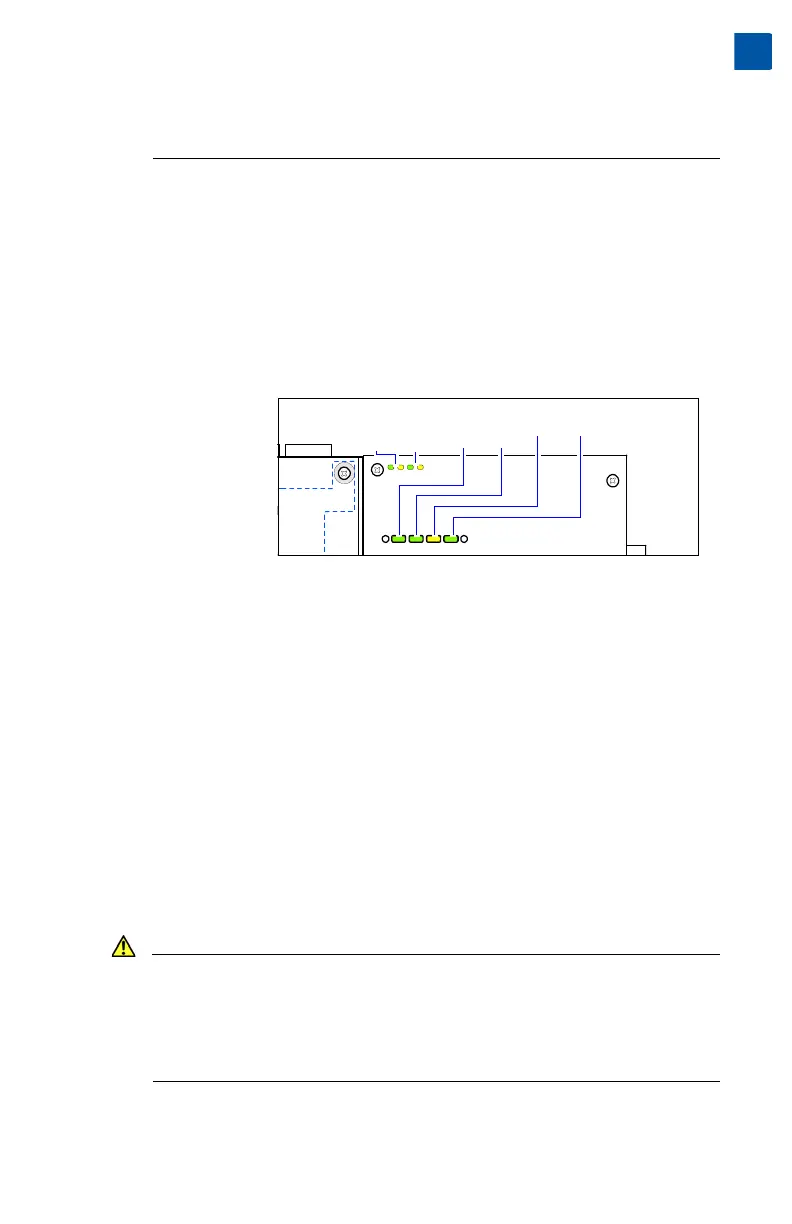
The controller includes several LEDs that can help determine the status of the unit.
They are located in two places: the top of the controller, visible through the cover,
and for serial ports, on the bottom board (only with cover removed).
From left-to-right these LEDs include:
Ethernet Ports
Each Ethernet port has a green LED, labeled on the top cover “LAN2” (or “SEC”),
and “LAN1” (or “PRI”). The LED indicates activity on that LAN2 (secondary) port or
LAN1 (primary) port as follows:
• Off — No Ethernet link is made.
• On — Ethernet link is present, but no activity on the LAN.
• Blinking — Ethernet link is present with data activity on the LAN.
Heartbeat
A yellow heartbeat “BEAT” LED is next to the Ethernet LEDs, also visible on the
cover. In normal operation, this LED blinks at 1 Hz, at 50%/50% on/off duty cycle.
During controller bootup, this LED blinks at 1 Hz with a 90%/10% on/off duty cycle
on any controller running AX-3.7 update 1 (build 3.7.105) or later. When bootup
completes, the platform daemon is started, and the normal (50%/50%) duty cycle
heartbeat flash pattern returns.
Caution This same 90%/10% on/off “BEAT” flash occurs during critical operations,
such as any firmware upgrade (in progress) to the controller and/or any
attached I/O modules. To be safe, do not remove power from the
controller while its “BEAT” LED flashes with a 90%/10% on/off duty cycle.
Wait for the normal (50%/50%) flash to return before removing power.
If the “BEAT” LED stays on constantly, does not light, or blinks very fast—more than
1Hz (once per second), contact System Engineering for technical support.
Visible on cover:
• Ethernet Ports
• Heartbeat
• Status
Bottom board only:
• Serial Ports
COM 2
Serial port LEDs on bottom
board, remove cover to see:
LAN2
LAN1
BEAT
STATUS
Status LEDs (visible with cover on):
(SEC) (PRI)
COM 1


 To Next Page