Part Number 12762 Rev 1.1 | April 30, 2014 WIRING DETAILS
Communications Wiring
18 NETWORK CONTROLLER 3E & 6E MOUNTING AND WIRING GUIDE |
Caution Do not plug the barrel connect plug from the WPM-XXX into the
controller until all other mounting and wiring is completed. See “Power Up
and Initial Checkout,” page 23.
Communications Wiring
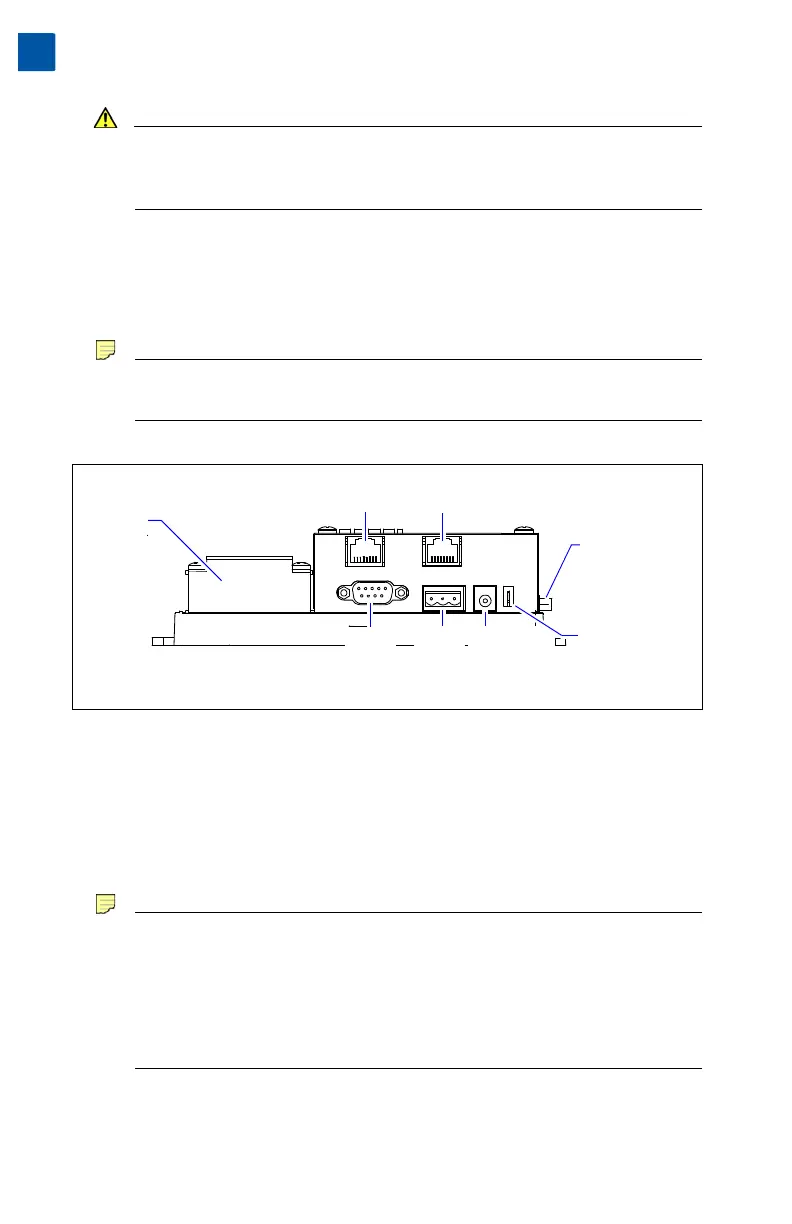
Communications ports are on the controller’s bottom side, which include:
• Ethernet
• Serial
Note Prior to connecting cables, provide strain relief for them to prevent
damage to the controller.
Figure 6 T-300E or T-600E controller bottom side (cover removed).
Ethernet
Two, female 10/100-Mbit Ethernet connections are provided on the controller.
These RJ-45 connectors are labeled LAN1 (PRI) and LAN2 (SEC). Use a standard
Ethernet patch cable for connecting to a hub or Ethernet switch.
The factory-default IP address for LAN1 is 192.168.1.12n, where the last
numeral n in the address matches the last digit in the controller’s serial number, and
the subnet mask is 255.255.255.0. By default, LAN2 is disabled.
Note Typically, you only use LAN1 (primary port), unless you have a specific
application for the other LAN2 port. For example, isolating a driver’s
network traffic, using LAN2. Do not use LAN2 as the primary port.
If enabling LAN2, note that LAN1 and LAN2 must be connected to
different subnets. Further, a JACE controller does not provide IP
routing or bridging operation between the two LAN ports.
Refer to the JACE NiagaraAX Install and Startup Guide for details on changing IP
address using the platform Commissioning Wizard (TCP/IP configuration step).
Earth Ground
Spade Lug
Primary Ethernet (RJ-45)
LAN 1
Secondary Ethernet (RJ-45)
LAN 2
Optional NiMH Battery
and bracket assembly, if
installed, mounts on top
of the Option Slot area.
RS-485
(3-pos.)
COM2
RS-232
(DB-9)
COM1
Barrel power
connector for
WPM-XXX
(Wall Mount
AC Adapter)
20-Pin
Connector
(I/O and
Power Modules)
Option
Slot area
(Slot #1
this side)


 To Next Page