EN
4 – English
4
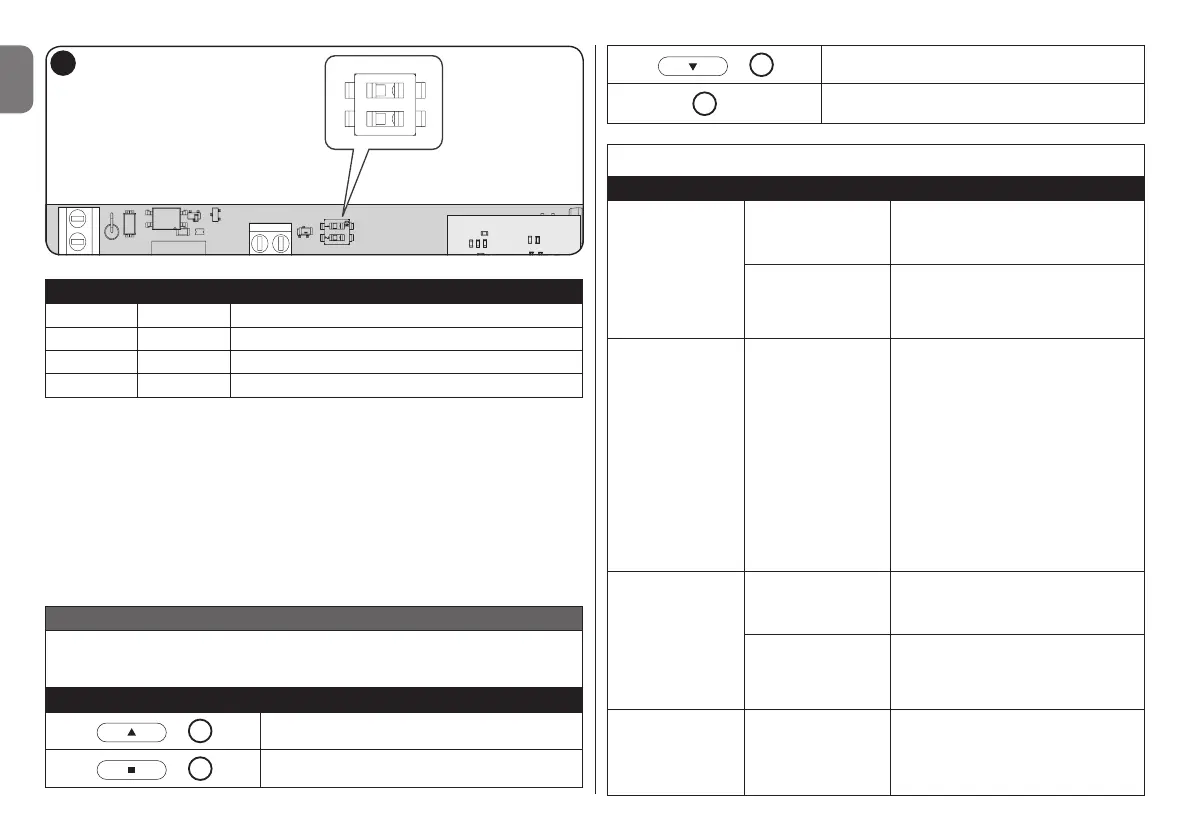
Dip 1 Dip 2 Description
Off Off Output 2-10 V
On Off Output 1-10 V
Off On Output 0-10 V
On On PWM (1k Hz)
Note:checkthetypeofloadinthetechnicalspecicationsofthede-
vice that is to be connected
4 - PROGRAMMING
The TTD0110 must be programmed with a transmitter memorised in
“Mode 1” or with the external button.
Up to 30 transmitters can be memorised in “Mode 1” or in “Mode 2”
in order to get different behaviours:
TABLE 2
Mode 1: automatically assign the three commands to the first three
buttons on the transmitter
Buttons Function
/
1
Dimmer up
/
2
Toggle
/
3
Dimmer down
4
...
-
Mode 2: freely associate one command from among those available
Function Procedure Description
Dimmer up
1 short press
on the button
( < 1 second )
the brightness of the lamp increas-
es by a small percentage if it is not
already set to the maximum value
1 long press
on the button
( > 1 second )
the brightness of the lamp in-
creases until it reaches the maxi-
mum value set or until the button
is released
Toggle
every time you
press the button
the dimmer turns the lamp On or
Off.
Brightness associated with “On”:
the last brightness value set on
the dimmer.
This value is memorised automati-
cally by the dimmer when the lamp
is switched off (i.e. the memorised
value will be the brightness of the
lamp before being switched off)
or, in any case, about 60 seconds
since the brightness was last ad-
justed (i.e. the last brightness value).
Dimmer down
1 short press
on the button
( < 1 second )
the brightness of the lamp decreas-
es by a small percentage if it is not
already set to the minimum value
1 long press
on the button
( > 1 second )
the brightness of the lamp de-
creases until it reaches the mini-
mum value set or until the button
is released
Dimmer up
Toggle
Dimmer down
...
every time you
press the button
the various functions are performed
alternately


 To Next Page