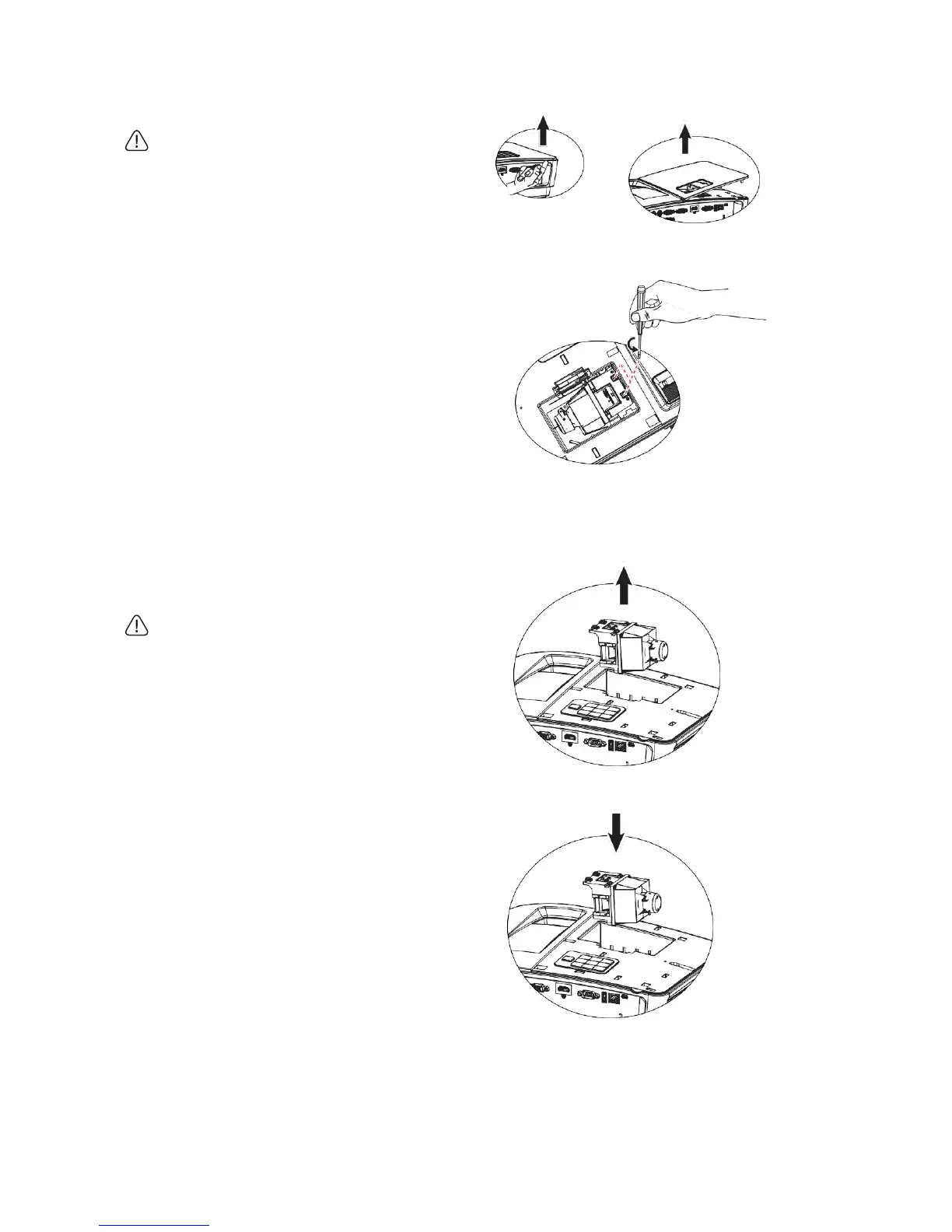
3. Push bulb cover upward (a) and then lift
the cover (b) to take out bulb cover.
• Do not connect power supply before
mounting bulb cover.
• Please do not put fingers between the bulb
and the projector. Sharp edges inside the
projector may scratch fingers.
4. Loosen the screws fastening the bulb.
5. Lift the handle to keep the handle upright.
Pull the bulb out of the projector slowly
with the handle.
• The bulb may be broken by too fast pulling,
and broken glass may fall into the
projector.
• Do not put the bulb at the place with
possible water splash, in the reach by
children, and near inflammables.
• Do not put the hand in the projector after
taking out the bulb. The touch of internal
optical modules may cause non-uniform
color or distortion of projection image.
6. Insert new bulb into bulb chamber in place
in the projector.
(a)
(b)


 To Next Page