The
Mode
Dial
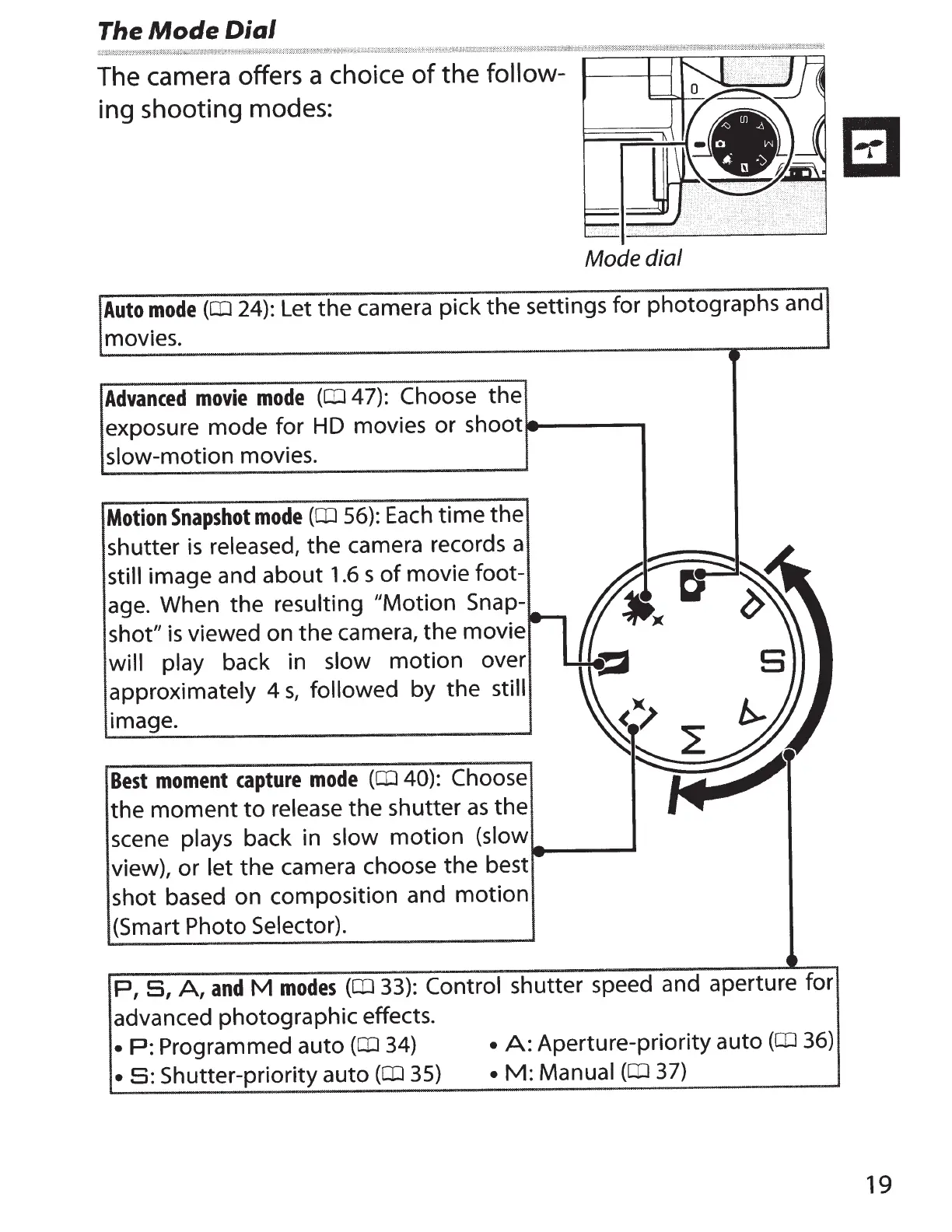
The camera offers a choice
of
the
follow-
ing shooting modes:
Mode dial
Auto
mode
(CD
24):
Let the camera pick the settings for photographs and
movies.
Advanced
movie
mode
(CD
4
7):
Choose the
exposure mode for
HD
movies or
shoot-----
slow-motion movies.
Motion
Snapshot
mode
(CD
56):
Each
time
the
shutter
is
released, the camera records a
still image and about
1.6
s
of
movie foot-
age. When the resulting "Motion
Snap-
shot"
is
viewed on the camera, the movie
will play back in slow
motion
over
approximately 4
s,
followed by
the
still
image.
Best
moment
capture
mode
(CD
40): Choose
the
moment
to
release the shutter
as
the
scene plays back in slow
motion
(slow
view), or let the camera choose
the
best
shot based on composition and
motion
(Smart Photo Selector).
_____
_.
P,
S,
A,
and
M
modes
(a:J
33): Control
shutter speed and aperture for
advanced photographic effects.
•
P:
Programmed auto
(a:J
34)
•
A:
Aperture-priority auto
(a:J
36)
•
S:
Shutter-priority auto
(a:J
35)
•
M:
Manual
(CD
37)
8
19



 To Next Page