EasyManua.ls Logo

Nikon 1 v2 - Page 73

Nikon 1 v2
349 pages
Print Icon
To Next Page IconTo Next Page
To Previous Page IconTo Previous Page
Loading...
L
~
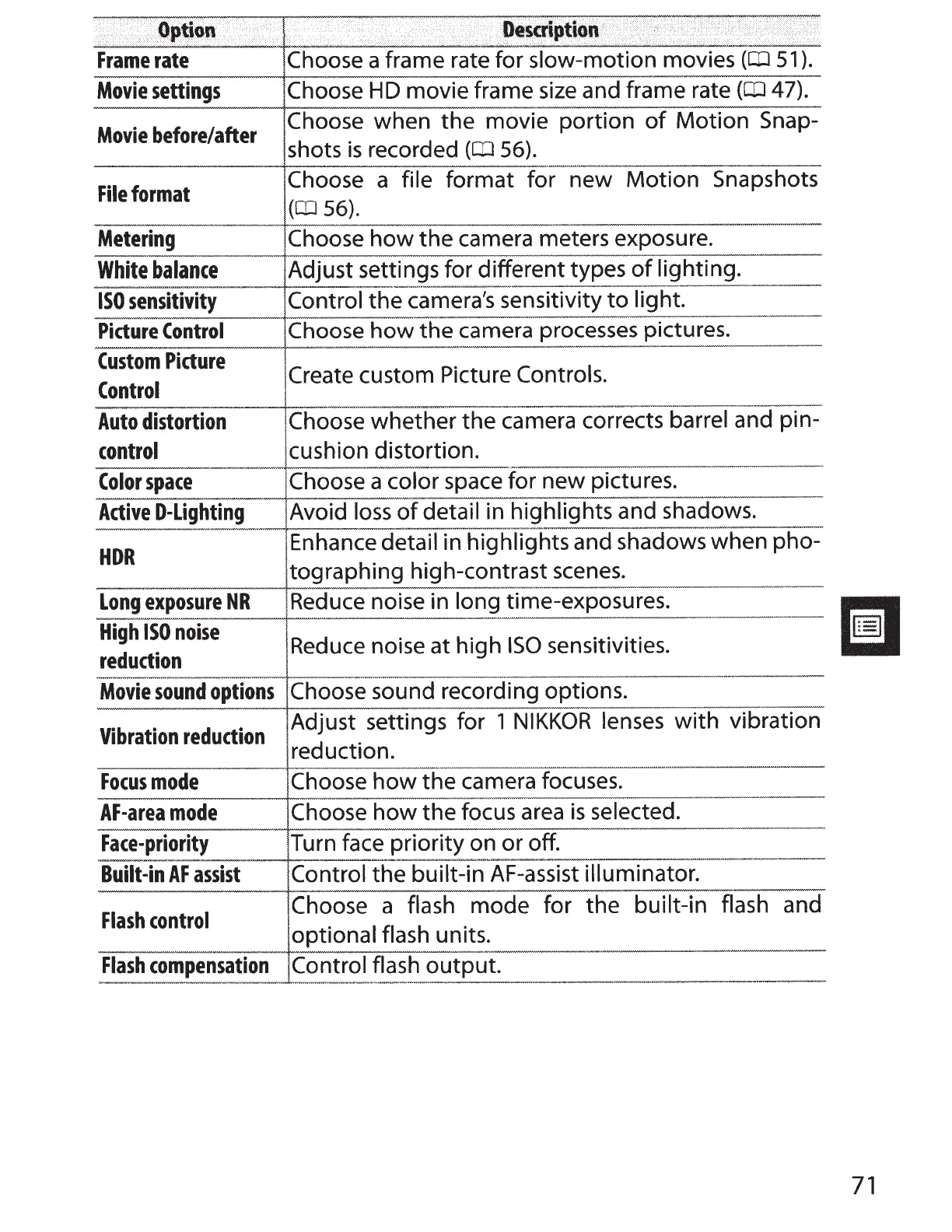
Option
Frame
rate
Movie
settings
Movie
before/after
File
format
. .
Description
·
Choose
a frame rate for
slow-motion
movies
(CD
51).
Choose
HD
movie frame
size
and frame rate
(CIJ
47).
Choose
when
the
movie
portion
of
Motion Snap-
shots
is
recorded
(CD
56).
Choose a
file
format for new
Motion
Snapshots
(CD
56).
Metering
Choose
how
the
camera meters exposure.
White
balance
Adjust settings for different types
of
lighting.
----
------
--
-
--~~---
-
----------
ISO
sensitivity
Control
the
camera's sensitivity
to
light.
Picture
Control
Choose
how
the
camera processes pictures.
Custom
Picture
Create
custom Picture Controls.
Control
Auto
distortion
Choose
whether
the
camera corrects
barrel
and pin-
control
cushion distortion.
Color
space
Choose a
color
space for new pictures.
Active
D-Lighting
Avoid
loss
of
detail in highlights and shadows.
HDR
Enhance
detail in
highlights
and shadows when pho-
tographing high-contrast scenes.
Long
exposure
NR
Reduce noise in
long
time-exposures.
High
ISO
noise
reduction
Reduce noise at high
ISO
sensitivities.
-------·----+---------~
--
----------------------------
Movie
sound
options
Choose
sound recording options.
Vibration
reduction
Adjust settings for
1
NIKKOR
lenses
with
vibration
reduction.
Focus
mode
Choose
how
the
camera focuses.
AF-area
mode
Choose
how
the
focus
area
is
selected.
Face-priority
Turn face
priority
on
or
off.
-----------
··
-#-~--·
------
------
------------
--
-------
Built-in
AF
assist
Control
the
built-in
AF-assist
illuminator.
Flash
control
Choose a
flash
mode for
the
built-in flash
and
optional flash
units.
Flash
compensation
Control flash
output.
-
-
~~---
~
--
71

Table of Contents

Other manuals for Nikon 1 v2

Related product manuals