II
Playback
Menu
Options
.....
<Oa.t
....
.
•.
.
..
••••
••••••
.......
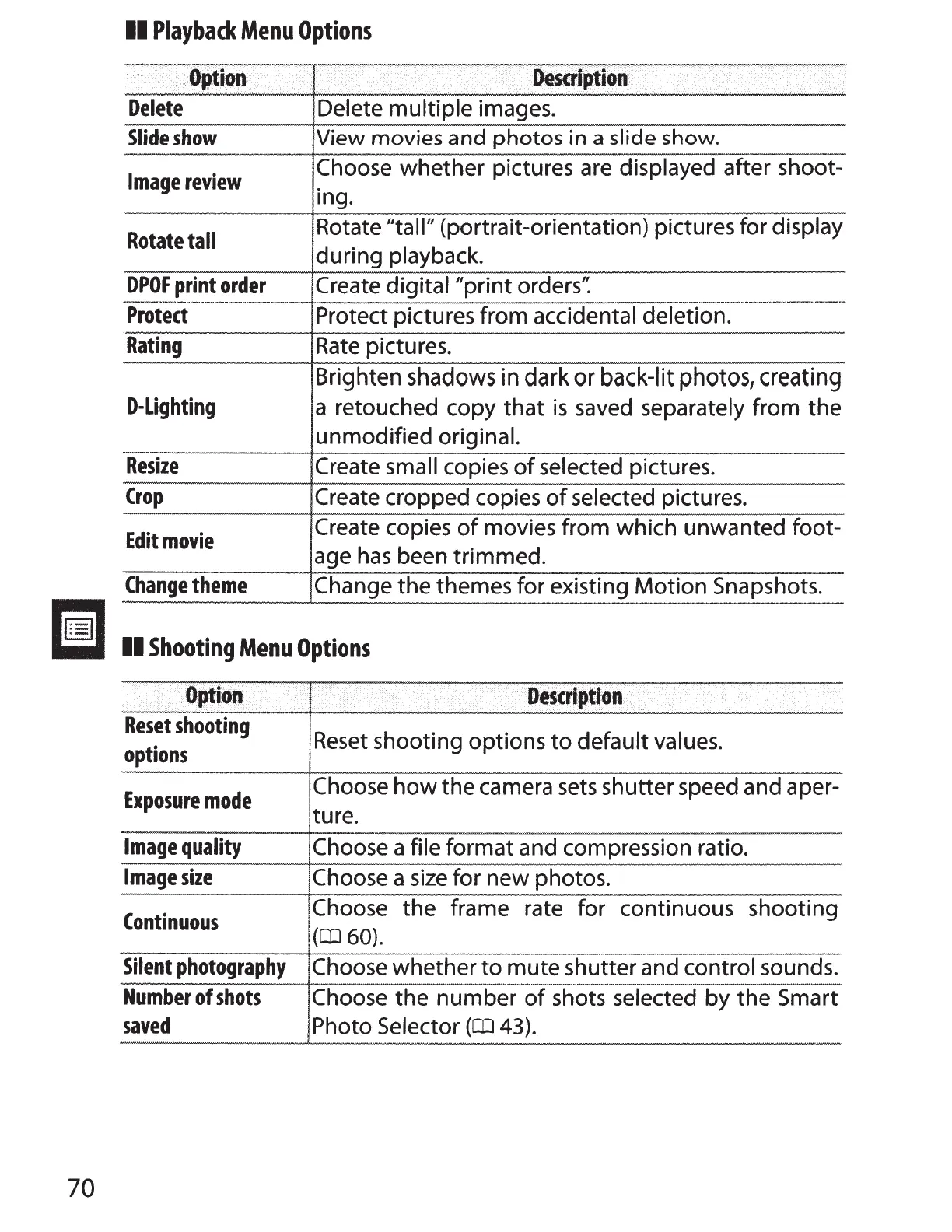
Delete
Delete
multiple
images.
Slid@
show
View
movies
and
photos
in
a
slide
show.
Image
review
Choose
whether
pictures are displayed after shoot-
in
g.
Rotate
tall
Rotate "tall" (portrait-orientation) pictures for display
during playback.
DPOF
print
order
Create digital
"print
orders'~
Protect
Protect pictures from accidental deletion.
Rating
Rate
pictures.
Brighten shadows in dark or back-lit
photOS
1
creating
D-Lighting
a retouched copy
that
is
saved separately from the
unmodified original.
Resize
Create small copies
of
selected pictures.
Crop
Create cropped copies
of
selected pictures.
Edit
movie
Create copies
of
movies from which unwanted foot-
age
has
been trimmed.
Change
theme
Change the themes for existing
Motion
Snapshots.
r=l
liil
II
Shooting
Menu
Options
......
.!
..
.L.!
...
_
...........
~
Reset
shooting
Reset
shooting options
to
default values.
options
Exposure
mode
Choose
how
the
camera
sets
shutter speed and a per-
ture.
Image
quality
Choose a file format and compression ratio.
Image
size
Choose a
size
for
new photos.
Continuous
Choose the frame rate for continuous shooting
(CIJ
60).
Silent
photography
Choose whether
to
mute shutter and control sounds.
Number
of
shots
Choose the
number
of
shots selected by the Smart
saved
Photo Selector
(CIJ
43).
70



 To Next Page