97
Fine-Tuning Nikon Capture 4 Editor
Nikon Capture 4 Editor Preferences
Fine-Tuning Nikon Capture 4 Editor
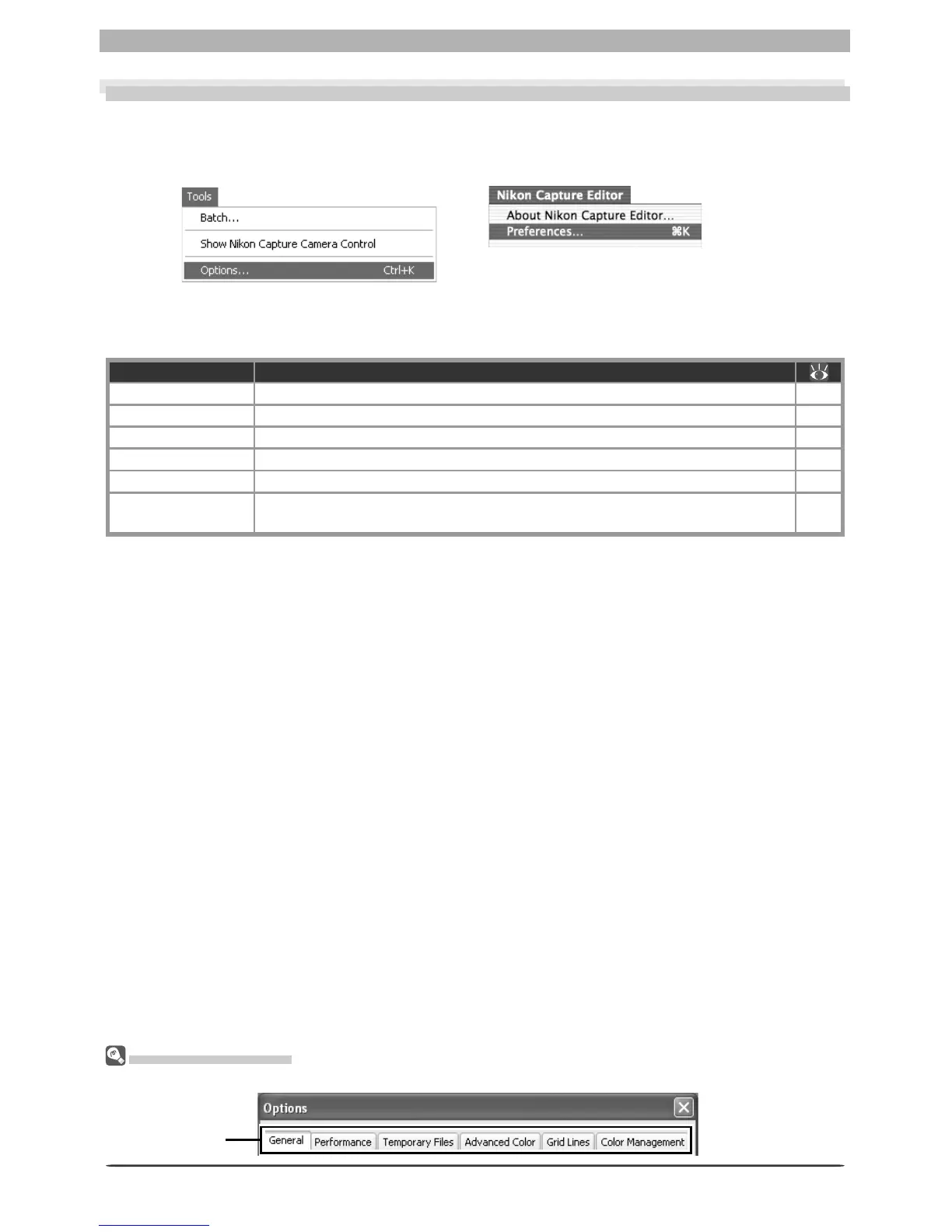
To view the Preferences (Options) dialog, select Options… from the Tools menu (Windows)
or select Preferences… from the application menu (Mac OS X) or Edit menu (Mac OS 9).
Viewing Preferences
To view settings in any of the six panels, click the appropriate tab.
The Pref er enc es dialog contains the following 6 tabs:
Tab Description
General Adjust application settings. 98
Performance Fine-tune application performance 100
Temporary Files Specify the location of the folders used for tem po rary stor age. 101
Advanced Color Set the defaults for the white and black points in the Curves window. 102
Grid Lines Specify the spacing and color of the grid dis played in im age windows. 103
Color Management
Select the color profi les used by the Nikon Color Man age ment System
(CMS).
104–
106
After making changes to preferences, click OK to save changes and return to the Nikon
Capture 4 Editor window. Click Cancel to cancel any changes to settings and return to the
Nikon Capture 4 Editor window.
Mac OS X
Windows
Tab








 To Next Page