112
The Camera Control Window
Capturing Photographs to Disk
If Nikon Capture 4 Camera Control is running when a D2-series, D200, D100, D70s, D70, or
D50 camera is con nect ed, or a D1-series cam era is con nect ed with the mode dial set to PC,
pictures taken with the camera will be stored on your computer hard disk, not the camera
memory card.
Open the Camera Control window
Open the Download Options dialog
Close the Camera Control window
Exit Camera Control.
Take pictures.
Adjust capture options.
Start Nikon Capture 4 Camera Con trol.
110
113
114
115
Connect the camera to your computer.
Finish shooting.
Rotate images to match camera orientation.
114
1
Start Nikon Capture 4 Camera Con trol ( 110 )
2
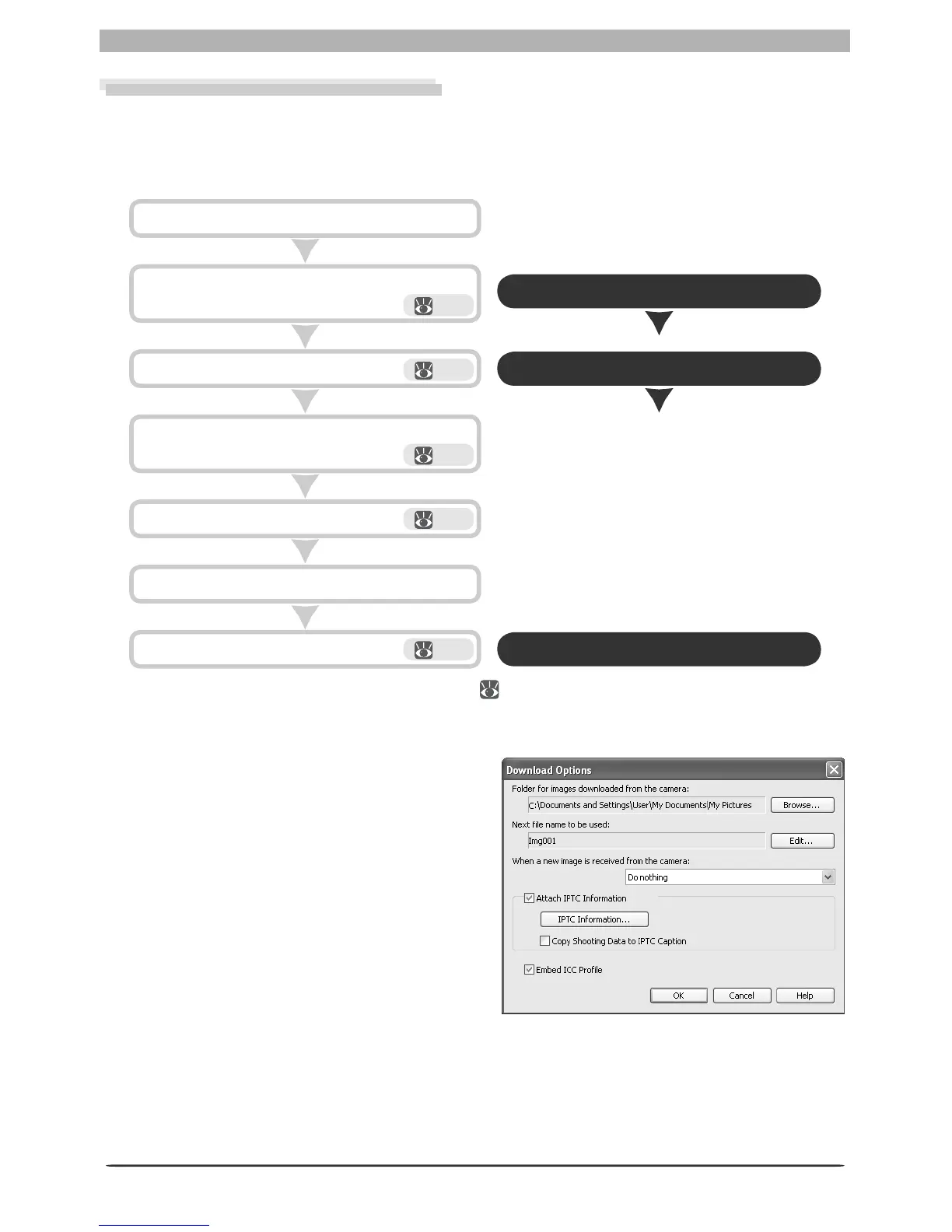
Display the Download Options dialog
Click Download Options in the Camera
Control window. The dialog shown at right
will be displayed.








 To Next Page