10
The Editor Window
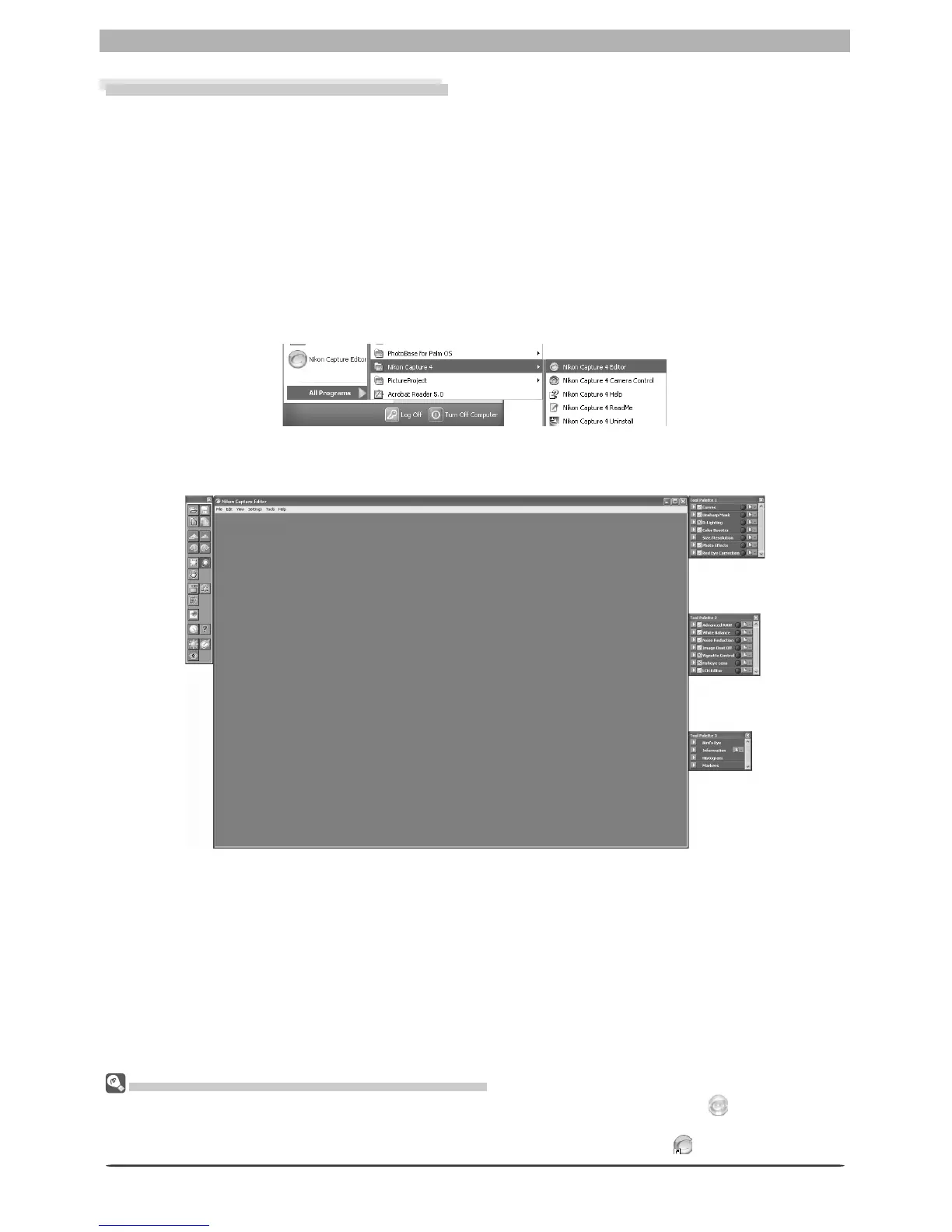
Starting Nikon Capture 4 Editor
Nikon Capture 4 Editor can be started from the Start menu (Win dows) or double-click ing the
ap pli ca tion icon (Macintosh).
Windows
1
Turn the computer on
Turn the computer on and wait for the operating system to start up.
2
Start Nikon Capture 4 Editor
From the Start menu, select All Programs > Nikon Capture 4 > Nikon Capture 4
Editor (Windows XP Home Edition/Windows XP Professional) or Pro grams > Nikon
Capture 4 > Nikon Capture 4 Ed i tor (other versions of Win dows).
Oth er Ways of Starting the Editor (Windows)
Nikon Capture 4 Editor can be started by double-clicking the Nikon Capture 4 icon ( ) in the folder to
which Nikon Capture 4 was installed. If a shortcut to Nikon Capture 4 was created on the desktop during
installation, the Editor can also be started by double-clicking the shortcut icon ( ) on the desktop.








 To Next Page