11
Getting to Know Nikon Capture 4 Editor
Macintosh
1
Turn the computer on
Turn the computer on and wait for the operating system to start up.
2
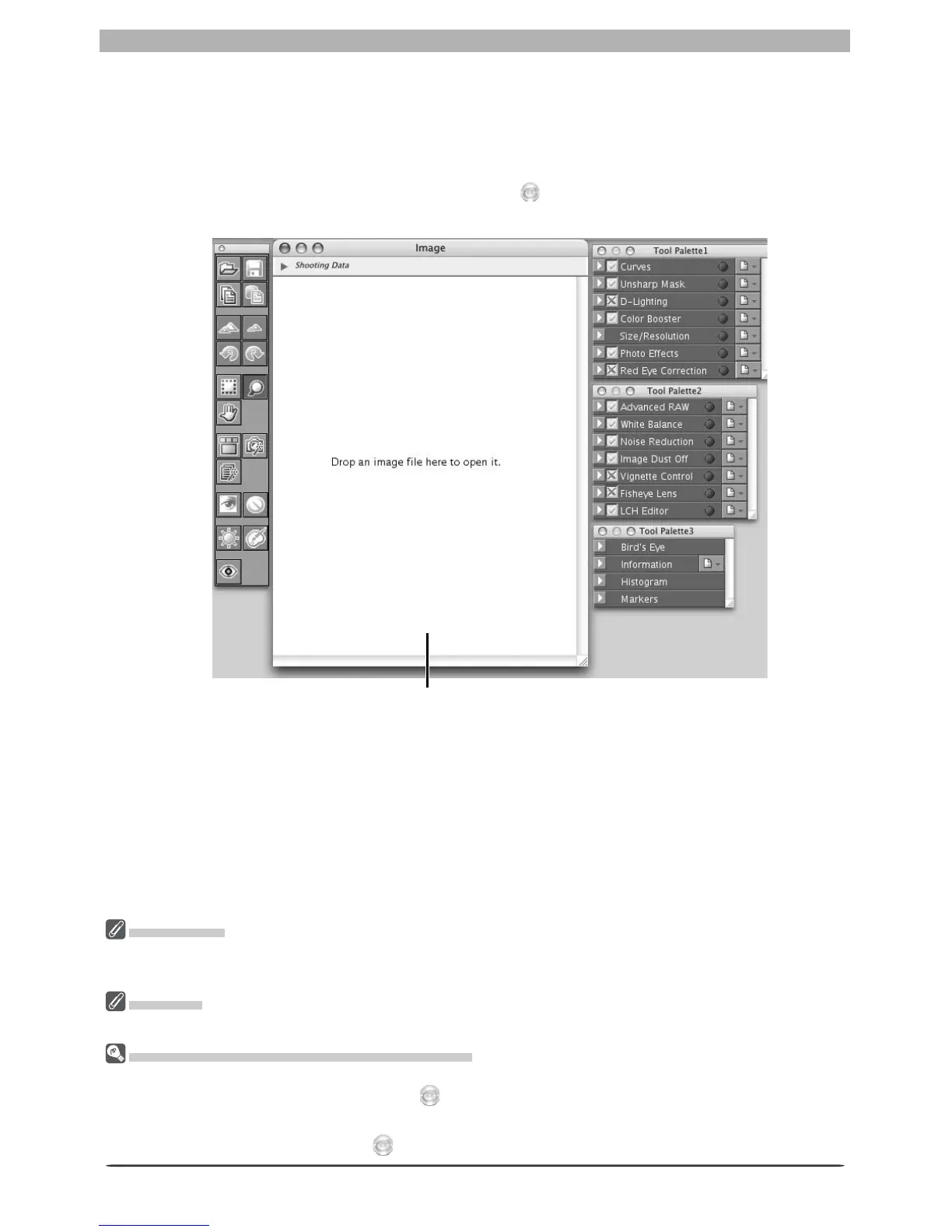
Start Nikon Capture 4 Editor
Double-click the Nikon Capture 4 Editor icon ( ) in the folder to which you installed
Nikon Capture 4.
Prod uct Key
If prompt ed to supply a product key when starting Nikon Capture 4 Editor or Nikon Capture 4 Camera
Control, en ter the product key supplied on the Nikon Capture 4 CD case.
Mac OS 9
Dutch, Italian, Korean, and Swedish versions of Nikon Capture 4 are not available for Mac OS 9.
Oth er Ways of Starting the Editor (Mac OS)
Mac OS 9: If an alias for Nikon Capture 4 was created on the desktop during installation, the Editor can
also be started by double-clicking the alias ( ).
Mac OS X: If Nikon Capture 4 was reg is tered in the Dock during installation, the Editor can also be started
by clicking the Nikon Capture 4 icon ( ) in the Dock.
No image displayed in image win dow








 To Next Page