127
Getting to Know Nikon Capture 4 Camera Control
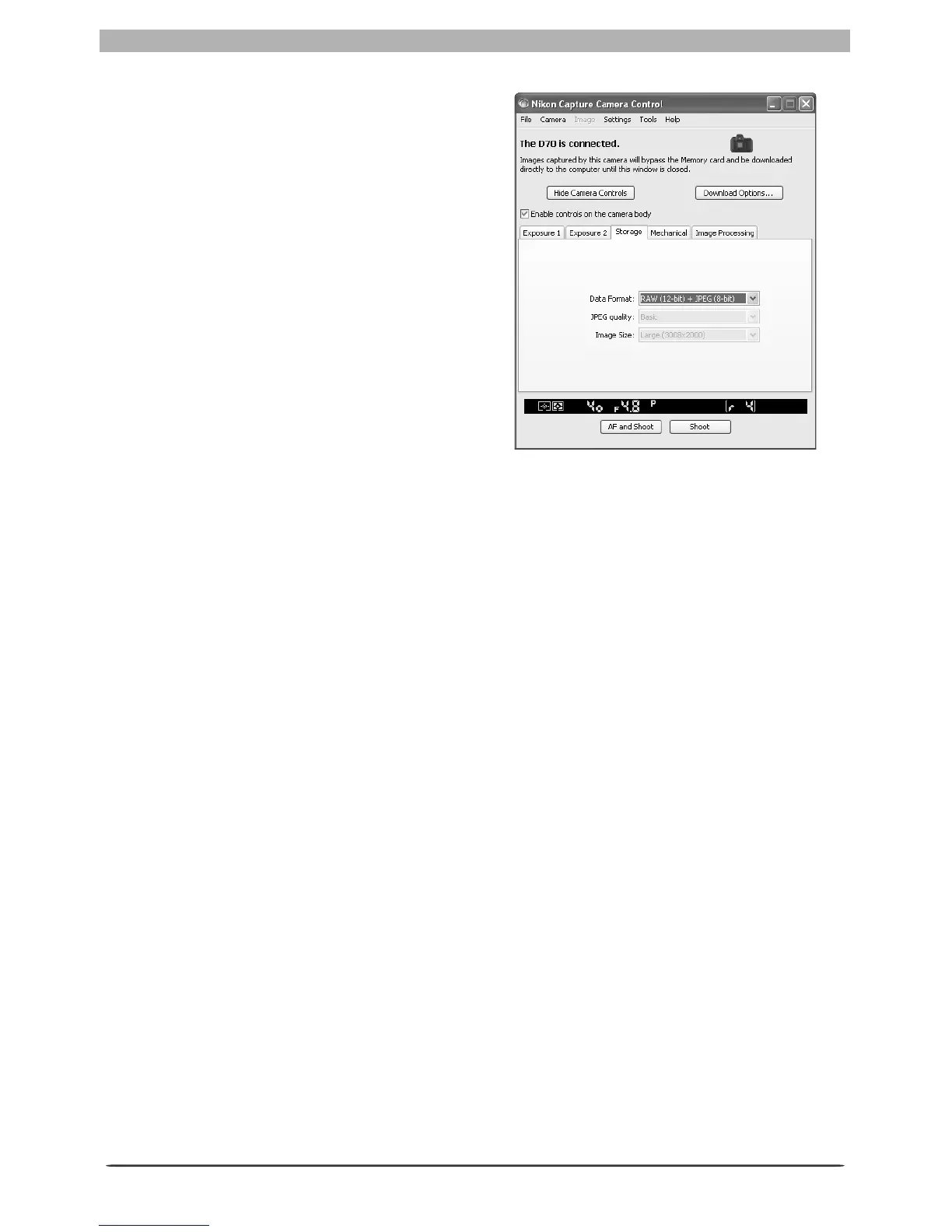
The Storage Tab
The following settings can be adjusted from
the Stor age tab:
Data Format: The following data for mats
are available: RAW (12-bit) + JPEG (8-bit)
(D2 series/D200/D70s/D70/D50 only), RAW
(12-bit), TIFF-RGB (8-bit) (D2 series/D1
series/D100 only), TIFF-YCbCr (8-bit) (D1
series only), and JPEG (8-bit). This set ting
determines pix el bit depth and fi le size.
JPEG Quality: When data format is set to
JPEG (8-bit), you can choose image quality
from Fine, Normal, and Ba sic. When RAW
(12-bit) + JPEG (8-bit) is selected with the
D2 series and D200, image quality can be se-
lected from Fine, Normal, and Ba sic. When
RAW (12-bit) + JPEG (8-bit) is selected
with the D70s, D70, or D50, image quality is
fi xed at Basic.
JPEG Compression (D2X/D2Hs/D200 only): Choose from Fixed size and Optimal quality.
See the camera manual for details.
Color (D1 series only): Choose from Color and Black & White. Black & White is not avail-
able when RAW is selected for Data Format.
Image Size: Choose image size. See the camera manual for details.
RAW Compression ( D2 seri es /D1x / D1
H
/D200 only): Check this option to compress NEF (RAW)
images taken at a data for mat setting of RAW (12-bit) + JPEG (8-bit) (D2 series and D200
only) or RAW (12-bit).
High-speed crop (D2X only): Select this option to enable high-speed crop. See the camera
manual for details.
D70








 To Next Page