4
Introduction
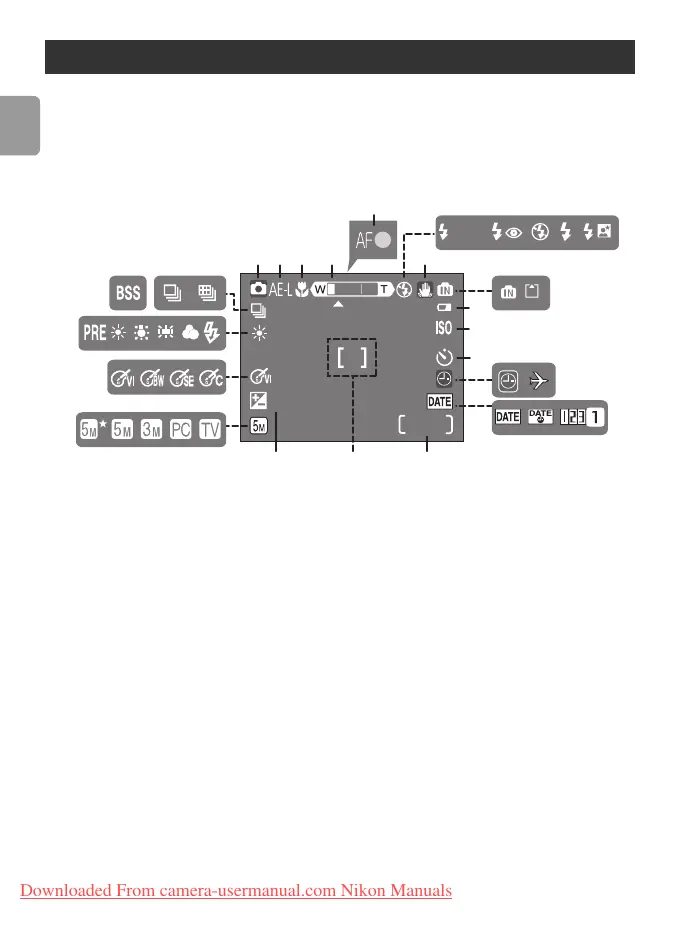
The following indicators may appear in the monitor during shooting and
playback (actual display varies with current camera settings):
Shooting
The Monitor
1 Shooting mode ............13, 23, 39
2 Exposure lock ...........................32
3 Macro close-up mode............... 22
4 Zoom indicator...................14, 22
5 Focus indicator .........................15
6 Flash mode............................... 18
7 Camera shake icon................... 16
8 Internal memory/Memory card
indicator................................... 11
9 Battery level indicator ...............13
10 Sensitivity .................................16
11 Self-timer indicator................... 20
12 “Date not set” indicator........... 88
Time zone indicator.................. 64
13 Date imprint/Date counter ....... 67
14 Number of exposures
remaining .......................... 13, 98
Movie length ..................... 39, 98
15 Focus area ............................... 15
16 Exposure compensation ........... 75
17 Image mode ............................ 72
18 Color options........................... 77
19 White balance ......................... 73
20 Best Shot Selector (BSS) ........... 76
21 Continuous shooting mode ..... 75
+
1.0
9999
10
AUTO
9
10
11
141516
17
18
19
123 4 7
56
8
20 21
12
13
Downloaded From camera-usermanual.com Nikon Manuals















 To Next Page