71
Basic Camera Setup: The Setup Menu
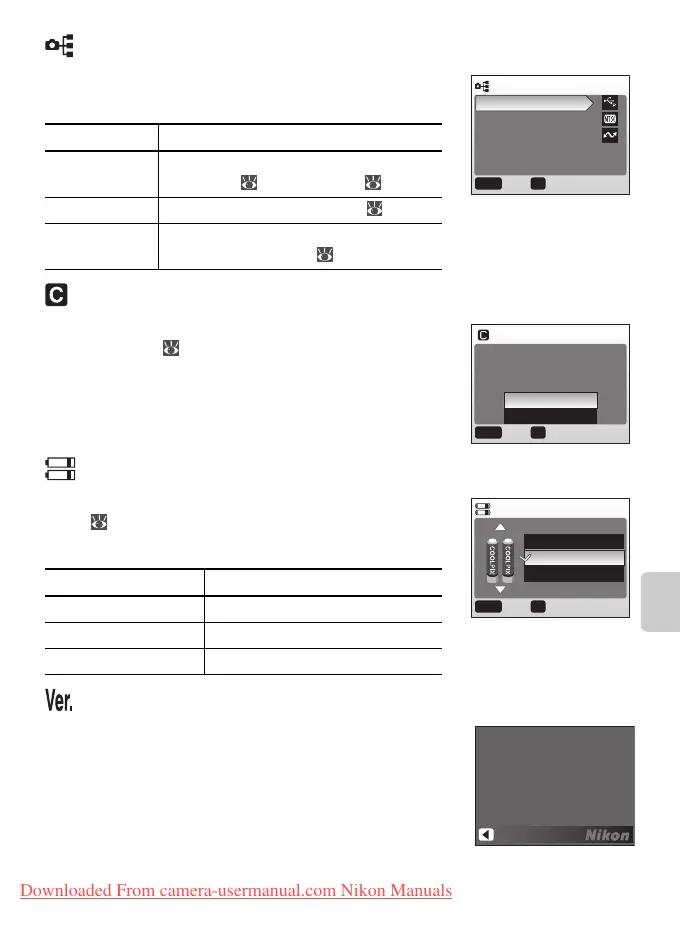
Interface
Adjust settings for connection to a computer or
video device.
Reset All
Select Reset all to restore camera settings to their
default values ( 95).
Battery Type
To ensure that the camera shows the correct battery
level ( 13), choose a type that matches the batter-
ies currently in use.
Firmware Version
View the current camera firmware version.
Option Description
USB Select USB option for connection to
computer ( 51) or printer ( 54).
Video mode Choose from NTSC and PAL ( 48).
Auto
transfer
Choose On to mark all new pictures for
transfer to computer ( 50).
Option Battery Type
Alkaline Alkaline
COOLPIX (NiMH) EN-MH1, oxyride
Lithium Lithium
INTERFACE
USB
Video mode
Auto transfer
MENU OK
ConfirmExit
RESET ALL
Reset all settings to default
values
MENU OK
ConfirmExit
No
Reset
BATTERY TYPE
Alkaline
COOLPIX(NiMH)
Lithium
MENU OK
ConfirmExit
COOL
PIX L3 Ver.X.X
Back
Downloaded From camera-usermanual.com Nikon Manuals















 To Next Page