6
Introduction
Inserting Batteries
The camera uses two AA batteries. Depending on the country or region of
purchase, the package will include either alkaline batteries or an MH-71 bat-
tery charger with rechargeable EN-MH1 batteries.
Charge the batteries (EN-MH1 batteries only)
If the camera came with a battery charger and rechargeable Nikon EN-MH1
NiMH batteries, charge the batteries as described below. If the camera came
with a pair of alkaline batteries, skip to “Insert the batteries” on the follow-
ing page.
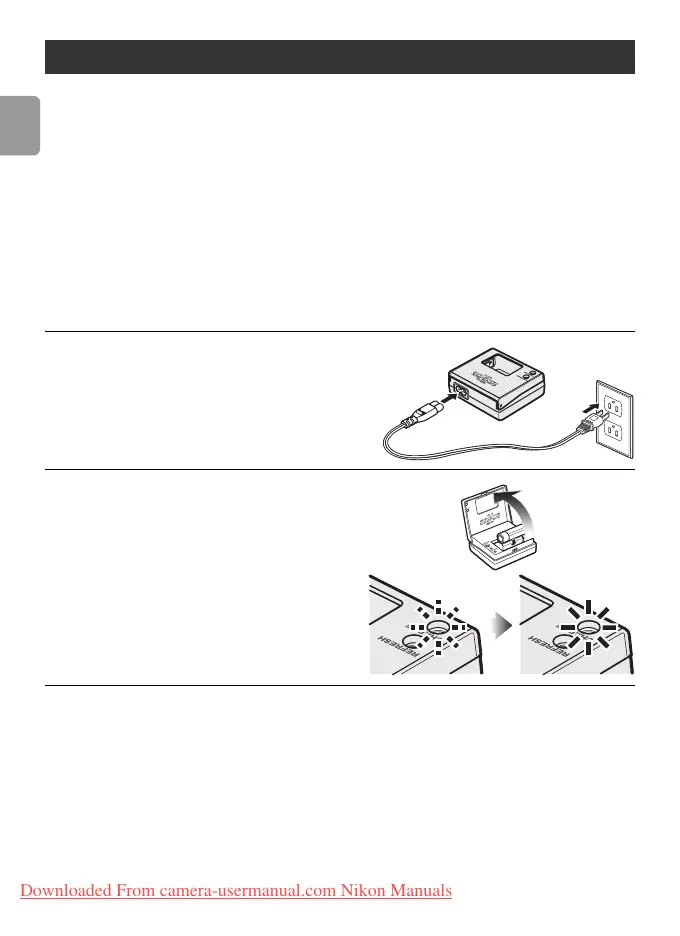
1
Plug the charger in
Connect the power cable to the
charger (1) and then plug it into a
power outlet (2). The CHARGE lamp
will light (3).
2
Charge the batteries
Insert the batteries as indicated on
the charger. The CHARGE lamp will
start to blink. Charging is complete
when the CHARGE lamp stops
blinking.
A pair of new or fully exhausted
batteries will charge in about two
and a half hours.
First Steps
1
2
3
Downloaded From camera-usermanual.com Nikon Manuals















 To Next Page