28
Basic Photography and Playback: A (Auto) Mode
Step 4 Playing Back and Deleting Pictures
Playing Back Pictures (Playback Mode)
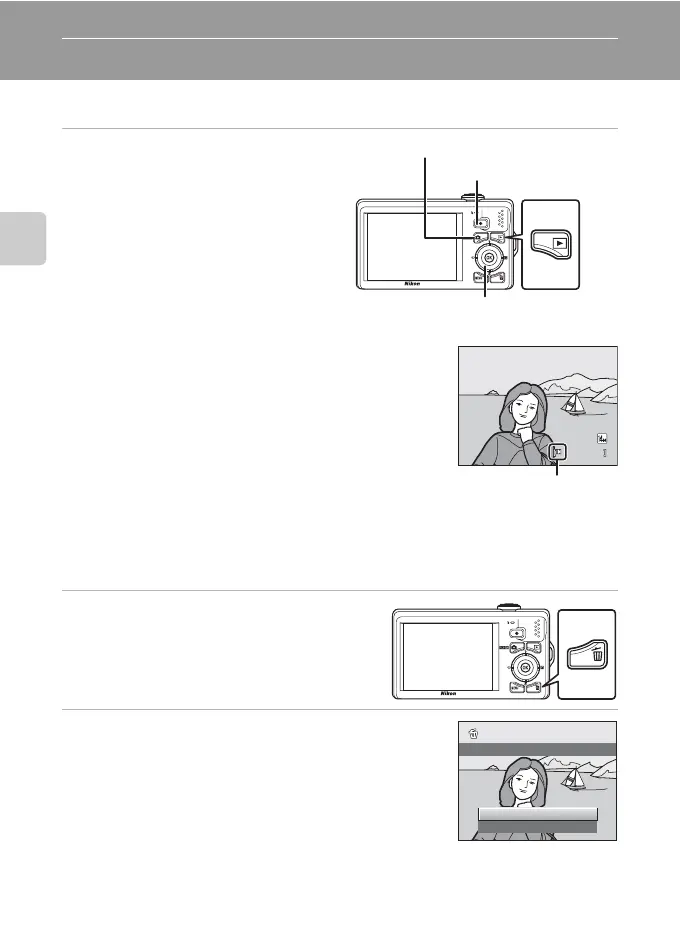
Press the c (playback) button.
The last picture taken will be displayed in full-
frame playback mode.
Rotate the rotary multi selector, or press H, I,
J, or K to view previous or subsequent
pictures (A 9).
Press the A button, the shutter-release
button, or b (movie-record) button to switch
to shooting mode.
When playing back pictures stored in the
camera’s internal memory, C is displayed. When a memory
card is inserted in the camera, C is not displayed and images
stored on the memory card are played back.
Deleting Pictures
1 Press the l button to delete the
picture currently displayed in the
monitor.
2 Use the rotary multi selector to select Yes and
press the k button.
Deleted pictures cannot be restored.
To exit without deleting the picture, select No and press
the k button.
(auto) button
Rotary multi selector c (playback)
button
b (movie-record) button
4/ 4
0004.J P G
1 5 / 0 5 / 2 0 1 0 15 : 3 0
1 5/05/201 0 15:30
Internal memory
indicator
Yes
No
Erase 1 image?



 To Next Page
 Loading...











