Home
Nikon
Digital Camera
D5
Network Guide
Page 35
Nikon D5 - Page 35
92 pages
Manual
Save Page as PDF
To Next Page
To Next Page
To Previous Page
To Previous Page
Loading...
25
A
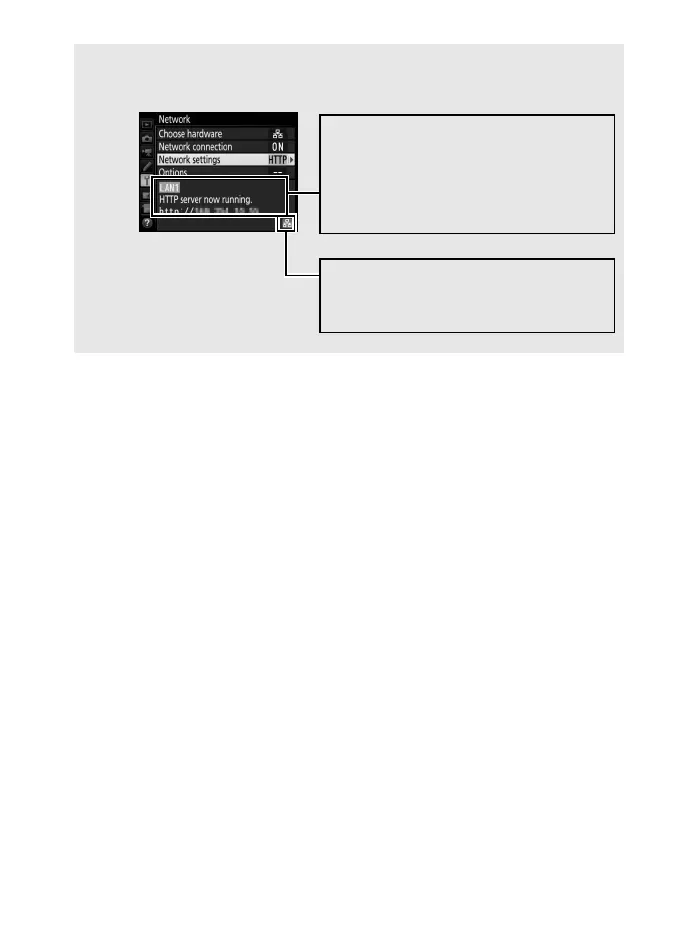
Network Status
Network status can be viewed in the top level
of the network menu.
Sig
nal
st
ren
gt
h
: W
ireless signal
strength. Ethernet connections are
shown
by
d
.
Status area
: T
he status of the
connection to the host. The camera
URL is displayed when a c
onnection
is established. Errors are also
display
ed here (
0
77).
34
36
Table of Contents
Main Page
Default Chapter
2
What Networks Can Do for You
2
Notices
5
Table of Contents
8
Introduction
11
Network Options
12
The Wireless Transmitter Utility
14
Transfer, Control, and HTTP
15
Ethernet Connections
15
Step 1: Connecting an Ethernet Cable
16
Turn the Camera on
17
Step 2: Enabling the Ethernet
18
Step 3: the Connection Wizard
18
Step 4: Pairing
22
Image Transfer
24
Camera Control
28
HTTP Server
31
Computer and Android Web Browsers
37
Iphone Web Browsers
44
Ftp
49
Ethernet Connections
49
Step 1: Connecting an Ethernet Cable
50
Step 2: Enabling the Ethernet
51
Step 3: the Connection Wizard
51
FTP Upload
55
Synchronized Release
59
Selecting Wireless LAN for Synchronized Release
60
Synchronized Release Options
60
Taking Pictures
62
Take Pictures
63
Menu Guide
65
Appendices
75
Creating Profiles on a Computer
75
Creating an FTP Server
77
Manual Profile Creation
85
Adjust Settings
86
Troubleshooting
87
Index
88
Other manuals for Nikon D5
User Manual
512 pages
Professional Setting Guide
44 pages
Related product manuals
Nikon D6
1198 pages
Nikon Df
396 pages
Nikon D4
484 pages
Nikon D3
472 pages
Nikon D90
359 pages
Nikon D60
248 pages
Nikon D3S
460 pages
Nikon D40
139 pages
Nikon D50
148 pages
Nikon D80
162 pages
Nikon D70
218 pages
Nikon D2XS
288 pages



 To Next Page