42
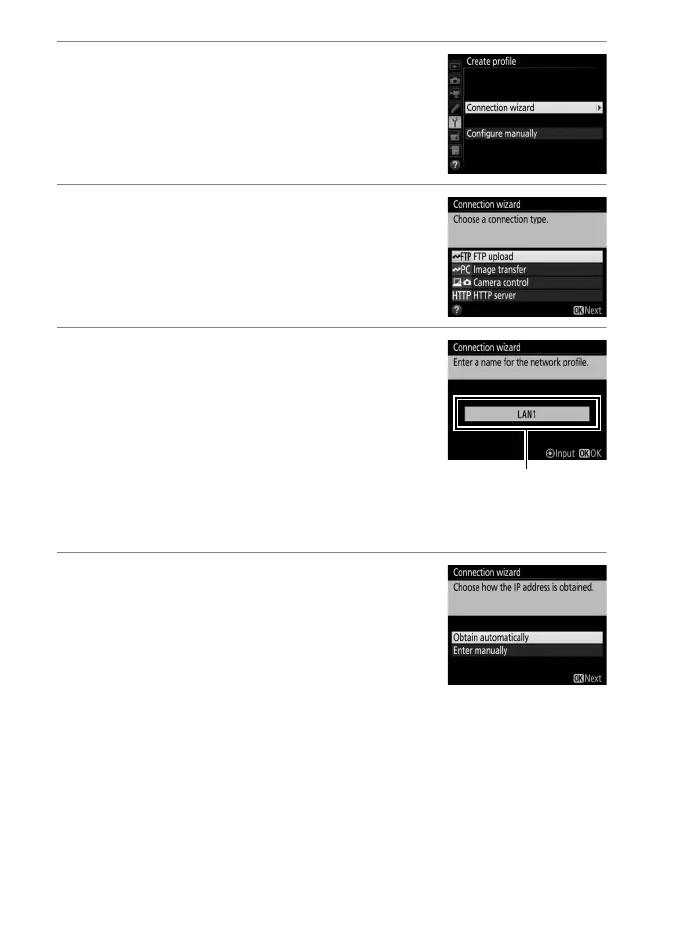
3 Start the connection wizard.
Highlight Connection wizard and press
2 to start the connection wizard.
4 Choose a connection type.
Highlight FTP upload and press J.
5 Name the new network profile.
A default profile name will be displayed;
to change the name, press the center of
the multi selector (0 10). The profile
name will appear in the Network >
Network settings list in the camera
setup menu. Press J to proceed to the
next step when entry is complete.
6 Obtain or select an IP address.
Highlight one of the following options
and press J.
• Obtain automatically: Select this option if
the network is configured to supply the
IP address automatically. Press J to
proceed to Step 7.
• Enter manually: When prompted, enter an IP address and
subnet mask by pressing 4 and 2 to highlight segments
and 1 and 3 to change. Press J to exit when entry is
complete, then press J again to proceed to Step 7.



 To Next Page