43
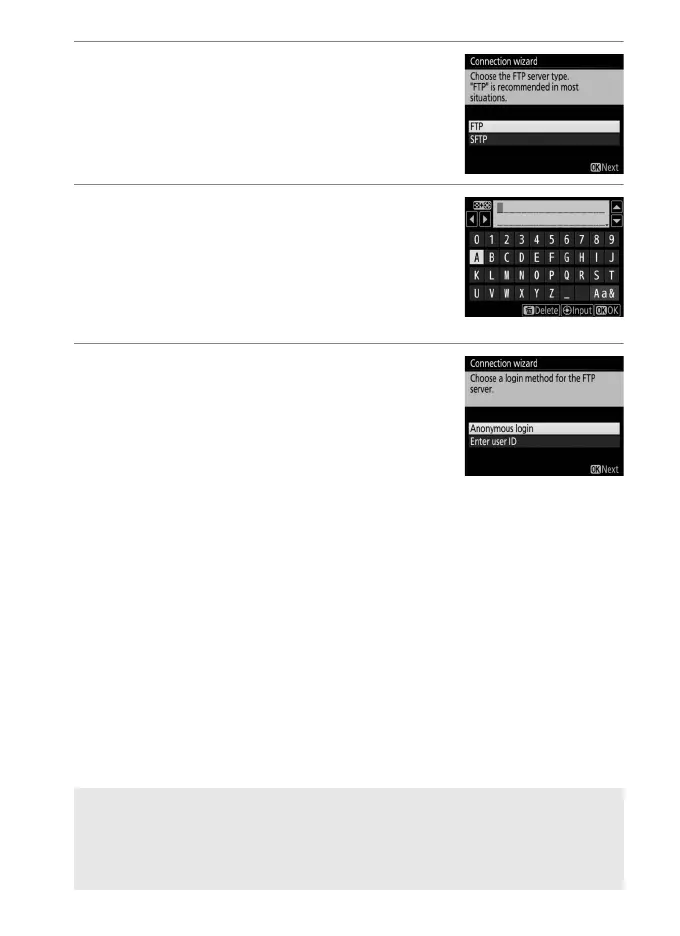
7 Choose the server type.
Highlight FTP or SFTP (secure ftp) and
press J.
8 Enter the IP address.
Press the center of the multi selector,
enter the server URL or IP address (0 10)
and press J, and then press J to
connect.
9 Log in.
Highlight one of the following options
and press J.
• Anonymous login: Select this option if the
server does not require a user ID or
password.
• Enter user ID: Enter a user ID and password when prompted
and press J.
A Firewall Settings
Ports 21 and 32768 through 61000 are used for ftp, ports 22 and 32768
through 61000 for sftp. File transfer may be blocked if the server firewall
is not configured to allow access to these ports.



 To Next Page