190
I
The Playback Menu
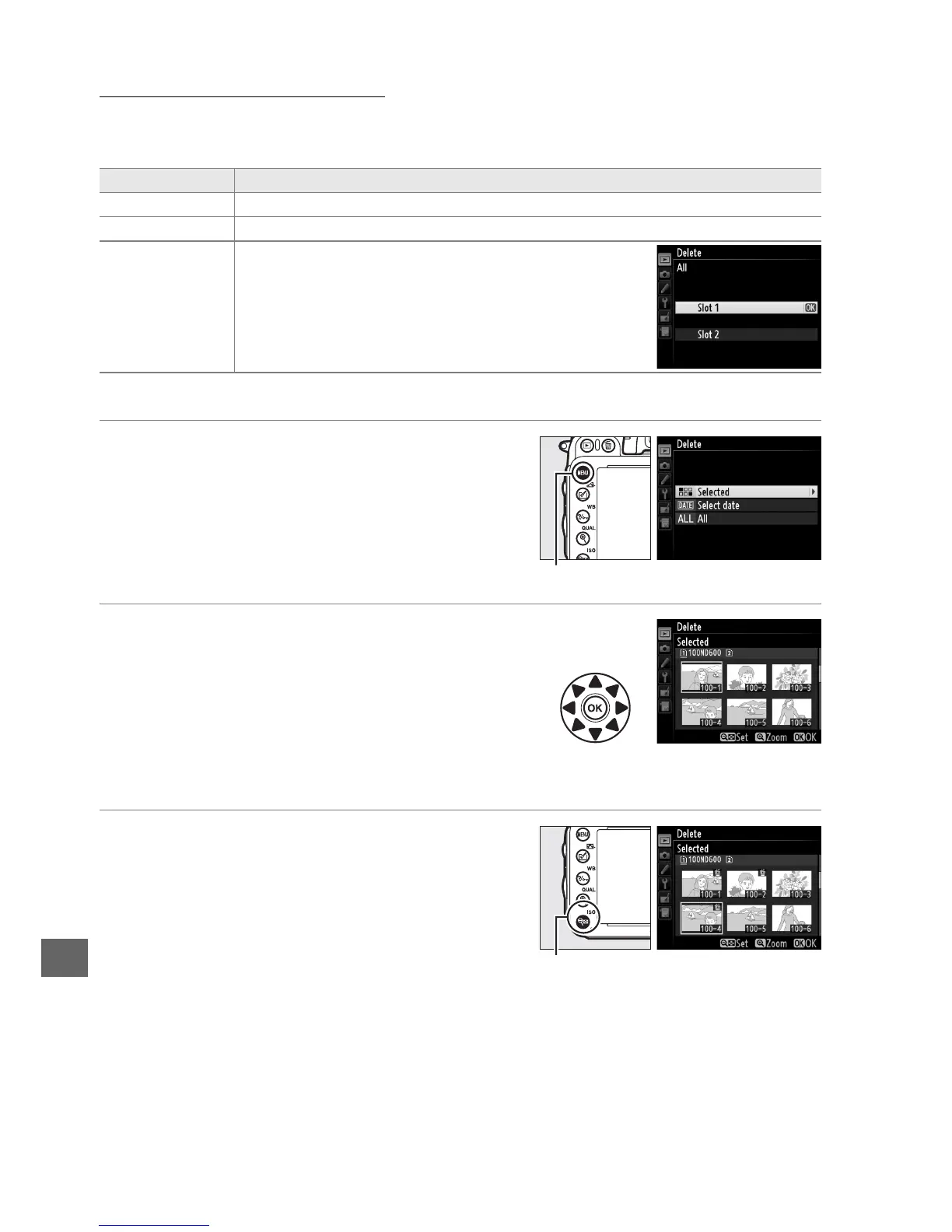
The Delete option in the playback menu contains the following options.
Note that
depending on the number of images, some time may be required for deletion.
❚❚ Selected: Deleting Selected Photographs
1 Choose Selected for the Delete option
in the playback menu.
Press the G button and select Delete in
the playback menu.
Highlight Selected and
press 2.
2 Highlight a picture.
Use the multi selector to highlight a picture
(to view the highlighted picture full screen,
press and hold the X (T) button; to view
images in other locations, hold the D
button, press 1, and select the desired card
and folder as described on page 178).
3 Select the highlighted picture.
Press the W (S) button to select the
highlighted picture.
Selected pictures are
marked by a O icon.
Repeat steps 2 and 3 to
select additional pictures; to deselect a
picture, highlight it and press W (S).
Option Description
Q Selected Delete selected pictures.
n Select date Delete all pictures taken on a selected date (0 191).
R All
Delete all pictures in the folder currently selected for
playback (0 207). If two cards are inserted, you can
select the card from which pictures will be deleted.
G button
W (S) button



 To Next Page