1
X
X
Introduction
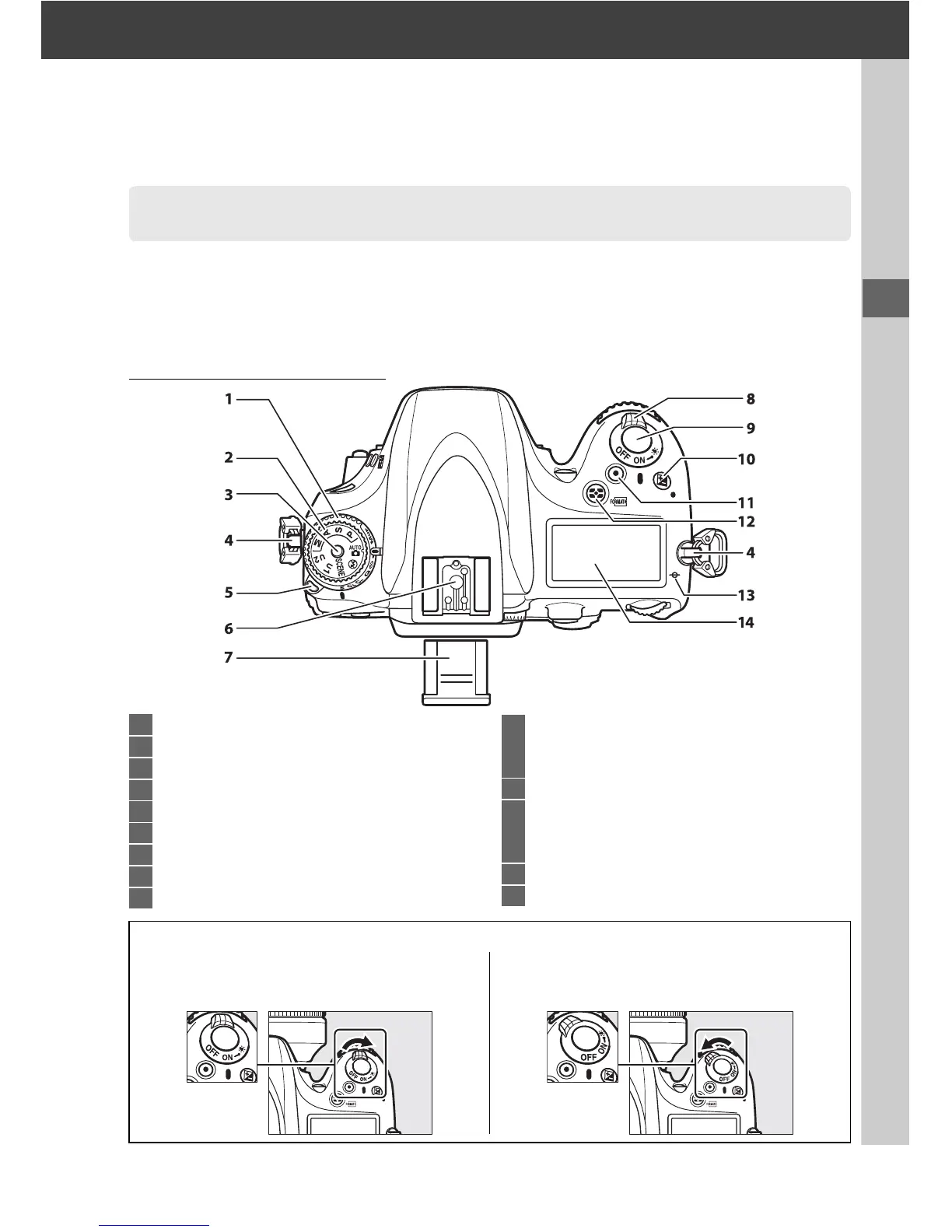
Take a few moments to familiarize yourself with camera controls and displays.
You
may find it helpful to bookmark this section and refer to it as you read through the
rest of the manual.
The Camera Body
Getting to Know the Camera
1 Release mode dial .............................................6, 83
2 Mode dial....................................................................5
3 Mode dial lock release.............................................5
4 Eyelet for camera strap
5 Release mode dial lock release ......................6, 83
6 Accessory shoe (for optional flash unit).........292
7 Accessory shoe cover..........................................292
8 Power switch..............................................................1
9 Shutter-release button...................................38, 39
10 E button
Exposure compensation................................ 112
Two-button reset............................................. 151
11 Movie-record button.............................................58
12 Z/Q button
Metering............................................................ 109
Formatting memory cards...............................31
13 Focal plane mark (E)........................................ 103
14 Control panel.............................................................7
A The Power Switch
Rotate the power switch as shown to turn
the camera on.
Rotate the power switch as shown to turn
the camera off.



 To Next Page