200
Q
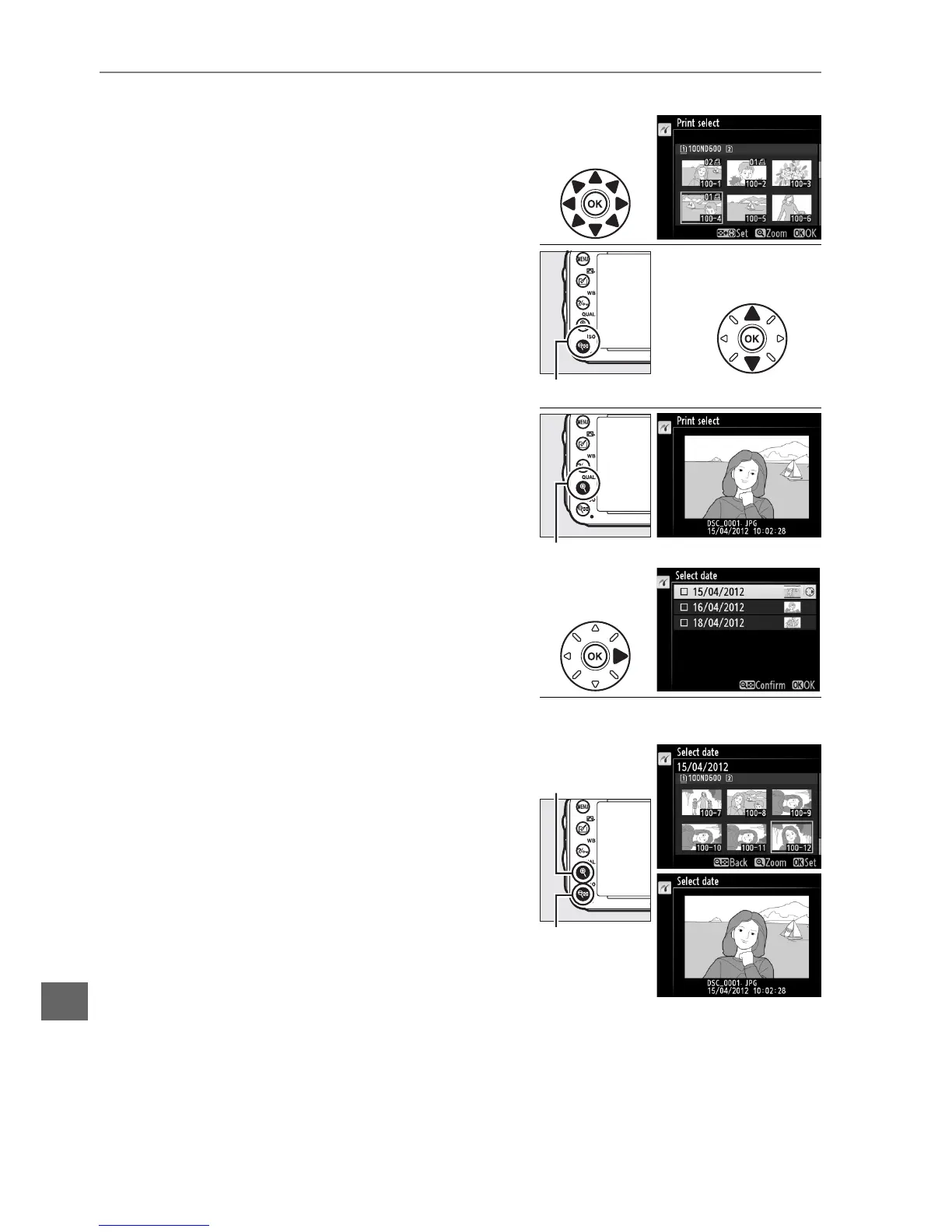
3 Select pictures or choose a date.
If you chose Print select or Print (DPOF) in
Step 2, use the multi selector to scroll through
the pictures on the memory card; to view
images in other locations, hold the D
button, press 1, and select the desired card
and folder as described on page 178.
To
display the current picture full screen, press
and hold the X (T) button.
To select the
current picture for printing, hold the
W (S) button and press 1.
The picture
will be marked with a Z icon and the
number of prints will be set to 1.
Keeping
the W (S) button pressed, press 1 or 3 to
specify the number of prints (up to 99; to
deselect the picture, press 3 when the
number of prints is 1).
Continue until all the
desired pictures have been selected.
If you chose Select date in Step 2, press 1 or 3
to highlight a date and press 2 to toggle the
highlighted date on or off.
To view the
pictures taken on the selected date, press
W (S).
Use the multi selector to scroll
through the pictures, or press and hold
X (T) to view the current picture full
screen.
Press W (S) again to return to the
date selection dialog.
W (S) + 13: Choose number of copies
X (T) button: View photo full screen
X (T)
button: View
highlighted photo
full screen
W (S)
button: View



 To Next Page