103
Taking Photographs—Flash Photography
2
Rotate the mode dial to the desired setting and choose a fl ash sync mode
as described in Steps 1–4 of “Using the Built-in Speedlight” ( 97–98).
3
Position the subject in the center of the frame
and press the shutter-release button halfway to
focus.
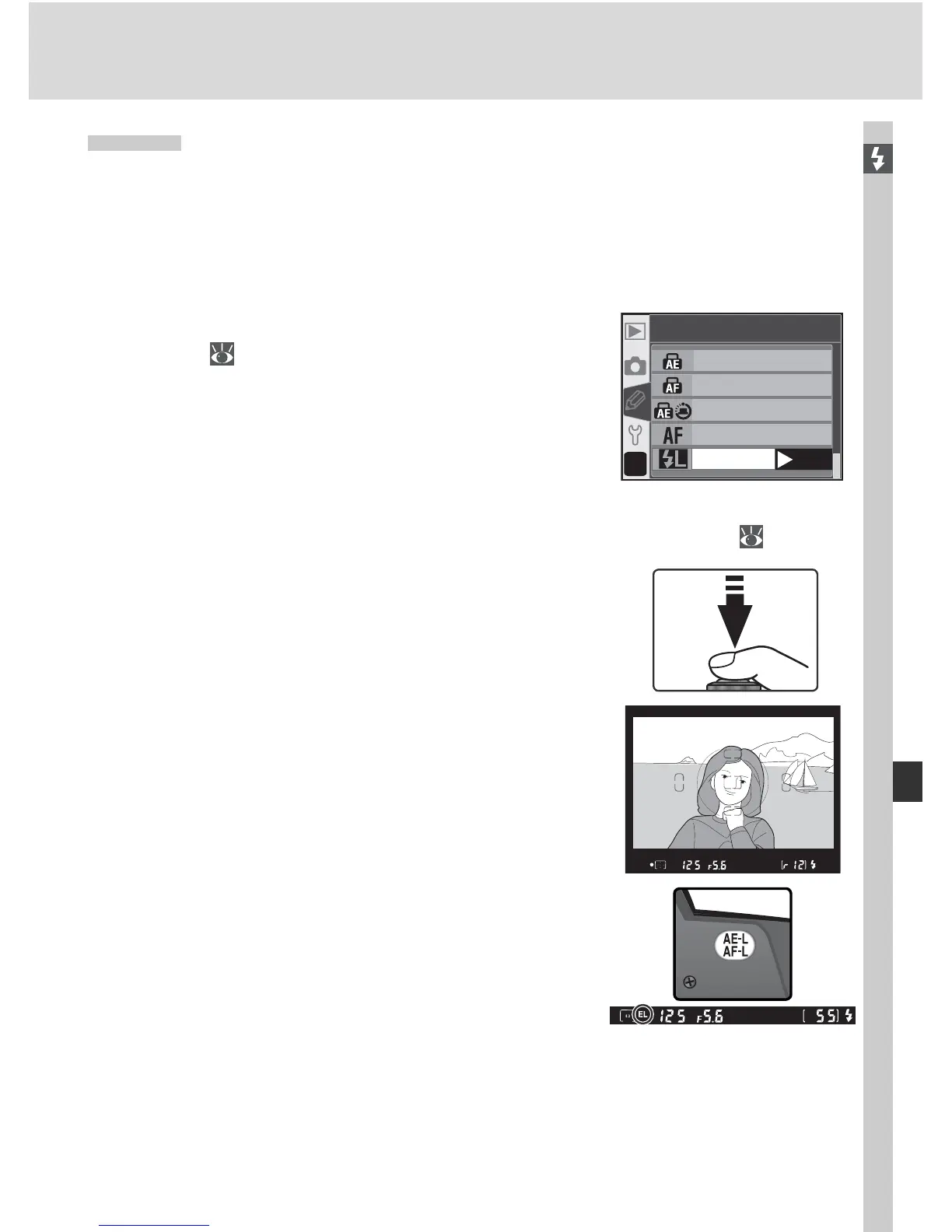
FV Lock
This feature is used to lock fl ash output, allowing photographs to be re-
composed without changing the fl ash level. This ensures that fl ash output
is appropriate to the subject even when the subject is not positioned in the
center of the frame. Flash output is adjusted automatically for any changes
in sensitivity (ISO equivalency) or aperture. To use FV lock:
1
Select FV Lock for Custom Setting 15 (AE-
L / AF-L; 147).
?
15
AE-L/AF-L
AE Lock only
AF Lock only
AE Lock hold
AF-ON
FV Lock
OK
4
After confi rming that the fl ash-ready indicator
is displayed in the viewfi nder,
press the AE-L /
AF-L button. The built-in Speedlight will emit a
monitor prefl ash to determine the appropriate
fl ash level. Flash output will be locked at this
level and an EL icon will be displayed in the
viewfi nder.



 To Next Page