EasyManua.ls Logo

Nikon D70 - Page 52

Nikon D70
218 pages
Print Icon
To Next Page IconTo Next Page
To Previous Page IconTo Previous Page
Loading...
42
Taking Photographs—Image Quality and Size
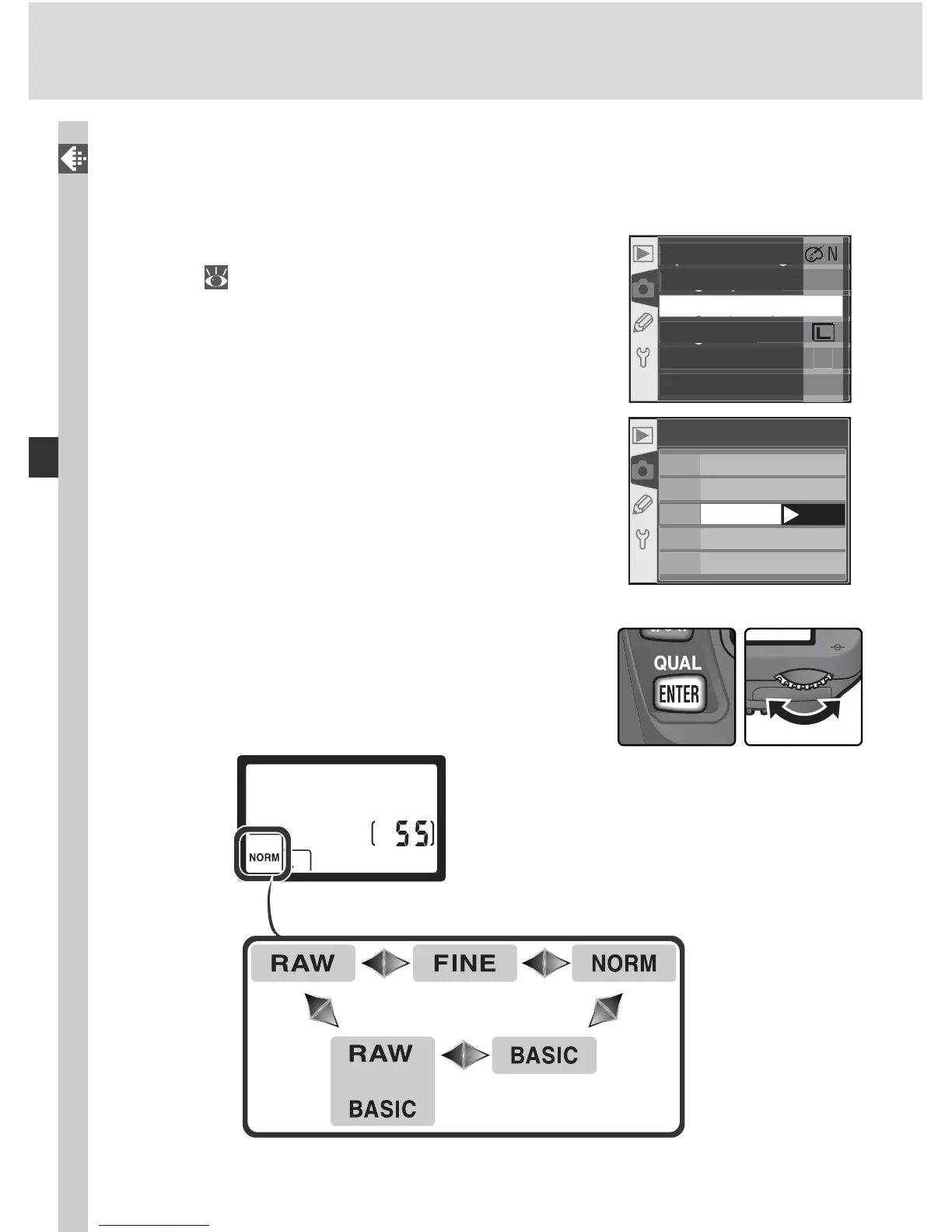
Image quality can be set using the Image quality option in the shooting
menu or by pressing the QUAL button and rotating the main command dial.
The Image Quality Menu
1
Highlight Im age quality in the shooting
menu (
132) and press the multi selector to
the right.
2
00
A
N
O
R
M
O
F
F
N
pg
O
p
timize ima
ge
gp
Lon
g
ex
p
. N
R
gy
Ima
g
e
q
ualit
y
gq y
g
Ima
g
e siz
e
Whit
e
ba
l
.
I
SO
2
High light the de sired op tion and press the
multi se lec tor to the right. The shooting menu
will be displayed.
RA W
FINE
NORM
BASIC
RAW+B
NEF
(
Raw
)
JPEG Fine
JPEG Normal
JPEG Basic
NEF
+
JPEG Basic
Image quality
OK
The QUAL Button
When the monitor is off, image quality can be
set by pressing the QUAL button and rotating the
main command dial. Image quality is displayed in
the control panel:

Table of Contents

Other manuals for Nikon D70

Related product manuals