95
N
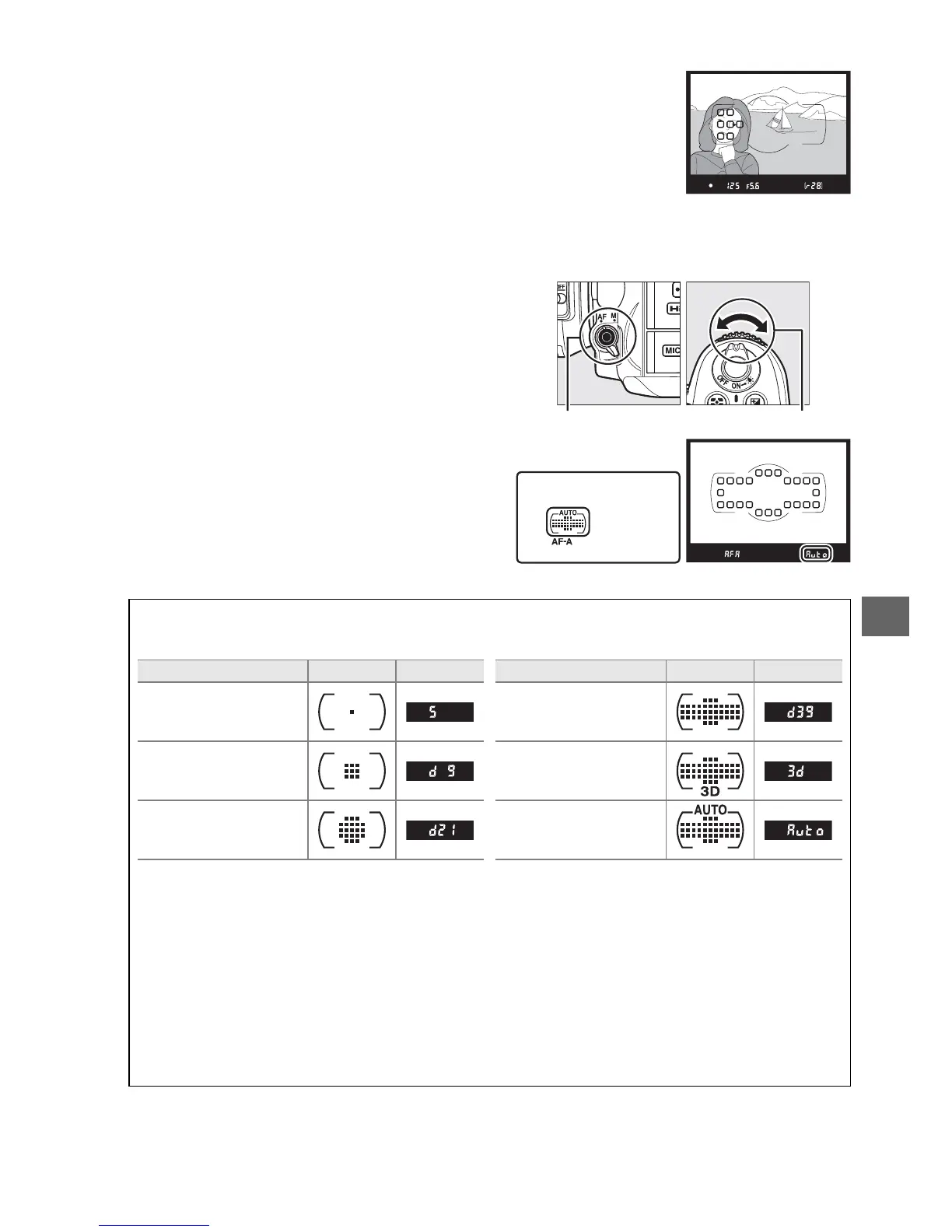
• Auto-area AF: The camera automatically detects the subject and
selects the focus point.
If a type G or D lens is used, the
camera can distinguish human subjects from the background
for improved subject detection.
The active focus points are
highlighted briefly after the camera focuses; in AF-C mode or
when continuous-servo autofocus is selected in AF-A mode,
the main focus point remains highlighted after the other
focus points have turned off.
To select the AF-area mode, press the AF-
mode button and rotate the sub-command
dial until the desired setting is displayed in
the viewfinder or control panel.
A AF-Area Mode
AF-area mode is shown in the control panel and viewfinder.
AF-area mode Control panel Viewfinder AF-area mode Control panel Viewfinder
Single-point AF
39-point dynamic-area
AF
*
9-point dynamic-area
AF
*
3D-tracking
*
21-point dynamic-area
AF
*
Auto-area AF
* Only active focus point is displayed in the viewfinder.
Remaining focus points provide information to
assist focus operation.
A Manual Focus
Single-point AF is automatically selected when manual focus is used.
A See Also
For information on adjusting how long the camera waits before refocusing when an object
moves in front of the camera, see Custom Setting a3 (Focus tracking with lock-on, 0 209).
See page 50 for information on the autofocus options available in live view or during movie
recording.







 To Next Page