10
X
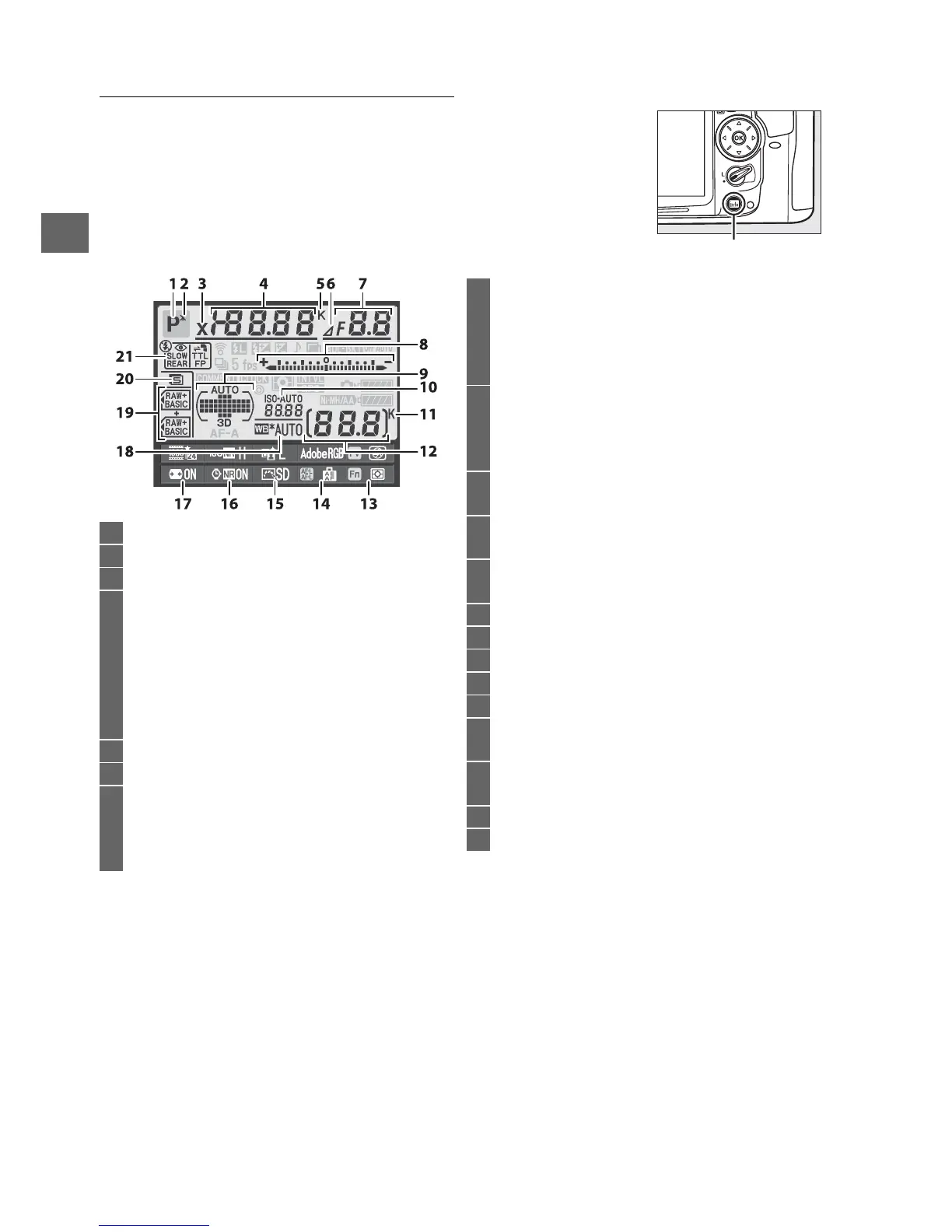
The Information Display
Press the R button to display shutter speed, aperture, the
number of exposures remaining, AF-area mode, and other
shooting information in the monitor.
R button
1 Shooting mode...........................................................6
2 Flexible program indicator ....................................68
3 Flash sync indicator.............................................. 222
4 Shutter speed ....................................................69, 71
Exposure compensation value .......................... 107
Flash compensation value.................................. 148
Number of shots in bracketing sequence
.............................................................. 109, 112, 114
Focal length (non-CPU lenses) .......................... 159
Color temperature ................................................ 122
5 Color temperature indicator .............................. 122
6 Aperture stop indicator.................................70, 270
7 Aperture (f-number) ........................................70, 71
Aperture (number of stops) .........................70, 270
Bracketing increment ................................. 110, 112
Maximum aperture (non-CPU lenses) ............. 159
8 Exposure indicator.................................................. 72
Exposure compensation display........................107
Bracketing progress indicator
Exposure and flash bracketing .......................109
WB bracketing ....................................................112
9 Auto-area AF indicator........................................... 95
Focus points indicator......................................37, 96
AF-area mode indicator......................................... 95
3D-tracking indicator ............................................. 94
10 ISO sensitivity indicator .......................................101
Auto ISO sensitivity indicator.............................104
11 “K” (appears when memory remains for over
1000 exposures)................................................... 36
12 Number of exposures remaining ....................... 36
Manual lens number ............................................161
13 Fn button assignment ..........................................230
14 AE-L/AF-L button assignment ..............................232
15 Picture Control indicator .....................................132
16 Long exposure noise reduction indicator .......205
17 Auto distortion control ........................................205
18 White balance ........................................................117
White balance fine-tuning indicator ................120
19 Image quality ........................................................... 85
Role played by card in slot 2................................. 89
20 Image size ................................................................. 88
21 Flash mode .............................................................144







 To Next Page