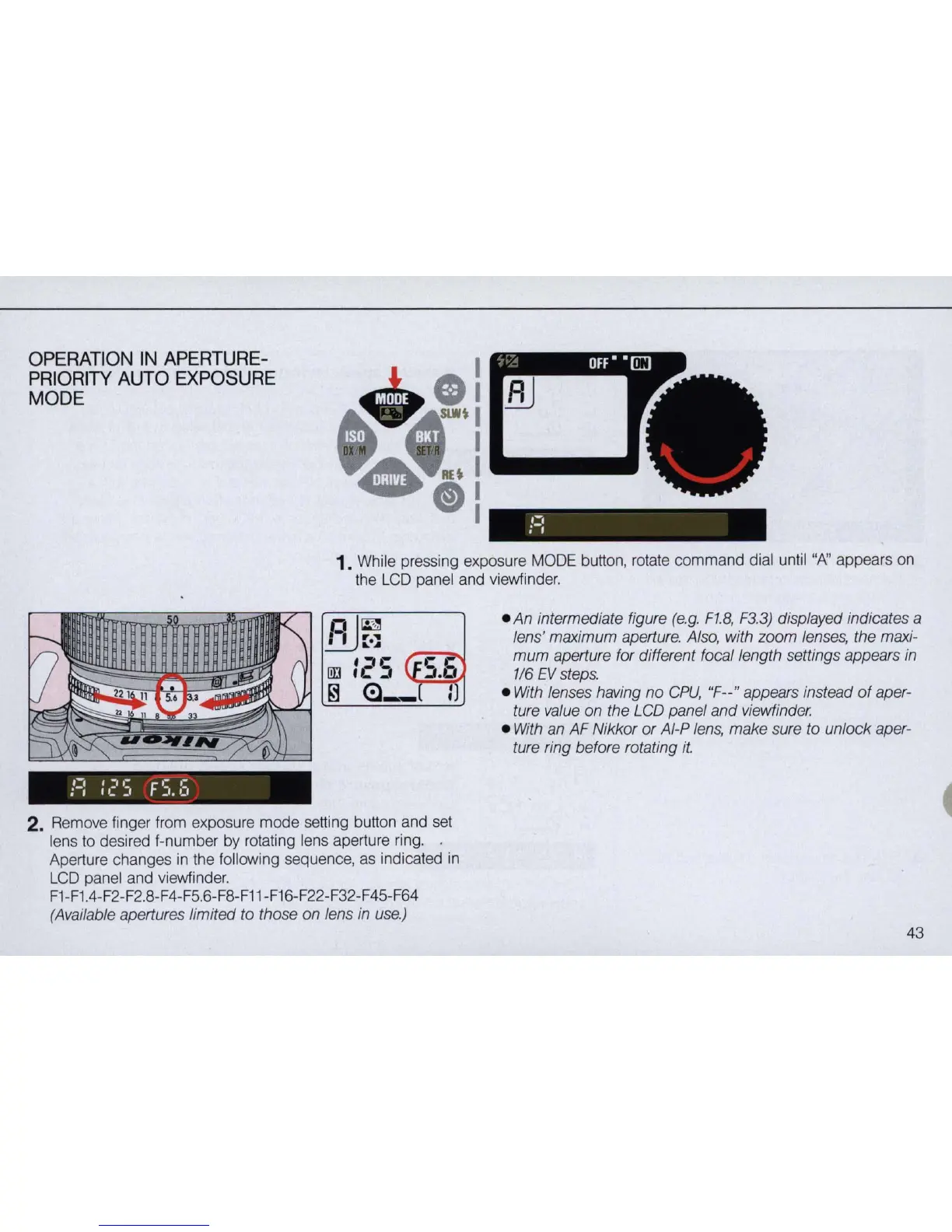
OPERATION
IN
APERTURE-
PRIORITY
AUTO
EXPOSURE
MODE
,-,
;-,
1.
While pressing exposure MODE button, rotate command dial until
UP\'
appears on
the
LCD
panel and viewfinder.
!=:
:
c·
5 F
5.
:5
2. Remove finger from exposure mode setting bu
tt
on and set
lens
to
desired f-number by rotating lens aperture ring. .
Aperture changes in the following sequence,
as
indicated
in
LCD
panel and viewfinder.
F1
-
F1.4-F2
-
F2
.
8-F4
-
F5
.6-F8-F11-F16-F22-F32-F45-F64
(Available apertures limited to those on lens in
use.)
• An intermediate figure
(e.g.
F1.B
,
F3.3)
displayed indicates a
lens' maximum aperture. Also, with zoom lenses, the maxi-
mum
aperture for different focal length settings appears
in
1/6
EV
steps.
•
With
lenses having
no
CPu,
"F--" appears instead
of
aper-
ture value on the LCD panel and viewfinder.
•
With
an AF Nikkor or AI-P
lens,
make sure to unlock aper-
ture ring before rotating
it.
43



 To Next Page