8
Using the WR-1: The Basics
Using the WR-1: The Basics
The instructions that follow describe how to control a single camera
using two WR-1 units, one functioning as a transmitter and the other
as a receiver.
Step 1: Position the Tx/Rx/OFF Switches
Step 1: Position the Tx/Rx/OFF Switches
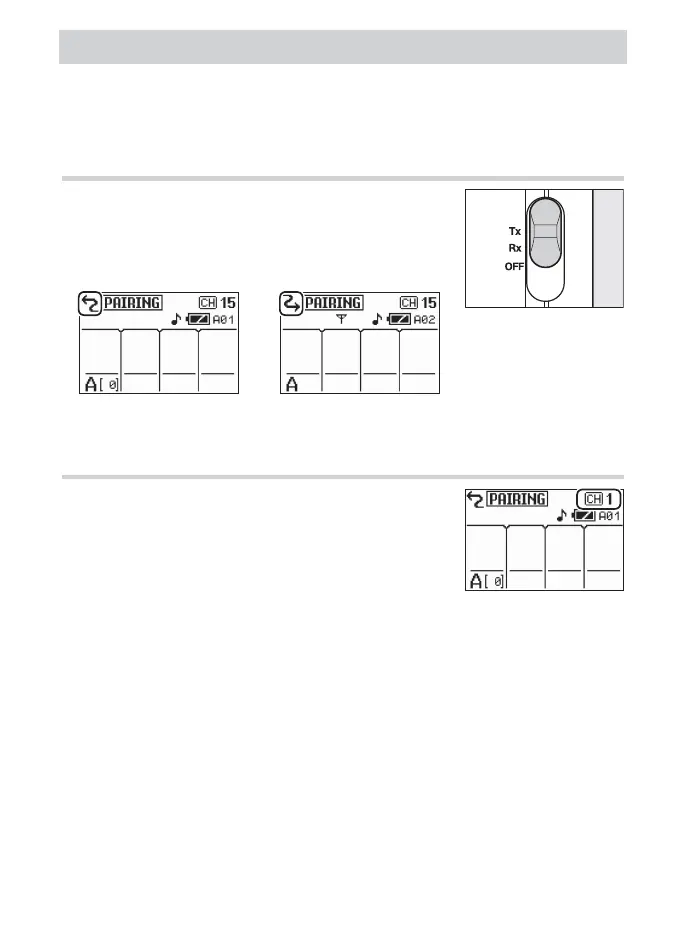
Slide the Tx/Rx/OFF switch for the transmitter
to Tx and the switch for the receiver to Rx. The
units will turn on and display the information
shown below.
Tx (transmitter) Rx (receiver)
Step 2: Set the Units to the Same Channel
Step 2: Set the Units to the Same Channel
Press 1 or 3 to choose from channels 1 to 15.
Transmitters must be set to the same channel
as the receivers they control.



 To Next Page