20
Release Hold Time
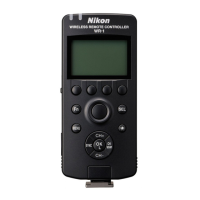
Choose how the remote cameras respond when the transmitter
shutter-release button is held all the way down.
TIME: The transmitter shutter-release button can be used for long
time-exposures; shooting ends automatically after a selected
time.
SINGLE SHOOT: Only one picture will be taken regardless of how
long the button is pressed.
1
Select SPECIAL on the transmitter.
Press the MENU button on the transmitter to
display the menus, then highlight SPECIAL
and press 2.
2
Select RHT.
In the transmitter SPECIAL menu, highlight
RHT and press 2 to display the options
shown at right.
3
Choose an option.
TIME: Highlight TIME and press 2. The op-
tions shown at right will be displayed; press
4 or 2 to highlight minutes or seconds and
1 or 3 to choose the maximum shooting
time for long time-exposures (up to 60 min-
utes). Press z to exit when settings are complete.
SINGLE SHOOT: Highlight SINGLE SHOOT and press z.
•
•
•
•


 To Next Page