13
Synchronized Release
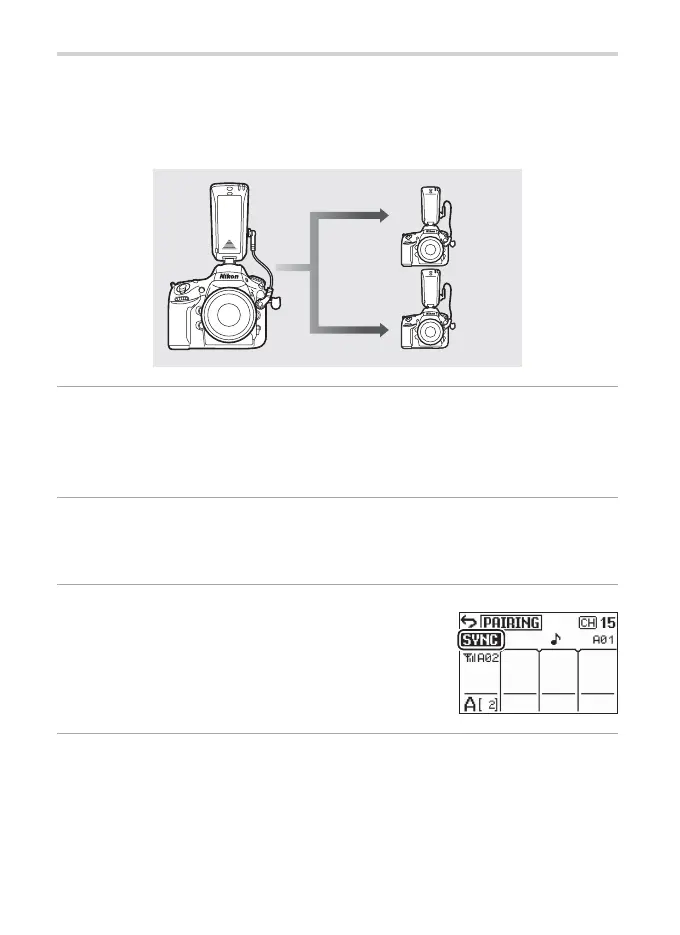
To synchronize the shutters of one or more remote cameras with the
shutter on a master camera, attach the receivers to the remote cam-
eras and the transmitter to the master camera. The master camera
must be equipped with a ten-pin remote terminal.
1
Connect the controllers.
Connect the transmitter (set to Tx) to the master camera (any cam-
era with a ten-pin remote terminal) and the receivers (set to Rx) to
the remote cameras.
2
Confi gure the controllers.
Pair all controllers and set them to the same channel and group
(0 8, 9, 10).
3
Set the transmitter to SYNC mode.
Press 4 on the transmitter to enable sync
mode and confi rm that k appears in the
display.
4
Take pictures.
The shutters on all cameras will be released when the shutter-re-
lease button on the master camera is pressed all the way down.


 To Next Page