TRUE METRIX
®
PRO System Comprehensive Resource Guide (GDH-FAD Enzyme) Meter Key Features 7
Meter Key Features
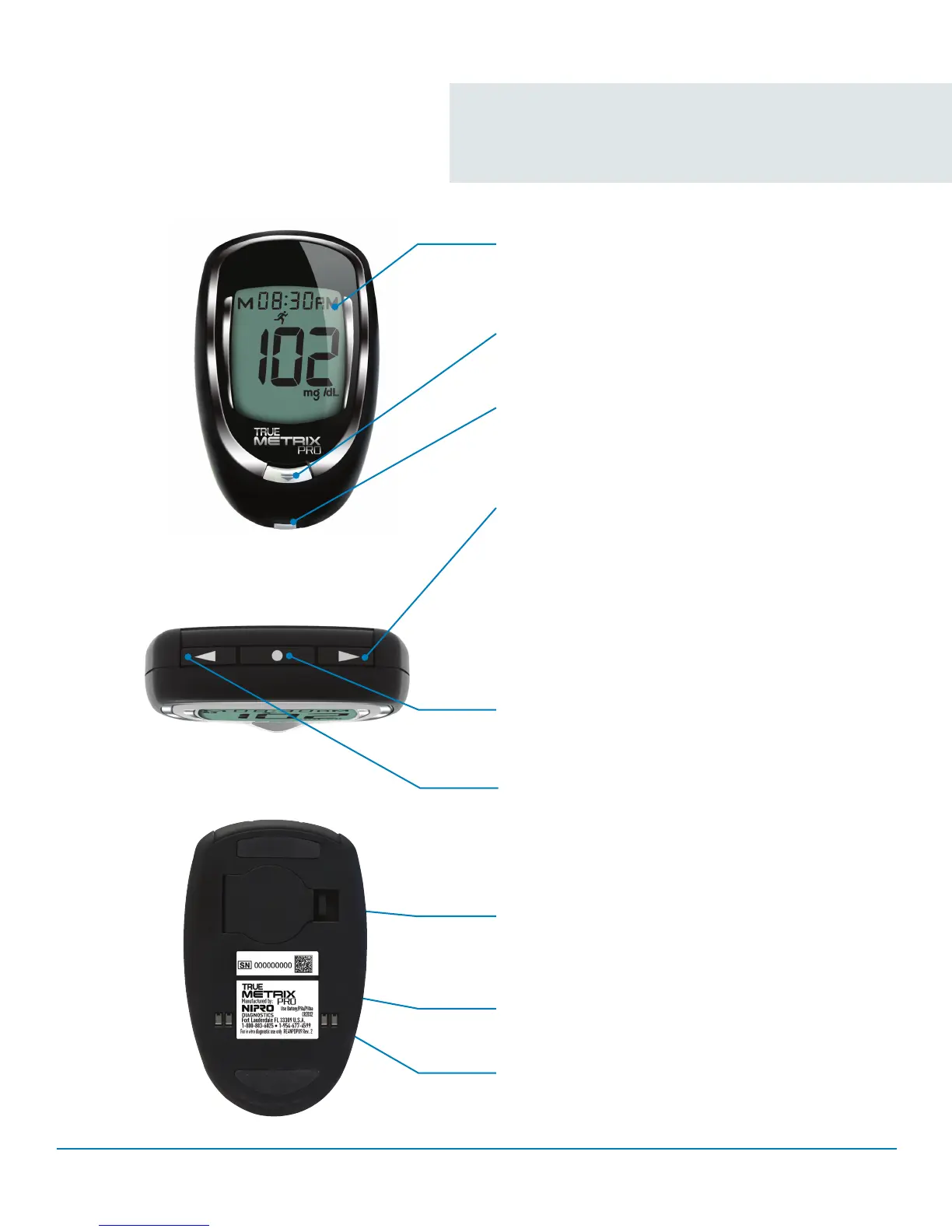
Front of Meter
Display Screen
Shows test results, messages,
user prompts, information
Strip Release Button
Releases test strip after testing for disposal
Test Port
Insert TRUE METRIX
®
PRO Test Strip here,
contact blocks facing up
Top of Meter
Back of Meter
“ ” Button
Decrease numbers in Meter Set Up; remove
ALT symbol; move backward by date/time when
viewing results and Averages in Memory
“ • ” Button
Turn meter on to view Average values, to view
results in Memory, to access Meter Set Up, and
turn on Event Tags in Meter Memory
“ ” Button
Increase numbers in Meter Set Up; add ALT
Symbol; move forward by date/time when viewing
results and Averages in Memory; scroll through
Event Tags to mark results (if feature on); turn on
Event Tags, Ketone Test Alert and Test Reminders
during Meter Set Up
Meter Label
Contains serial number of meter
Battery Door
Use one non-rechargeable 3V lithium battery
(#CR2032), positive (“+”) side up
Data Contacts
Connects meter with computer via docking
station for data upload
▼
▼



 To Next Page