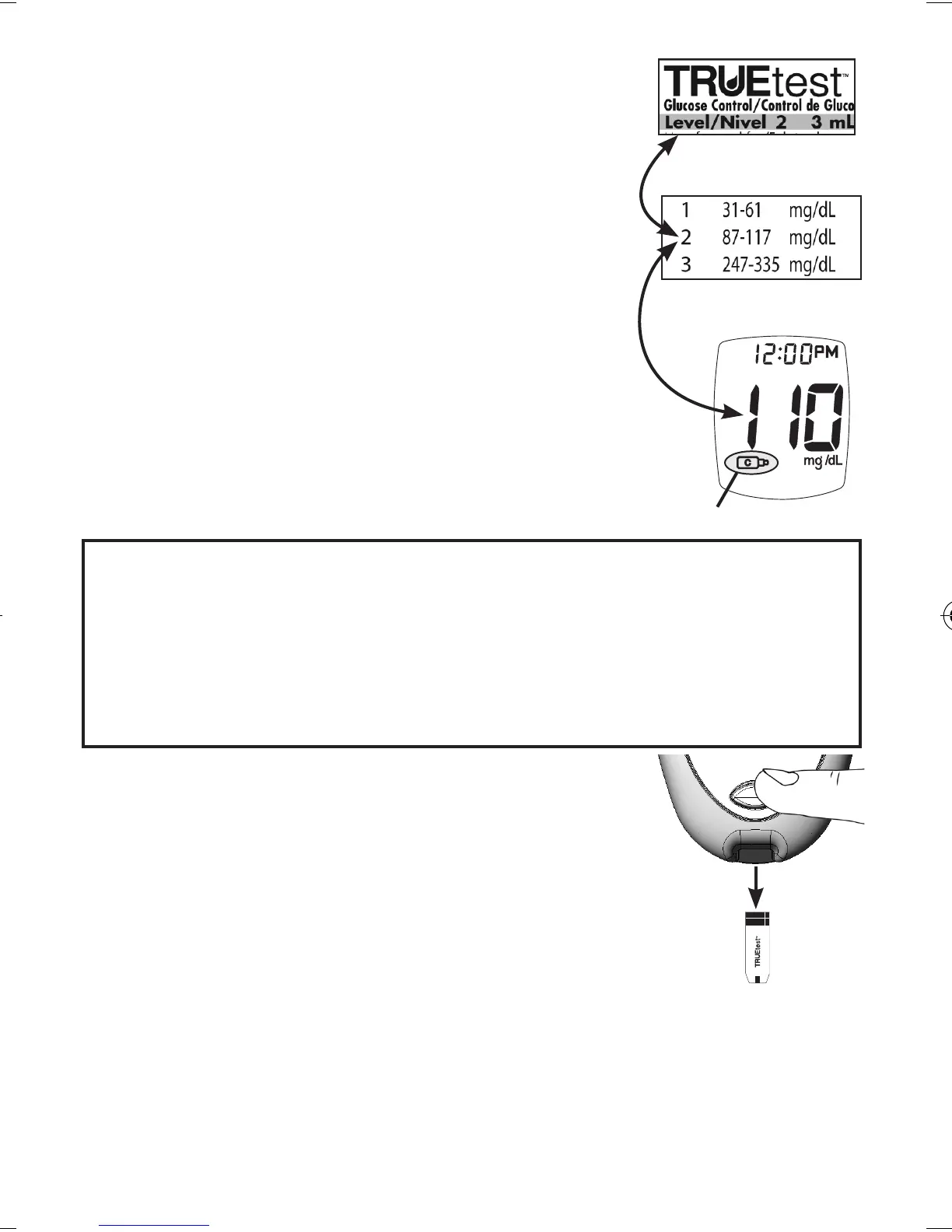
11. Compare result to Control Range
printed on Strip vial label for
Control Level you are using.
If result is in range, System
can be used for testing blood.
If result does not fall within
range, repeat test using a new
Strip.
Note: Control Test result shows
the Control Symbol in the
Display.
Caution! If Control Test result is outside range,
test again. If result is still outside range,
System should not be used for testing
blood. Call for assistance (see cover for
phone number).
12.
Aer result is shown, Strip Release
Button ashes. Hold Meter with Test
Strip pointing down. Press Strip Release
Button to release and discard Strip in
appropriate container. Meter turns o.
Note: Removing Strip before result
displays cancels the test. An error message
appears and the result is not stored in
Memory. Retest with a new Strip and do not
remove before result is displayed.
20
Control Symbol
Test Strip
Vial Label
Glucose Control
Bottle Label
Tre_OB_GutsENG_E4NPD04r22.indd 20 4/24/12 9:53 AM



 To Next Page