EasyManua.ls Logo

Nokia CK-15W - User Manual

Nokia CK-15W
34 pages
Print Icon
To Next Page IconTo Next Page
Loading...
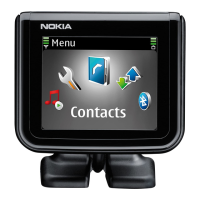
Nokia Bluetooth Display Car Kit
CK-15W
User and Installation Guide
9200326
Issue 1 EN
9200326_en1.fm Page 1 Thursday, January 25, 2007 11:09 AM

Other manuals for Nokia CK-15W

Questions and Answers

  • W
    wmillsAug 3, 2025
    Why can't I connect my device to the Nokia CK-15W Automobile Accessories car kit?
    • W
      williamberryAug 3, 2025
      If you're having trouble connecting your device to the Nokia Automobile Accessories car kit, make sure the car kit is switched on and paired with your device. In addition, verify that the Bluetooth feature is activated on your device.
  • C
    Christine HernandezAug 9, 2025
    What to do if Nokia CK-15W car kit doesn't connect automatically to my device?
    • D
      Dylan ThomasAug 9, 2025
      If the Nokia Automobile Accessories car kit does not automatically connect to your paired device, ensure that the Bluetooth feature is activated on your device. Also, verify that your device is set to connect to the car kit automatically when the car kit is switched on.
  • R
    robertallenAug 14, 2025
    What to do if the caller cannot hear my voice during a call using Nokia Automobile Accessories?
    • S
      Sonya SanfordAug 14, 2025
      If the caller can't hear you when using the Nokia Automobile Accessories, first check that the car kit microphone is not muted. Also, ensure that your mobile device is properly connected to the car kit.
  • H
    Hailey WolfAug 20, 2025
    What to do if the car radio is not muted when answering a call with Nokia CK-15W Automobile Accessories?
    • E
      Emily JohnsonAug 21, 2025
      If the car radio isn't muted when you answer a call using Nokia Automobile Accessories, ask the technician who installed the car kit to ensure that the mute line is properly connected.
  • V
    Veronica WrightAug 27, 2025
    How to fix Nokia CK-15W car kit not switching on with the car ignition?
    • J
      Julia ZimmermanAug 27, 2025
      If the Nokia Automobile Accessories car kit does not switch on when you turn on the car ignition, ask the technician who installed the car kit to ensure that the ignition sense wire is properly connected.

Summary

Product Declaration of Conformity

Essential Safety Guidelines

Quick Start and Basic Operations

Input Device Controls and Navigation

Details the functions of the input device keys and the Navi wheel.

Initial Device Setup Process

Step-by-step guide for language selection, pairing, and contact copying.

Introduction to Nokia Car Kit CK-15 W

Guide Structure and Content

Explains the organization and key sections of the user manual.

Understanding Bluetooth Technology

Explains the role and function of Bluetooth wireless technology in the car kit.

Getting Started with the Car Kit

Car Kit Components Identification

Lists and describes all the parts included in the car kit package.

Display and Standby Mode Information

Details the information displayed on the screen when the car kit is in standby.

Menu Navigation and Device Power

Instructions for navigating the car kit menus and controlling power.

Device Pairing and Connection

Step-by-step instructions for pairing the car kit with a mobile device.

Managing Bluetooth Connections

Covers manual, automatic connections, disconnection, and clearing paired devices.

Managing Phone Calls

Volume Adjustment and Call Initiation

How to adjust volume, make calls, and utilize speed dialing features.

Answering, Holding, and Switching Calls

Procedures for answering incoming calls, putting calls on hold, and switching between calls.

Microphone Muting and DTMF Tones

How to mute the microphone and send DTMF tones during a call.

Exploring Menu Options

Contacts and Speed Dial Management

Managing contacts, searching for them, and configuring speed dial numbers.

Contact Transfer and Call History

Copying contacts from a mobile device and viewing the call register.

Bluetooth and Display Settings Configuration

Adjusting Bluetooth connections and customizing display appearance and themes.

Advanced Settings and Troubleshooting

Configuring additional settings, resetting the device, and resolving common issues.

Car Kit Installation Instructions

Safety Precautions for Installation

Essential safety measures to observe before and during installation.

Hands-Free Unit HF-15 Installation

Mounting the main HF-15 unit and connecting its associated cables.

Input Device CU-8 Mounting

Guidance on properly positioning and securing the CU-8 input device.

Display Unit SU-29 Mounting

Instructions for mounting the SU-29 display unit for optimal user visibility.

Loudspeaker and Microphone Placement

Optimal placement of the SP-3 loudspeaker and MP-2 microphone for audio performance.

Power Cable PCU-4 Wiring and Connection

Step-by-step instructions for wiring and connecting the PCU-4 power cable.

Optional Enhancements and Antennas

Information regarding optional accessories like mobile holders and antenna couplers.

Post-Installation Operation Check

How to verify the car kit's functionality after it has been installed.

Maintaining Your Car Kit

Vehicle and RF Safety Considerations

Regulatory Compliance Notices

Nokia CK-15W Specifications

General IconGeneral
Connectivity technologyWireless
Product colorBlack

Related product manuals