Quick start
5
Quick start
This section briefly describes the basic features of the car kit. For details,
refer to the respective sections in this guide.
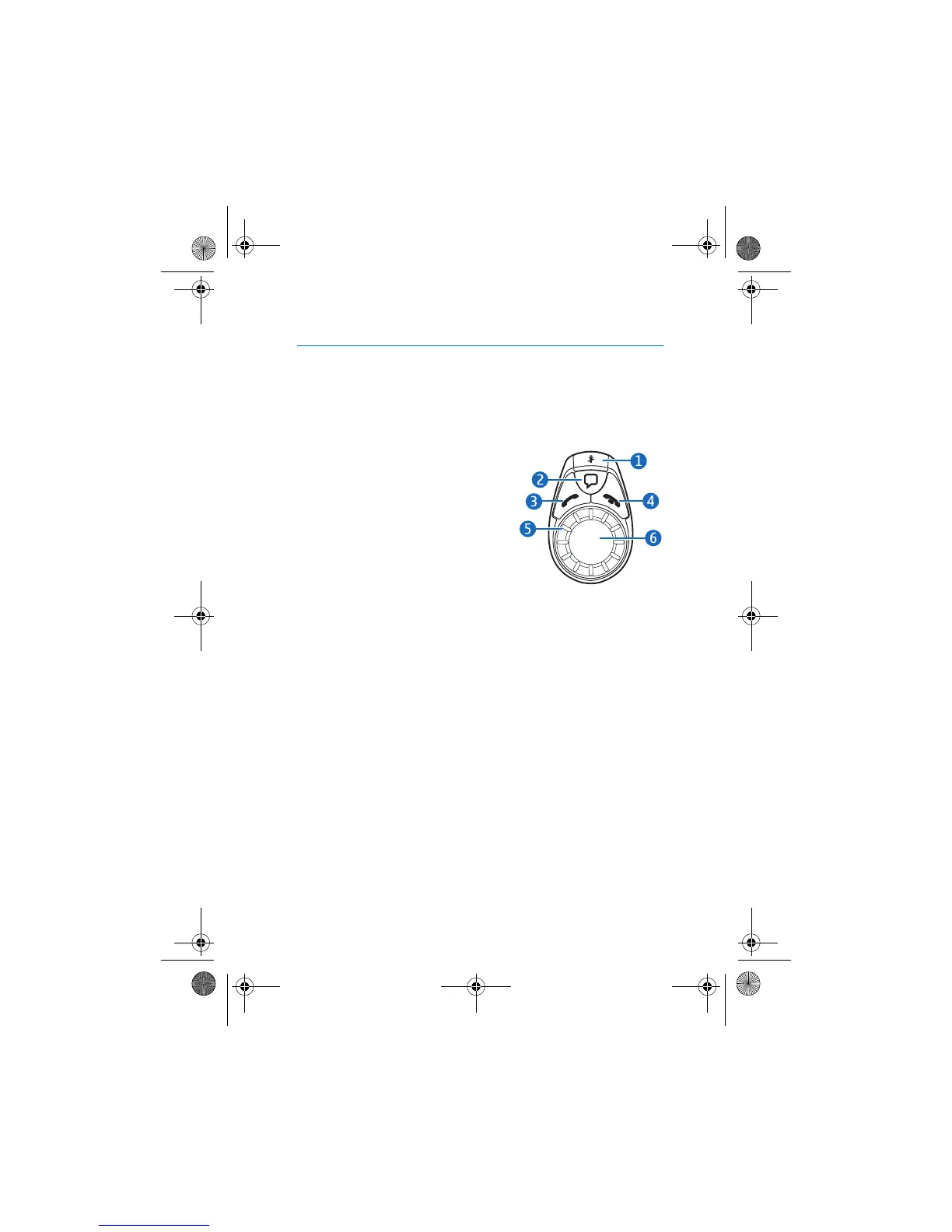
■ The input device
Microphone mute key (1)
• Press to set the car kit volume to
silent in the standby mode or when
you receive a call.
• Press to mute or unmute the
microphone during a call.
• Press and hold to switch an active call
from the car kit to the compatible
mobile device connected to it.
Voice dialing key (2)
• Press to activate voice dialing with a compatible mobile device when
you are not in a call.
Call key (3)
• Press to make or answer a call or to switch between an active call
and a call on hold.
• Press to view the list of last dialed numbers in the standby mode.
• Press twice to redial the last dialed number in the standby mode.
End key (4)
• Press to end or reject a call.
• Press to delete a single character when you write text or numbers.
• Press to return to the previous menu level or display view.
• Press and hold to return to the standby mode from the menu
functions.
9200326_en1.fm Page 5 Thursday, January 25, 2007 11:09 AM



 To Next Page