7
Displays, Indicators and Controls
Displays, Indicators and Controls
This section describes the displays, indicators, and controls for the
Model 7500.
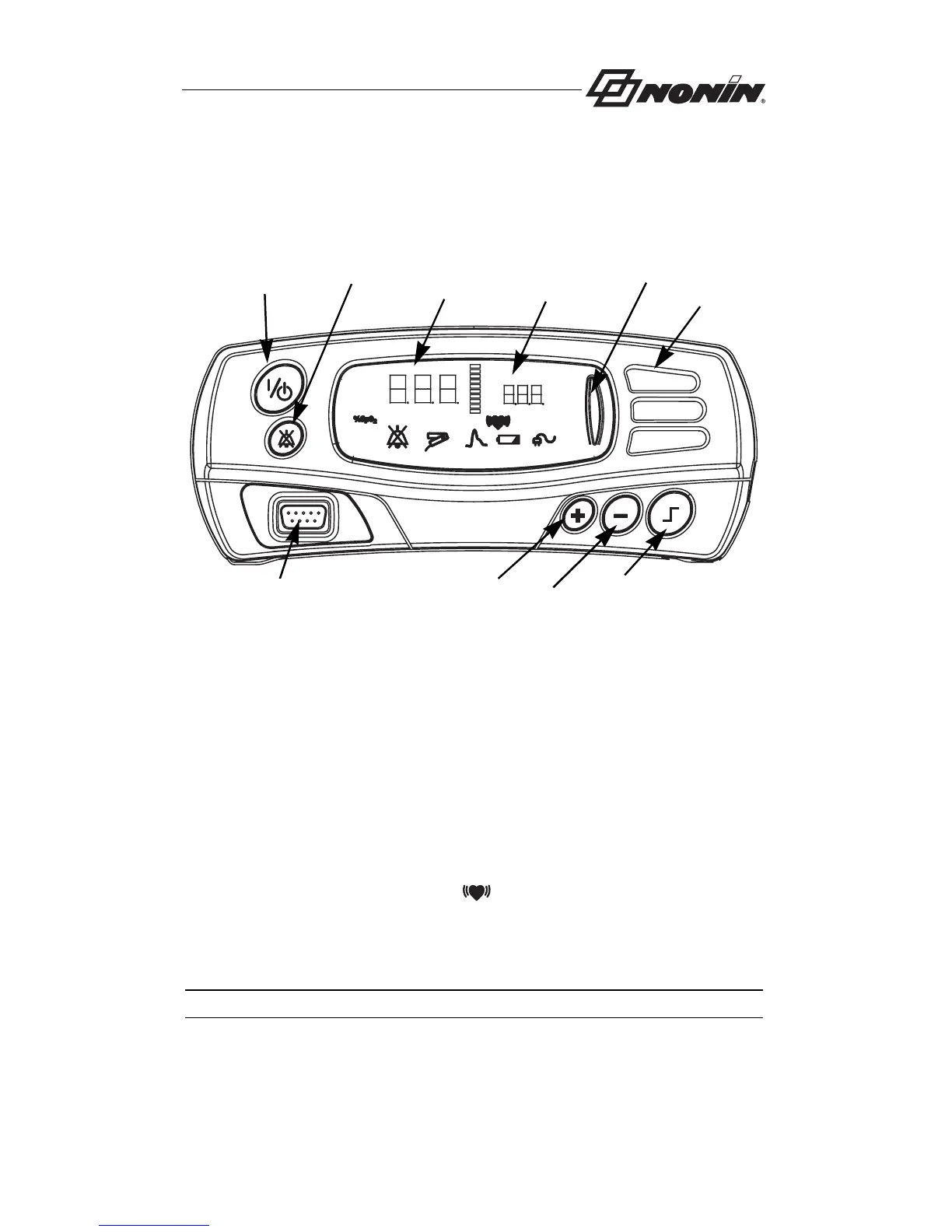
%SpO
2
Display
The %SpO
2
display is located on the left-hand side of the Model 7500
front panel and is identified by the %SpO
2
symbol. This display shows
blood oxygen saturation, from 0 to 100 percent. The numeric displays
blink during SpO
2
alarm conditions. See “Specifications” for sensor
accuracy information.
Pulse Rate Display
The pulse rate display is located on the right-hand side of the Model 7500
front panel and is identified by the
symbol. This display shows the
pulse rate in beats per minute, from 18 to 321. The numeric displays blink
during pulse rate alarm conditions. See “Specifications” for sensor
accuracy information.
NOTE: LED means “light-emitting diode.”
On/Standby
Alarm
Plus (+)
Minus (-)
Limits
%SpO
2
Display
Pulse Rate
Display
Alarm
Bar
Speaker
Sensor
Connector
Silence



 To Next Page