15
Operator Functions
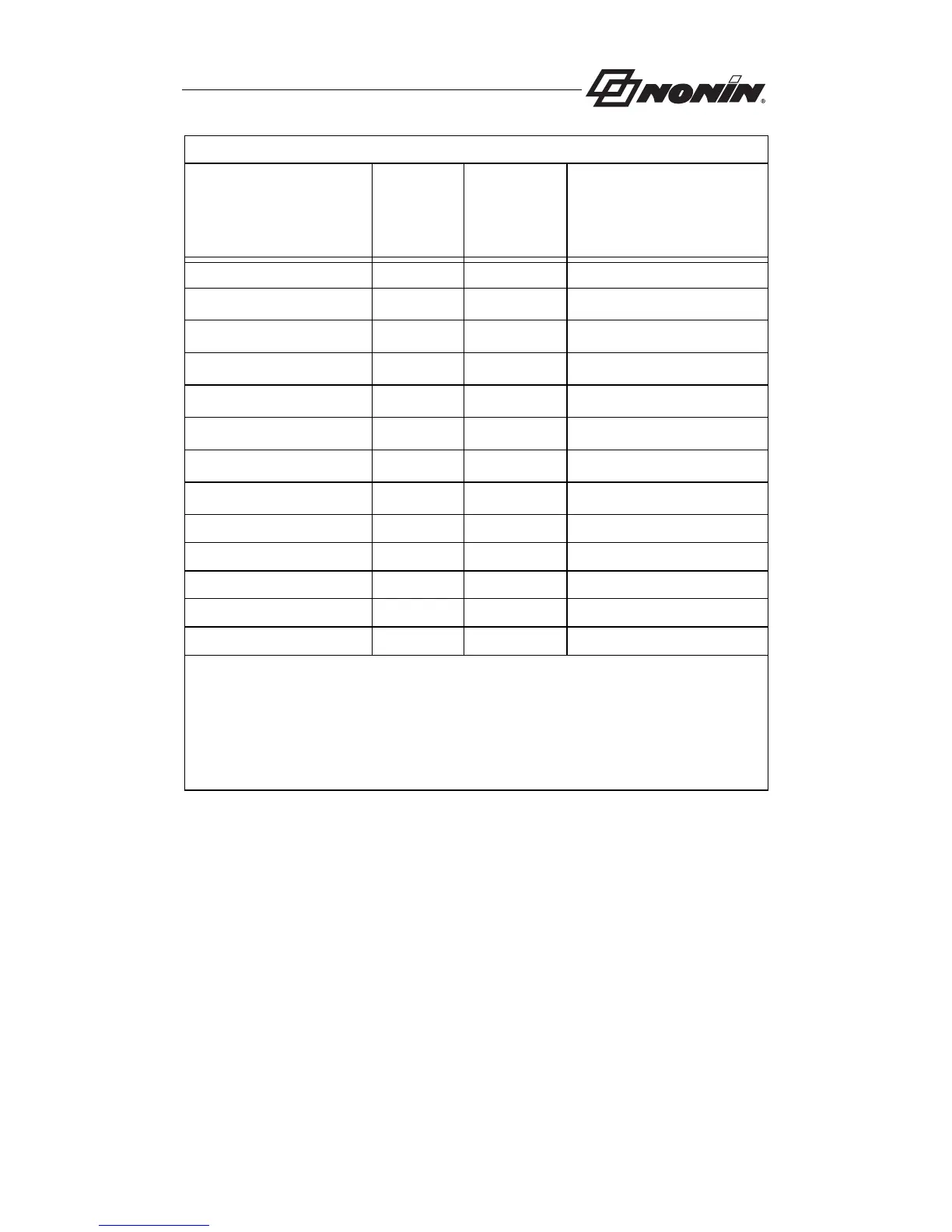
Table 1: Limits Display Sequence
Parameter
Parameter
(SpO
2
)
Display
Initial
Setting
(Pulse Rate
Display)
Adjustment Range
Recall Alarm Settings “rCL”“no”“yES” or “no”
Low %SpO
2
Alarm Limit
“02L”
2,3
“85” “Off”, 50 to 95 by 1
Pulse High Alarm Limit
“HH”
2
“200” “Off”, 75 to 275 by 5
Pulse Low Alarm Limit
“HL”
2
“50” “Off”, 30 to 110 by 5
High %SpO
2
Alarm Limit
“02H”
2
“Off” “Off”, 80 to 100 by 1
Alarm Volume
“adb”
2
“Hi” “Off” or “Lo” or “Hi”
Clear Memory
“Clr”
1
“no” “yES” or “no”
Confirm Memory Clear
“del”
1
“no” “yES” or “no”
Year “y” “00” 0 to 99 by 1
Month “nn” “00” 0 to 12 by 1
Day “d” “00” 1 to 31 by 1
Hour “h” “00” 0 to 23 by 1
Minutes “nn” “00” 0 to 59 by 1
Notes:
1) Both of these menu options are part of the memory clear command; “del” will be
displayed only if “yES” was selected as the setting for the “Clr” parameter.
2) These parameters are restored when Recall Alarm Settings is set to “yES.” these are
also the settings displayed by Review Alarm Settings.
3) The low SpO
2
Alarm limit saved for recall cannot be lower than the current default for that
alarm limit. If it is, the default value will be used when alarm limits are restored.



 To Next Page