32
Troubleshooting
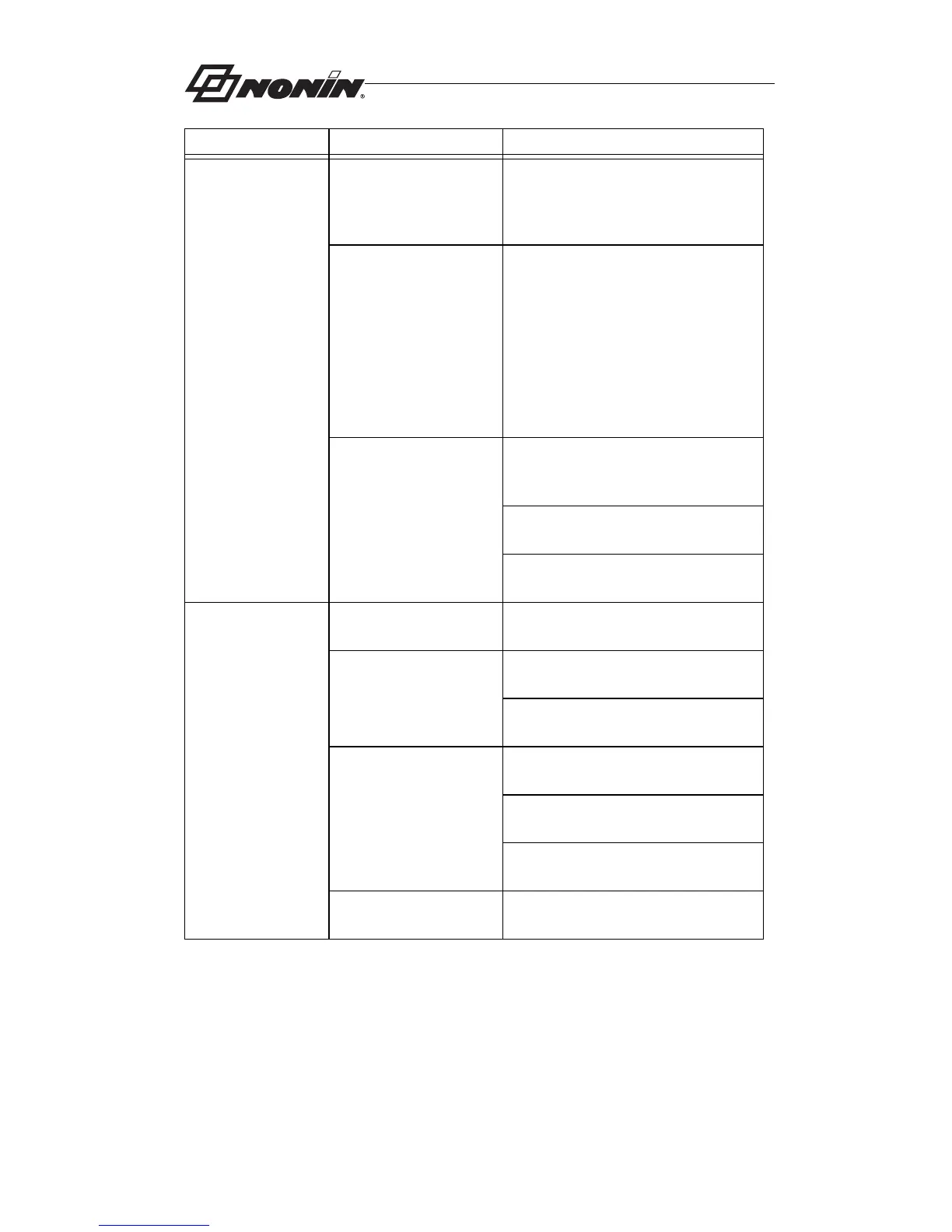
Unable to obtain a
green pulse
display on the
bargraph, cont’d.
The sensor is applied
incorrectly.
Apply the sensor correctly.
There is possible
interference from one
of the following
sources:
• arterial catheter
• blood pressure cuff
• electrosurgical
procedure
• infusion line
Reduce or eliminate any
interference. Make sure that the
sensor is not placed on the same
arm being used for other patient
therapies or diagnostics (e.g.,
blood pressure cuff).
The red LED is not lit
in the sensor’s finger
insertion area.
Ensure the sensor is securely
attached to the Model 7500.
Check the sensor for any visible
signs of deterioration.
Contact NONIN Customer
Support.
Frequent or
steady pulse
quality indication.
There is excessive
ambient light.
Shield the sensor from the light
source.
The Model 7500 is
applied to a polished
or artificial fingernail.
Apply the sensor to a finger without
artificial or polished nails.
Position the sensor at a different
site.
The red LED is not lit
in the sensor’s finger
insertion area.
Ensure the sensor is securely
attached to the Model 7500.
Check the sensor for any visible
signs of deterioration.
Contact NONIN Customer
Support.
Excessive patient
motion.
Reduce patient motion.
Problem Possible Cause Possible Solution



 To Next Page