Subscribing to Marinestar
Follow the steps below to activate a Marinestar subscription for decimeter-level GNSS corrections,
assuming RTK is not available:
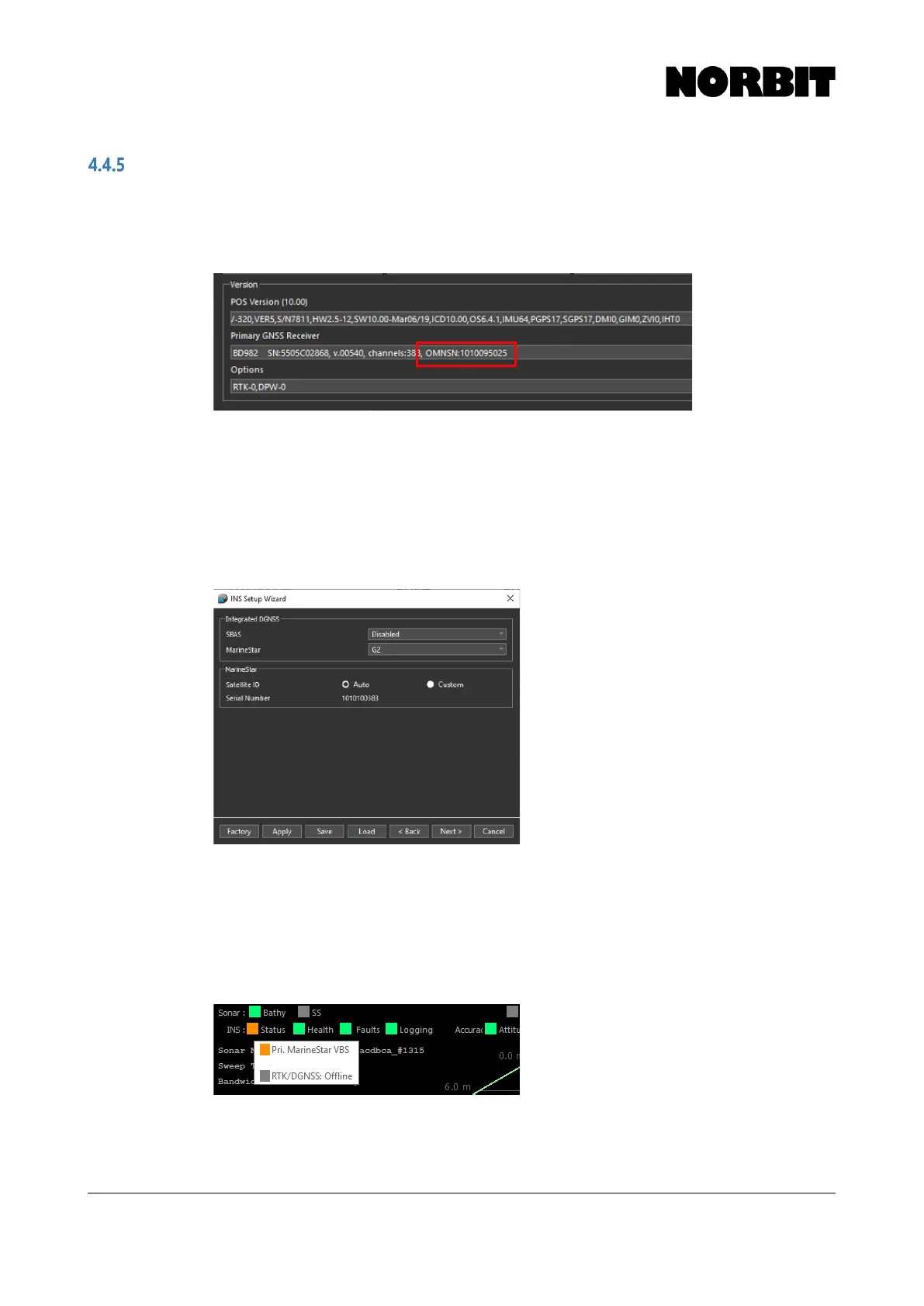
1. Select INS Tools > System Status and obtain the OMNSN number:
2. Go to http://www.fugroMarinestar.com/Order_form and request a subscription. In your
request, you must supply the OMNSN number from the previous step.
3. Arrange a time with Fugro to activate the subscription, as the system must be powered on
and tracking satellites when the activation code is transmitted. Be sure to consider time
zone differences when organizing the activation time.
4. Enable Marinestar in the INS Setup Wizard, as described in section 4.4.1.5. In most
cases you can leave the selection to Auto, however you may be advised to set a specific
mode and frequency by Fugro, in which case choose the Custom option.
5. Prior to your arranged activation time, ensure that the system is powered on and tracking
satellites. Advise Fugro when the system is ready.
6. It may take 30-45 minutes after the code is sent for the subscription to activate.
7. Confirm that the subscription is valid by observing the System Status window. If it is active,
you should expect to see the status updates as well as an updated expiration date. When
the system utilizes Marinestar corrections in the INS solution, the INS status displays Pri.
Marinestar… when the mouse is moved over the Status indicator.



 To Next Page